Campaign Details
The campaign page — Overview, Participants and Analytics tabs, exports, editing and deleting.
Open any launched campaign from the list to see where it stands. (A Draft opens the wizard instead.)
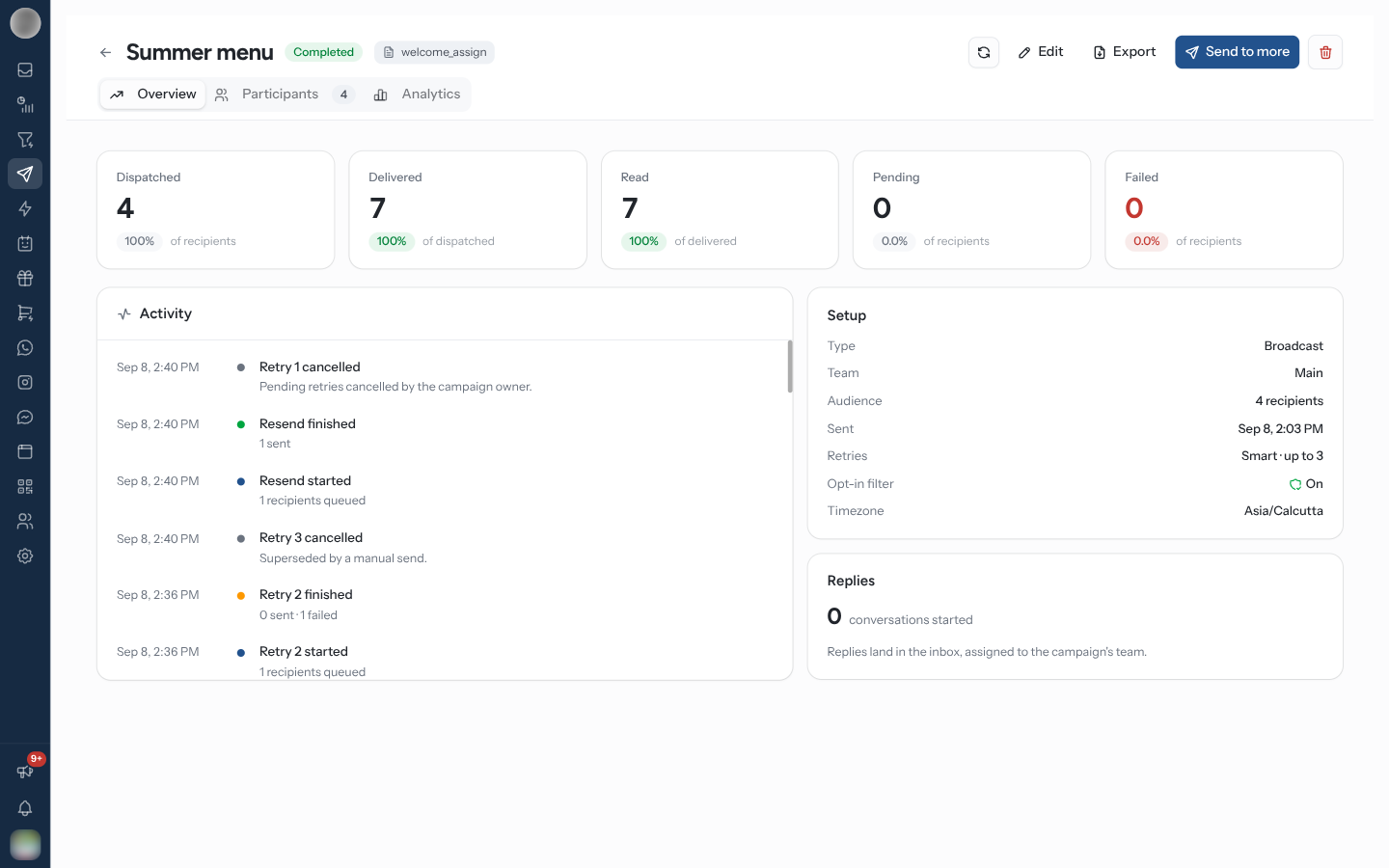
The Header
The title row shows the campaign's name, its status and the template it sends. Hover a Failed or red Paused badge to read why it stopped.
| Control | What it does |
|---|---|
| Refresh | Re-reads all three tabs. Statuses arrive after the send finishes and retries fire on their own, so an open page goes stale |
| Edit | Reopens the wizard on its Review step |
| Export | Downloads the delivery report or the analytics report — see Export a Report |
| Send to more | Opens the wizard's Audience step to add recipients. Only people never messaged are sent to |
| Bin icon | Deletes the campaign |
To the right of the tabs sit the send controls: Pause and Resume for a broadcast, or Pause Drip, Start Drip and Resume Drip for a drip — see Pausing, Resuming & Retrying.
Overview
The five numbers
| Card | Counts | Rate shown against |
|---|---|---|
| Dispatched | Recipients handed to Meta at least once, including any Meta then rejected | Recipients |
| Delivered | Messages that reached the phone | Dispatched |
| Read | Messages opened | Delivered |
| Pending | Recipients not messaged yet | Recipients |
| Failed | Recipients whose latest attempt failed | Recipients |
Failed is where recipients stand now: someone a retry later reached is no longer counted. Delivered is the number that means success — Dispatched is only what went out.
The cards below
| Card | Shows |
|---|---|
| Next batch | The send that has not gone out yet — a scheduled start or a booked retry — with its attempt number, start time and how many recipients it covers. Offers Cancel schedule, or Retry now and Cancel pending retries for a retry |
| Drip schedule / Next stage | Drips only. Every stage with its template, how many are waiting and how many were sent, and "N of N stages complete" |
| Activity | Each send as it was scheduled, started, finished ("N sent · N failed") or cancelled |
| Setup | Type, Team, Audience, Sent, Retries, Opt-in filter and Timezone |
| Replies | How many "conversations started". "Replies land in the inbox, assigned to the campaign's team." |
Participants
Everyone on the campaign and what happened to each of them, 25 to a page.
| Column | Shows |
|---|---|
| Contact | Name and phone |
| Status | SENT, DELIVERED, READ, PENDING or FAILED |
| Attempts | One chip per attempt — hover for its outcome |
| Last attempt | When the latest attempt went out |
| Reason | Why the latest attempt failed, with Meta's error code |
| Read | When it was read |
Filter with the pills — All, Delivered, Read, Sent, Pending, Failed — and search with Search name or phone. On a drip, a stage picker narrows the list to All stages or one Stage N.
| Action | What it does |
|---|---|
| Retry now (on a failed row) | Re-sends to that one recipient |
| Open (on any other row) | Opens the contact's conversation in the Inbox |
| Retry all failed | Re-sends to every failed recipient |
| Retry selected | Re-sends to the failed recipients you ticked |
| Remove from campaign | Takes the ticked recipients off the campaign. The contacts are not deleted |
Retry buttons appear on broadcasts only. More on what a retry does in Retry failed recipients.
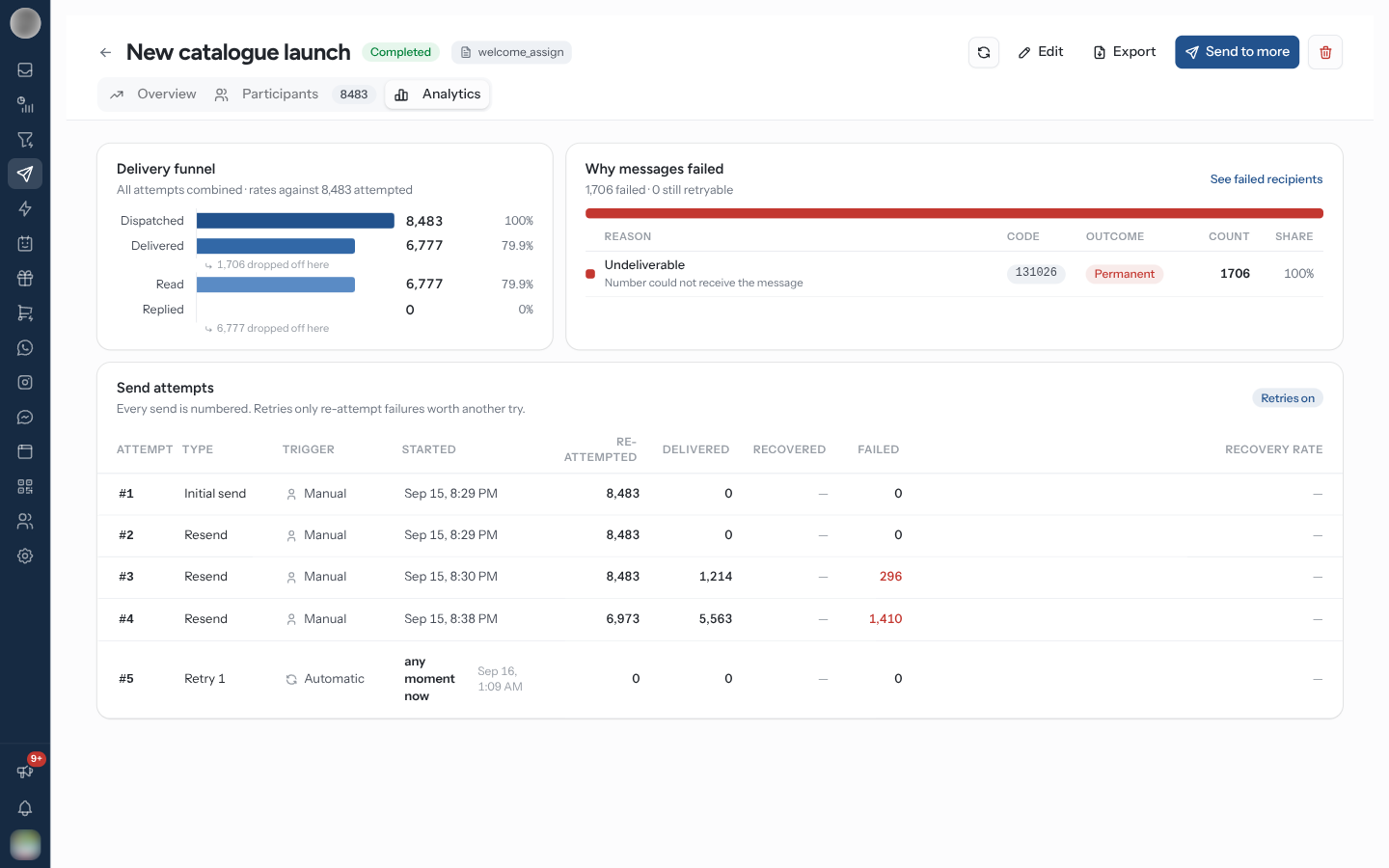
Analytics
| Section | Shows |
|---|---|
| Delivery funnel | Attempted → Dispatched → Delivered → Read → Replied, all attempts combined, with how many dropped off at each stage |
| Why messages failed | Each failure reason with its Code, Outcome, Count and Share. "N failed · N still retryable" summarises it; See failed recipients lists them |
| Send attempts | One numbered row per send — the first send, any scheduled send, each automatic or manual retry — with its Trigger (Manual, Scheduled, Automatic or Drip), how many it re-attempted, delivered, recovered and failed, and its Recovery rate. Click a row to see who it went to |
The Outcome column says what a retry could do about a failure:
| Outcome | Means |
|---|---|
| Retryable | A later attempt may succeed — automatic retries pick these up |
| Limited | Meta is limiting your sending |
| Permanent | The number cannot receive the message |
| Needs a fix | The template is the problem — edit or replace it |
| Unclassified | No specific reason was recorded |
When retries recovered anything, the tab says "Retries recovered N messages that would otherwise have failed."
Export a Report
Export in the header offers two reports:
| Menu item | Downloads |
|---|---|
| Delivery Report → Download as Excel | The delivery report, as .xlsx |
| Delivery Report → Download as OpenDocument (ODS) | The same, as .ods |
| Analytics → Download as PDF | The Analytics tab as a report — funnel, failure reasons and send attempts — fetched fresh, with the template and team in the heading |
On a drip with a stage picked on Participants, the delivery report covers that stage.
Exports contain participant phone numbers — treat them as personal data.
Delete a Campaign
Click the bin icon and confirm "Are you sure you want to delete this campaign? This action cannot be undone."
Deleting destroys the delivery record and its analytics. If you want the history for future comparison, export both reports first.
A draft is deleted from the wizard instead, with Discard draft.
Reading the Numbers
| Pattern | Likely meaning |
|---|---|
| Many Permanent failures | List quality — numbers not on WhatsApp, or contacts who opted out |
| Many Retryable failures with retries off | Meta's marketing frequency cap. Turn on retries next time |
| High delivery, low read | The message is not compelling, or arrived at a bad time |
| High read, few replies | The call to action is unclear |
| Replies flooding the Inbox | Check staffing before the next send |
Read this alongside Message Analytics, which puts the campaign in the context of everything else you send.
Related Pages
- Pausing, Resuming & Retrying
- Creating a Campaign
- Message Analytics
- Inbox — where the replies land