External API
Call RateUp from your own systems — API keys and access, the v2 endpoints with examples, errors, retries, and moving off v1.
The External API (the partner API) lets your own systems drive RateUp: create contacts, fill audiences, launch campaigns, send WhatsApp templates, run a loyalty till and read survey responses. It is a REST API over HTTPS with JSON bodies, authenticated with an API key you create in Settings → Integrations → API Service.
The machine-readable contract is published as OpenAPI JSON:
https://api.rateup.app/api/external/v2/openapi.json (and /api/external/v1/openapi.json for
the legacy version). Import it into Postman, Insomnia or a client generator. A browsable
reference is at api.rateup.app/reference, with v2 and v1
as separate documents. This page explains how the API behaves and shows worked examples.
Two Versions
| v2 (current) | v1 (legacy) | |
|---|---|---|
| Base URL | https://api.rateup.app/api/external/v2 | https://api.rateup.app/api/external/v1/{orgId} |
| Organisation | Named by the key — no id in the URL | In the path |
| Key format | rk_live_… or rk_test_… | No prefix |
| Test keys | Yes | No — v1 keys are always live |
| Lists | Cursor-paged | The original shapes |
| Errors | One envelope everywhere | Original shapes for business failures (see v1) |
| For | Every new integration | Integrations already built on v1 |
A key works on its own version only. Calling v2 with a v1 key, or v1 with a v2 key, answers
401 with a message naming the right base URL — This is a v1 key; it works on /api/external/v1/{orgId}
or This is a v2 key; it works on /api/external/v2.
Both versions get the same security: keys are checked against their own organisation, feature
limits are enforced, and every write accepts an Idempotency-Key.
Keys and Access
Keys are created and managed in Settings → Integrations → API Service — see Integrations → API Service for the screen itself. In short:
| Property | What it means |
|---|---|
| Name | Your label, up to 80 characters — e.g. Production POS |
| API version | v2 (recommended) or v1 (legacy). Fixed once the key exists |
| Mode | Live or Test (v2 only). Fixed once the key exists |
| Access | Full access, or Only selected features |
| Expiry | Optional. The key stops working at the end of the chosen day |
| Last used | When the key last made a request (updated at most every few minutes) |
An organisation can hold 20 keys. Use one per integration, so you can rotate or revoke one without touching the others. The full key is shown once, when it is created or rotated — RateUp stores only a hash of it.
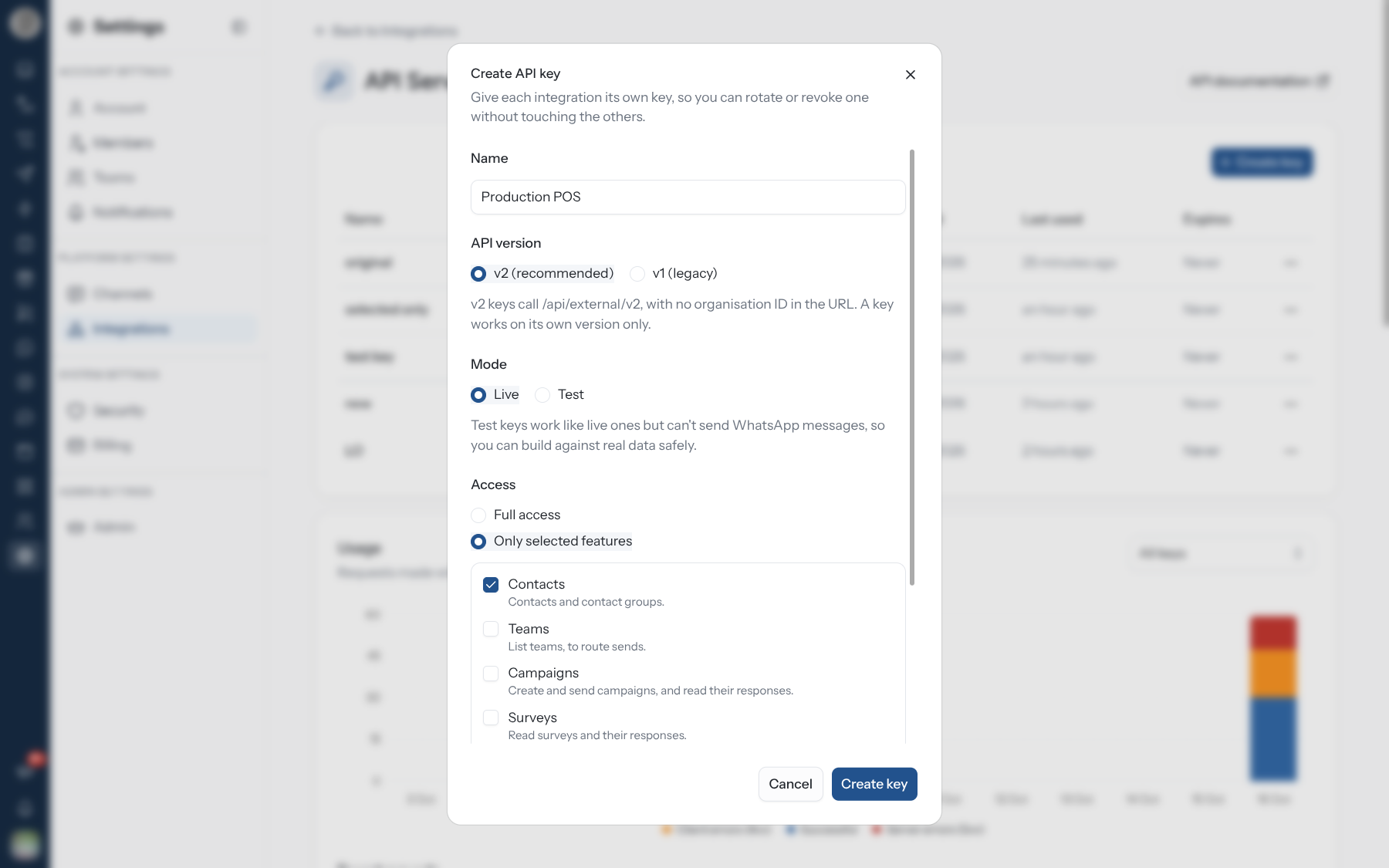
Live and test keys
A test key (rk_test_…) works like a live one against your real data, but is refused on every
route that sends a paid WhatsApp message:
POST /wa/templates/send,POST /wa/templates/send-with-fileandPOST /wa/templates/{templateId}/send/contactsPOST /campaigns/{campaignId}/sendPOST /loyalty/members/card/send
There the answer is 403 test_key_not_allowed — "Test keys cannot send WhatsApp messages; use a
live key". Everything else, including contact writes and loyalty points, really happens with a
test key: test mode is about not spending money, not a sandbox.
Limiting a key to features
A key with Full access can call every endpoint, including ones added later. A key limited to Only selected features can call only the endpoints in those features:
| Feature | Covers | Permissions behind it |
|---|---|---|
| Contacts | Contacts and audiences, including contact identities | contacts.read, contacts.manage |
| Merge contacts | Merging two contacts into one (POST /contacts/{contactId}/merge) | contacts.merge |
| Teams | Listing teams, to route sends | teams.read |
| Campaigns | Creating and sending campaigns, reading their responses | campaigns.read, campaigns.manage, campaigns.send |
| Surveys | Surveys and their responses | surveys.read |
| WhatsApp messaging | Sending approved templates, reading message status | templates.read, inbox.read, inbox.reply |
| Loyalty | Members, points, rewards and vouchers | loyalty.read, loyalty.cashier |
| Webchat widget | Only the support widget on your website — its chat socket and /api/support/*. No endpoint on this page | widget.connect |
Merge contacts is separate from Contacts because a merge deletes a contact for good. A key limited to Contacts cannot merge until you add Merge contacts to it; a Full access key can.
POST /wa/templates/{templateId}/send/contacts is open to a key with either WhatsApp messaging
or Campaigns.
Webchat widget is for the key you put in the support widget.
That key ships in your web page, so anyone can read it: a key with only Webchat widget opens no
endpoint here, and the widget refuses a key limited to other features
(403 — "This API key cannot run the webchat widget"). A Full access key still runs the widget.
A call outside the key's features answers 403 insufficient_scope, with the missing permission in
details.permission:
{
  "error": {
    "code": "insufficient_scope",
    "message": "This API key lacks the campaigns.send scope",
    "details": { "permission": "campaigns.send" },
    "requestId": "req-1x9k"
  }
}
A key created before features existed may have been limited to individual permissions; the keys table shows it as Custom permissions until you edit and save it.
A key is organisation-wide: it is not limited by team or channel, whatever the person who created it can see. Full access reaches every contact, conversation and loyalty balance in the organisation. Keep keys on your server — never in a browser, a mobile app or a repository — and give each integration only the features it needs.
Rotating and revoking
| Action | Effect |
|---|---|
| Rotate | Issues a new key with the same name, version, mode and access. The old key keeps working for the grace period you pick — Immediately, After 1 hour, After 24 hours or After 7 days — then stops |
| Revoke | Deletes the key. Requests using it are refused straight away |
| Edit | Changes the name or access. The key's value stays the same; changes apply at once |
A key that has already been rotated cannot be rotated again — rotate its replacement. An expired key cannot be rotated; create a new one.
Authenticate
Send the key as a bearer token on every request:
curl "https://api.rateup.app/api/external/v2/loyalty/ping" \
  -H "Authorization: Bearer $RATEUP_API_KEY"
There is no session and no refresh. A key is valid until it expires, is rotated out or is revoked.
| Answer | Cause |
|---|---|
401 unauthorized — "Send your API key as Authorization: Bearer rk_live_…" | No Authorization header, or no token in it |
401 unauthorized — "Invalid access token" | Wrong key, revoked, expired, or past its rotation grace period |
401 unauthorized — "This is a v1 key…" / "This is a v2 key…" | Key from the other version |
403 org_suspended | The RateUp account is suspended; its keys stop working too |
403 insufficient_scope | The key's features do not include this endpoint |
403 test_key_not_allowed | A test key on a paid send |
How Every Request Behaves
Errors
Every v2 error has the same envelope:
{
  "error": {
    "code": "insufficient_points",
    "message": "Insufficient points. Required: 500, Available: 320",
    "details": { "required": 500, "available": 320 },
    "requestId": "req-3b"
  }
}
Branch on code, show message to a person, and quote requestId when you contact support. The
HTTP status means what it says: a 4xx is something about your request or the organisation's
state, a 5xx is RateUp's problem.
| Status | Codes |
|---|---|
400 | validation_failed (with details.issues[] — path and message per problem), phone_invalid, card_code_invalid, member_ref_invalid, idempotency_key_invalid, cursor_invalid, file_invalid |
401 | unauthorized |
403 | insufficient_scope, test_key_not_allowed, org_suspended, subscription_required, subscription_expired, campaign_credits_exhausted |
404 | not_found, contact_not_found, contact_group_not_found, team_not_found, campaign_not_found, survey_not_found, template_not_found, message_not_found, identity_not_found, program_not_found, member_not_found, reward_not_found, voucher_not_found |
409 | contact_already_exists, identity_in_use, last_identity, contact_group_already_exists, already_exists, member_already_exists, campaign_send_in_progress, reward_already_assigned, reward_already_redeemed, voucher_already_redeemed, voucher_not_approved, reward_in_use, idempotency_key_reused, request_in_progress |
422 | insufficient_points, redemption_rules_violated, reward_out_of_stock, program_not_active, member_not_active, invalid_amount, template_not_approved, template_not_sendable, contact_limit_reached, campaign_incomplete, no_recipients, send_failed (WhatsApp refused the message) |
429 | rate_limited |
502 | send_failed — WhatsApp could not be reached; details.retryable is true |
503 | internal_error "Temporarily unavailable" on a send whose rate limiter could not be checked; send_failed when a campaign could not be queued |
500 | internal_error — the real error is logged against the requestId |
Pagination
v2 lists are cursor-paged, newest first:
curl "https://api.rateup.app/api/external/v2/contacts?limit=100" \
-H "Authorization: Bearer $RATEUP_API_KEY"{ "data": [ … ], "nextCursor": "MjAyNi0xMC0xNlQwOToz…" }| Parameter | Rule |
|---|---|
limit | 1–100, default 50 |
cursor | The nextCursor from the previous page. Opaque — pass it back, never build one. A cursor RateUp did not issue is 400 cursor_invalid |
nextCursor | null on the last page |
Rows created while you page neither repeat nor go missing.
The loyalty member and transaction lists are the exception. GET /loyalty/members and
GET /loyalty/points/transactions take page (from 1) and limit (1–100, default 20) and
answer { data, pagination: { page, limit, total, totalPages } }.
Retries and the Idempotency-Key header
Every write (POST, PUT, PATCH, DELETE) accepts an optional Idempotency-Key header. It is
your choice per request:
- With a key, the first answer is stored for 24 hours. Sending the same key and the same
body again returns that stored answer with the header
Idempotent-Replay: true, and nothing is done twice. - Without a key, the request simply runs. A retry runs again.
Always send an Idempotency-Key on sends and loyalty writes. Without one, a retry after a
timeout sends the WhatsApp message again, launches the campaign again, or awards the points
twice. Use a fresh UUID per operation, or something derived from your own record such as
shopify:mystore:1042.
| Situation | Answer |
|---|---|
Key is not 8–200 characters of A-Z a-z 0-9 _ . : @ - | 400 idempotency_key_invalid |
| Same key, different body, same endpoint | 409 idempotency_key_reused |
| Same key while the first request is still running | 409 request_in_progress, with Retry-After: 1 |
| The first request failed (any non-2xx) | The key is released — fix the problem and retry with the same key |
Keys are scoped per organisation and per endpoint. For loyalty awards the key is also written to
the points ledger, so an award with a reused key comes back with replayed: true and the balance
untouched — and you can look a lost write up with GET /loyalty/points/transactions?idempotencyKey=….
Phone numbers
v2 phone numbers are digits with the country code and no + — "919876543210", the same shape
v1 uses. Send them as a string or as a JSON number (919876543210). A leading + and spaces,
brackets, dots or dashes are tolerated and stripped, so "+91 98765-43210" also works. A number
without its country code is refused with 400 validation_failed.
Every response carries phones the same way: digits only, country code first, no +.
Customers without a phone number
A WhatsApp customer who uses a WhatsApp username can message you without sharing their phone
number. Their contact then has phone: null and a businessScopedUserId instead — WhatsApp's
business-scoped user ID (BSUID), such as "US.13491208655302741918". To send them a template,
pass the BSUID as phone exactly as you received it. Template sends to contacts
(/wa/templates/{templateId}/send/contacts) and campaigns use it automatically. Authentication
(one-time code) templates cannot be sent to a BSUID; WhatsApp refuses them.
Loyalty endpoints are more forgiving: a member's phone may also be local to the programme's country
(9876543210 on an Indian programme). Digits are read as including a country code first, and as a
local number only when that is not a valid number.
Rate limits
| Limit | Ceiling |
|---|---|
| Any request, per IP address (checked before the key) | 300 a minute |
| Any request, per organisation, across both versions | 1,200 a minute |
| Contact writes · audience writes | 300 a minute each |
POST /contacts/bulk · POST /audiences/{id}/contacts/import | 30 a minute each |
| Campaign writes | 120 a minute |
POST /campaigns/{id}/send | 10 a minute |
POST /wa/templates/send and /send-with-file (shared) | 600 a minute |
POST /wa/templates/{id}/send/contacts | 30 a minute |
| Every loyalty request | 600 a minute |
POST /loyalty/members | 60 an hour, and 3 a day per phone number |
POST /loyalty/members/card/send | 30 an hour |
Over a limit the answer is 429 rate_limited. The limits on sends and enrolments fail closed:
if RateUp cannot check them, the request is refused with 503 rather than let through. Back off
and retry — with the same Idempotency-Key.
Plan requirements
Campaign endpoints need a subscription that includes WhatsApp campaigns, and loyalty endpoints a
subscription with loyalty; otherwise 403 subscription_required. An expired subscription blocks
writes with 403 subscription_expired; reads keep working. Loyalty writes also need the programme
to be active (422 program_not_active).
v2 Endpoints
All paths below are relative to https://api.rateup.app/api/external/v2.
Contacts
Feature: Contacts.
| Method & path | Does |
|---|---|
GET /contacts | List contacts. Filters: search (name, email or phone digits), labelId, contactGroupId |
GET /contacts/lookup?kind=&value= | Find one contact by any identity — phone, email, BSUID, Instagram or Messenger id, your own id (see Find a contact by any identity). ?phone= still works |
GET /contacts/{contactId} | Get a contact, with its identities |
POST /contacts | Create a contact. Runs the organisation's contact-created automations |
POST /contacts/bulk | Create up to 1,000 contacts. No automations run |
PATCH /contacts/{contactId} | Change only the fields you send |
DELETE /contacts/{contactId} | Delete the contact and its conversation history |
GET /contacts/{contactId}/identities | List the contact's identities |
POST /contacts/{contactId}/identities | Add a phone, email or your own id to the contact |
DELETE /contacts/{contactId}/identities/{identityId} | Remove one identity |
POST /contacts/{contactId}/merge | Merge another contact into this one. Feature: Merge contacts |
Create a contact
curl -X POST "https://api.rateup.app/api/external/v2/contacts" \
  -H "Authorization: Bearer $RATEUP_API_KEY" \
  -H "Content-Type: application/json" \
  -d '{
    "phone": "919876543210",
    "name": "Priya Shah",
    "email": "[email protected]",
    "externalId": "crm-4821",
    "customFields": { "city": "Pune" },
    "labels": ["7a1c2e4b-0d3f-4b8e-9a51-2f6d8c3e1b07"]
}'{
"id": "3f6c1d2a-8b4e-4f0a-9c7d-1e2b3a4c5d6e",
"name": "Priya Shah",
"phone": "919876543210",
"businessScopedUserId": null,
"whatsappUsername": null,
"email": "[email protected]",
"externalId": "crm-4821",
"source": "external",
"consent": true,
"labels": [{ "id": "7a1c2e4b-0d3f-4b8e-9a51-2f6d8c3e1b07", "name": "VIP" }],
"customFields": { "city": "Pune" },
"createdAt": "2026-10-16T09:30:00.000Z"
}| Field | Rule |
|---|---|
phone | Required on create. Digits with the country code, no + (see Phone numbers) |
externalId | Your own id. Unique within the organisation |
customFields | An object keyed by the custom field's slug (see Custom Fields). An unknown slug is 400 validation_failed — "Unknown custom field" |
labels | Label ids. An id that is not the organisation's is "Unknown label" |
A phone or externalId already in use answers 409 contact_already_exists with
details.contactId and details.field, so a retried create is harmless.
On PATCH, customFields merge into the contact's values (send null for a field to remove
it), labels replace the contact's labels ([] removes them all), and email or externalId
set to null clears them.
POST /contacts/bulk takes { "contacts": [ … ] } and always answers 200:
{
  "created": [ { "id": "…", "phone": "919876543210", … } ],
  "skipped": [ { "index": 3, "phone": "919812345678", "reason": "already_exists" } ]
}
reason is already_exists or duplicate_in_request; index is the row's position in your
array.
Contact identities
One person can reach a business several ways: two phone numbers, an email, a WhatsApp business-scoped user ID (BSUID) when they message with a username instead of a phone, an Instagram account, a Facebook Page conversation, or an id in your own system. Each of these is an identity on the contact, and a contact can hold any number of each.
kind | value | Scope |
|---|---|---|
PHONE | Digits with the country code, no + | Organisation |
EMAIL | Lowercased | Organisation |
WA_BSUID | The business-scoped user ID (BSUID), e.g. US.13491208655302741918 | Organisation |
IG_SCOPED | The Instagram-scoped user ID | One Instagram account (channelId) |
FB_PSID | The Page-scoped user ID | One Facebook Page (channelId) |
WEBCHAT | The website widget's visitor id | One widget (channelId) |
EXTERNAL | An id in another system | One integration, e.g. shopify or my-crm |
GET /contacts/{contactId}, the lookup and the merge return the contact with its identities;
lists (GET /contacts, audience members) do not, to stay one query per page — call
GET /contacts/{contactId}/identities when you need them.
{
  "id": "3f6c1d2a-8b4e-4f0a-9c7d-1e2b3a4c5d6e",
  "name": "Priya Shah",
  "phone": "919876543210",
  "businessScopedUserId": "IN.20781945361027384",
  "email": "[email protected]",
  "…": "…",
  "identities": [
    {
      "id": "a1b2c3d4-0000-4000-8000-000000000001",
      "kind": "PHONE",
      "value": "919876543210",
      "channelId": null,
      "integration": null,
      "source": "INBOUND",
      "verified": true,
      "primary": true,
      "username": null,
      "displayName": "Priya",
      "lastSeenAt": "2026-11-04T10:12:00.000Z",
      "createdAt": "2026-10-16T09:30:00.000Z"
    },
    {
      "id": "a1b2c3d4-0000-4000-8000-000000000002",
      "kind": "EXTERNAL",
      "value": "cus_8812",
      "channelId": null,
      "integration": "shopify",
      "source": "IMPORT",
      "verified": true,
      "primary": true,
      "username": null,
      "displayName": null,
      "lastSeenAt": "2026-11-05T08:00:00.000Z",
      "createdAt": "2026-11-05T08:00:00.000Z"
    }
  ]
}primarymarks the identity shown as the contact'sphone,emailorbusinessScopedUserId; the others are extra ways to reach and find the same person.verifiedistruewhen the platform issued the id (an inbound message) or the customer proved it, andfalsefor one someone typed in.sourceis where it came from:INBOUND(a message),META_LINK(Meta linked a BSUID and a phone),HANDOFF(a signed link the customer followed),CUSTOMER(they typed it in a Journey or form),AGENT(staff added it or merged it in),IMPORT(CSV, an integration or this API).channelIdis the channel a per-channel id belongs to; for other kinds it is the channel the identity was last seen on, ornull.
Identities recorded before contact identities existed are filled in from each contact's phone,
email and platform ids by a one-time backfill; until then a contact may list none, but the
lookup still finds it.
Add an identity
Only PHONE, EMAIL and EXTERNAL can be added; platform ids (BSUID, Instagram, Messenger,
webchat) only ever come from the platform. EXTERNAL needs integration.
curl -X POST "https://api.rateup.app/api/external/v2/contacts/3f6c1d2a-8b4e-4f0a-9c7d-1e2b3a4c5d6e/identities" \
  -H "Authorization: Bearer $RATEUP_API_KEY" \
  -H "Content-Type: application/json" \
  -H "Idempotency-Key: 7c9e6679-7425-40de-944b-e07fc1f90ae7" \
  -d '{ "kind": "EXTERNAL", "value": "cus_8812", "integration": "shopify" }'
Answers 201 with the identity, or 200 when the contact already had it. The first phone or email
a contact gets becomes its phone or email; later ones are added as extra identities.
When another contact already has that phone, email or id, nothing is moved and the answer is
409 identity_in_use with that contact's id — merge the two if they are the same person:
{
  "error": {
    "code": "identity_in_use",
    "message": "Another contact already has that identity",
    "details": { "contactId": "9d8e7f60-1a2b-4c3d-8e9f-0a1b2c3d4e5f" },
    "requestId": "req-7f2a"
  }
}
A clash on a phone or email also shows up in the dashboard as a duplicate to review.
Remove an identity
DELETE /contacts/{contactId}/identities/{identityId} answers { "id": "…", "deleted": true }.
Removing the primary phone or email promotes the next one of that kind, or clears the field. A
contact's last identity cannot be removed (409 last_identity) — delete the contact instead.
Find a contact by any identity
curl "https://api.rateup.app/api/external/v2/contacts/lookup?kind=WA_BSUID&value=IN.20781945361027384" \
-H "Authorization: Bearer $RATEUP_API_KEY"| Parameter | |
|---|---|
kind + value | The identity to match exactly. A PHONE value is normalised like every phone (+91 98765-43210 → 919876543210), an EMAIL is matched case-insensitively |
phone | Shorthand for kind=PHONE&value=…, as before. Send either phone or kind and value |
channelId | IG_SCOPED, FB_PSID, WEBCHAT: only an id recorded on this channel |
integration | EXTERNAL: only an id from this system. Without it, any integration's id matches, and so does the contact's externalId |
It finds a merged contact by any of its phones, emails or ids, not only the ones shown on the
contact, and answers the contact with its identities, or 404 contact_not_found.
Merge two contacts
When two contacts are the same person — a customer who wrote from a username (BSUID only) and
later from their phone, or the same shopper on WhatsApp and Instagram — merge one into the other.
Feature: Merge contacts (contacts.merge).
curl -X POST "https://api.rateup.app/api/external/v2/contacts/3f6c1d2a-8b4e-4f0a-9c7d-1e2b3a4c5d6e/merge" \
  -H "Authorization: Bearer $RATEUP_API_KEY" \
  -H "Content-Type: application/json" \
  -H "Idempotency-Key: 0b8c2f3e-5d1a-4e7b-9c6f-2a4d8e1b3c5f" \
  -d '{
    "sourceContactId": "9d8e7f60-1a2b-4c3d-8e9f-0a1b2c3d4e5f",
    "fieldChoices": { "name": "source", "customFields": { "city": "source" } }
  }'
The contact in the path is kept; sourceContactId is merged into it and deleted:
- every identity moves over (the kept contact's
phone,emailand BSUID stay primary); - conversations, messages, calls, notes, orders and survey responses move over;
- labels, audiences and assignees are combined;
- where both have a value and they differ, the kept contact's wins unless
fieldChoicessays"source"; a blank on the kept contact is filled from the source.fieldChoicestakesname,email,address,dob,gender,notes,lifecycleId, andcustomFieldskeyed by slug; - in a loyalty programme both belong to, the larger account (higher balance, then older) is kept.
Answers 200 with the kept contact and its identities, and fires the
contact.merged webhook. A merge cannot be undone. Merging a contact into itself
is 400 validation_failed; a contact that is not found — including a source that was already
merged — is 404 contact_not_found with its id in details.contactId, so a retry without an
Idempotency-Key does no harm. Merges are limited to 30 a minute per organisation.
Audiences
Feature: Contacts.
Audiences were called contact groups before. In v2 they live at /audiences. The field
names keep the old spelling: the path parameter is contactGroupId, campaigns take
contactGroupIds, contacts filter on contactGroupId, and the error codes are
contact_group_not_found and contact_group_already_exists.
| Method & path | Does |
|---|---|
GET /audiences | List audiences. Filters: search, teamId, type (NORMAL or LOYALTY) |
POST /audiences | Create an audience: name, teamId, optional icon and tags |
GET /audiences/{contactGroupId} | An audience with its memberCount |
PATCH /audiences/{contactGroupId} | Change name, icon or tags (null clears icon or tags) |
DELETE /audiences/{contactGroupId} | Delete the audience and its memberships — the contacts stay. Answers 204 |
GET /audiences/{contactGroupId}/contacts | The audience's contacts, newest first |
POST /audiences/{contactGroupId}/contacts | Add up to 1,000 existing contacts by id |
POST /audiences/{contactGroupId}/contacts/remove | Remove up to 1,000 contacts by id. The contacts are not deleted |
POST /audiences/{contactGroupId}/contacts/import | Up to 1,000 contacts by phone: unknown numbers are created, known ones reused unchanged, all are added |
Audience names are unique within a team — a clash is 409 contact_group_already_exists.
Import contacts into an audience
curl -X POST "https://api.rateup.app/api/external/v2/audiences/$AUDIENCE_ID/contacts/import" \
  -H "Authorization: Bearer $RATEUP_API_KEY" \
  -H "Content-Type: application/json" \
  -H "Idempotency-Key: import-2026-10-16-batch-1" \
  -d '{
    "contacts": [
      { "phone": "919876543210", "name": "Priya Shah" },
      { "phone": "14155552671", "customFields": { "city": "Austin" } }
    ]
}'{
"created": 1,
"existing": 1,
"added": 2,
"alreadyMembers": 0,
"contacts": [
{ "phone": "919876543210", "contactId": "3f6c…", "status": "existing", "reason": null },
{ "phone": "14155552671", "contactId": "9b2e…", "status": "created", "reason": null }
]
}A row that could not be resolved has status: "failed" and a reason such as
external_id_conflict. Adding by id answers { "added", "alreadyMembers", "notFound": [ids] };
removing answers { "removed" }.
Teams
Feature: Teams.
| Method & path | Does |
|---|---|
GET /teams | List teams — { "data": [{ "id", "name" }], "nextCursor" } |
A team id is what campaigns and audiences belong to, and what a template send can be attributed to.
Campaigns
Feature: Campaigns. Needs a plan with WhatsApp campaigns.
| Method & path | Does |
|---|---|
GET /campaigns | List campaigns. Filters: status, type, teamId |
GET /campaigns/{campaignId} | The campaign, its audiences (contactGroupIds), drip stages, recipient count and latest send |
POST /campaigns | Create a campaign as a DRAFT, with its recipients |
POST /campaigns/{campaignId}/send | Launch it now or at scheduledAt. Paid — live keys only |
GET /campaigns/{campaignId}/responses | Responses to the WhatsApp Flow on the campaign's template |
DELETE /campaigns/{campaignId} | Delete it in any state; anything queued or scheduled is cancelled first |
Create, then send
curl -X POST "https://api.rateup.app/api/external/v2/campaigns" \
  -H "Authorization: Bearer $RATEUP_API_KEY" \
  -H "Content-Type: application/json" \
  -d '{
    "name": "Diwali offer",
    "type": "WHATSAPP",
    "teamId": "c1d2…",
    "templateId": "0e9f…",
    "dynamicTags": ["name"],
    "contactGroupIds": ["5a6b…"]
}'| Field | Rule |
|---|---|
type | WHATSAPP or DRIP |
templateId | Required for WHATSAPP |
dripStages | Required for DRIP: 1–20 of { templateId, delay, delayUnit: "minutes" | "hours" | "days", sendAtTime?: "HH:mm" } |
dynamicTags | Template variable mappings, in {{1}}, {{2}} order |
contactGroupIds, contactIds | The recipients: audience ids and individual contact ids — up to 1,000 of each |
The status cannot be set; a campaign starts as a draft. Then:
curl -X POST "https://api.rateup.app/api/external/v2/campaigns/$CAMPAIGN_ID/send" \
  -H "Authorization: Bearer $RATEUP_API_KEY" \
  -H "Content-Type: application/json" \
  -H "Idempotency-Key: diwali-offer-launch" \
-d '{ "scheduledAt": "2026-10-20T10:00:00+05:30", "dailySendLimit": 5000 }'{
"campaignId": "8c7d…",
"campaignStatus": "SCHEDULED",
"send": {
"id": "f1e2…",
"attemptNo": 1,
"trigger": "MANUAL",
"status": "SCHEDULED",
"targetStatuses": ["PENDING"],
"scheduledFor": "2026-10-20T04:30:00.000Z",
"startedAt": null,
"completedAt": null,
"createdAt": "2026-10-16T09:31:00.000Z",
"totals": { "targeted": 1200, "sent": 0, "delivered": 0, "read": 0, "failed": 0, "completed": 0 }
}
}The send answers 202. An empty body means send to every pending recipient, now.
| Body field | Rule |
|---|---|
sendToStatuses | Which recipients to (re)send to. Default ["PENDING"]; e.g. ["FAILED"] retries failures |
scheduledAt | ISO 8601 with offset, in the future. Not allowed for a DRIP |
dailySendLimit | Spread recipients across days, at most this many a day |
A DRIP campaign is started instead, and send is null — its stages go out on their own delays.
| Refusal | Meaning |
|---|---|
409 campaign_send_in_progress | It is already queuing or sending |
422 campaign_incomplete | No template, or a drip with no stages |
422 no_recipients | Nobody with those statuses |
403 campaign_credits_exhausted | This month's campaign credits are used up |
503 send_failed | It could not be queued — retry with the same key |
Stopping or pausing a campaign, and re-sending to named participants, are dashboard-only — see Campaign Details.
WhatsApp templates
Feature: WhatsApp messaging. Sends are paid — live keys only.
| Method & path | Does |
|---|---|
GET /wa/templates | List templates. Filters: templateType, status (Meta's review status) |
POST /wa/templates/send | Send an approved template by name to one phone number |
POST /wa/templates/send-with-file | The same, uploading the header media as multipart/form-data |
POST /wa/templates/{templateId}/send/contacts | Send to up to 1,000 contacts by id (feature WhatsApp messaging or Campaigns) |
GET /wa/templates/messages/{messageId}/status | Delivery status of a message a send returned |
Send a template
curl -X POST "https://api.rateup.app/api/external/v2/wa/templates/send" \
  -H "Authorization: Bearer $RATEUP_API_KEY" \
  -H "Content-Type: application/json" \
  -H "Idempotency-Key: order-1042-shipped" \
  -d '{
    "templateName": "order_shipped",
    "language": "en_US",
    "phone": "919876543210",
    "header": { "type": "image", "link": "https://cdn.example.com/banner.jpg" },
    "bodyVariables": ["Priya", "1042"]
}'{ "status": "accepted", "messageId": "wamid.HBgMOTE5ODc2NTQzMjEw…" }| Field | Rule |
|---|---|
templateName | The approved template's name |
language | e.g. en_US. Required when the template exists in several languages |
phone | Digits with the country code, no + — 919876543210. Or a contact's businessScopedUserId (see Customers without a phone number) |
header | Optional { type: "image" | "video" | "document", link, filename? }. Overrides the template's default media. link must be public — WhatsApp fetches it |
bodyVariables | Values for the body's {{1}}, {{2}}, … in order. Leave it out if the body has no variables |
buttonVariable | The dynamic part of a URL button, or a copy-code button's code |
quickReplyPayload | One payload per quick-reply button, in the template's button order |
teamId, tag | Optional — attribute the send to a team, label it for reporting |
scheduleInMinutes | Send later: 15 to 43,200 (30 days). The answer is then { "status": "scheduled", "scheduleId", "scheduledAt" } |
Authentication (OTP) templates: pass the code once, as the first body variable. For a
copy-code button RateUp reuses the first body variable as the button's value — do not set
buttonVariable. Generate and expire the code in your system; the API only delivers it.
Send with an uploaded file
curl -X POST "https://api.rateup.app/api/external/v2/wa/templates/send-with-file" \
  -H "Authorization: Bearer $RATEUP_API_KEY" \
  -H "Idempotency-Key: invoice-1042" \
  -F "templateName=invoice_ready" \
  -F "phone=919876543210" \
  -F "headerType=document" \
  -F "filename=Invoice-1042.pdf" \
  -F 'bodyVariables=["Priya","1042"]' \
  -F "file=@/path/to/invoice-1042.pdf"
Send every text field before the file. The file is streamed to WhatsApp as it arrives, so a
field after it is refused. The Idempotency-Key cannot cover the file's contents — use a fresh
key for every distinct send.
| Header type | Size limit | Formats |
|---|---|---|
image | 5 MB | JPEG, PNG |
video | 16 MB | MP4, 3GPP |
document | 100 MB | — |
headerType is required with a file. bodyVariables and quickReplyPayload may be a JSON array
(["Ann","500"]) or the same field repeated; a single plain value is a one-item list.
Send to contacts
{
  "contactIds": ["3f6c…", "9b2e…"],
  "bodyVariables": ["Weekend sale"],
  "header": { "type": "image", "link": "https://cdn.example.com/sale.jpg" }
}
It answers once every send has been tried:
{
  "sent": [{ "contactId": "3f6c…", "messageId": "wamid.…" }],
  "failed": [{ "contactId": "9b2e…", "code": "contact_limit_reached", "metaCode": null }],
  "skipped": [{ "contactId": "77aa…", "reason": "no_phone" }]
}
no_phone means the contact has neither a phone number nor a businessScopedUserId (BSUID).
Check delivery
{
  "messageId": "wamid.…",
  "status": "delivered",
  "createdAt": "2026-10-16T09:32:00.000Z",
  "sentAt": "2026-10-16T09:32:01.000Z",
  "deliveredAt": "2026-10-16T09:32:03.000Z",
  "readAt": null,
  "failedAt": null,
  "error": null
}
status is pending, sent, delivered, read or failed. Prefer the
message.status webhook to polling.
| Send failure | Meaning |
|---|---|
422 template_not_approved / template_not_sendable | The template cannot be sent as it stands (details.reason) |
422 contact_limit_reached | This month's active-contact allowance is used up — see Billing |
422 send_failed | WhatsApp refused it. details.metaCode, details.metaSubcode and details.retryable say why |
502 send_failed | WhatsApp could not be reached. Retry with the same key |
Surveys
Feature: Surveys.
| Method & path | Does |
|---|---|
GET /surveys | Web, WhatsApp and WhatsApp Flow surveys. Filter: type (web, whatsapp, waFlow) |
GET /surveys/{surveyId} | The survey and its questions (titles keyed by language code) |
GET /surveys/{surveyId}/responses | Responses, newest first, across every team the survey is shared with |
{
  "data": [
    {
      "id": "d4c3…",
      "createdAt": "2026-10-16T08:12:00.000Z",
      "teamId": "c1d2…",
      "language": "en",
      "tag": null,
      "phone": "919876543210",
      "encrypted": false,
      "encryptedAnswers": null,
      "answers": [
        { "questionId": "q1", "type": "rating", "title": "How was your visit?", "value": 5 }
      ]
    }
  ],
  "nextCursor": null
}
When the organisation encrypts responses, encrypted is true, answers is empty and
encryptedAnswers carries the ciphertext for you to decrypt with your own key.
Loyalty
Feature: Loyalty. Needs a plan with loyalty. Members are named by phone or card code, never
by id: send exactly one of phone or cardCode (a query parameter on reads, a member object on
writes). A card code may be bare, grouped (ABC-DEF-GHJ), lower case or the card URL.
| Method & path | Does |
|---|---|
GET /loyalty/ping | Checks the key and the programme — { ok, orgId, programStatus }. Cheap to call at start-up |
GET /loyalty/program | Currency wording, signup bonus and tier settings |
GET /loyalty/tiers · /earning-rules · /rewards · /rewards/{rewardCode} | The catalogue. Rewards and tiers are named by code and name |
GET /loyalty/members/lookup?phone= or ?cardCode= | Everything a till needs: balance, what they can buy, vouchers waiting, tier progress, recent history |
GET /loyalty/members | Page through members. search, status, page, limit |
GET /loyalty/members/preflight?phone= | Whether the number is already a contact or a member |
POST /loyalty/members | Enrol: phone, name, optional email, dob, gender, referralCode |
PATCH /loyalty/members | Update a member: member plus name, email, dob, gender, status |
POST /loyalty/members/card/send | Send the member's card on WhatsApp. Paid — live keys only |
POST /loyalty/points/award | Award points for a purchase |
POST /loyalty/points/adjust | Correct a balance (negative undoes an award). Filed for staff approval |
GET /loyalty/points/transactions | The ledger. Filters: phone, cardCode, orderId, idempotencyKey, type, from, to |
POST /loyalty/rewards/{rewardCode}/issue | Give a reward without charging points |
POST /loyalty/rewards/{rewardCode}/redeem | Spend points on a reward |
GET /loyalty/vouchers/{code} | Check a voucher before handing anything over |
POST /loyalty/vouchers/{code}/redeem | Mark a voucher used |
Award points for a purchase
curl -X POST "https://api.rateup.app/api/external/v2/loyalty/points/award" \
  -H "Authorization: Bearer $RATEUP_API_KEY" \
  -H "Content-Type: application/json" \
  -H "Idempotency-Key: pos-store7-order-1042" \
  -d '{
    "member": { "phone": "919876543210" },
    "purchaseAmount": 1250,
    "orderId": "1042"
}'{
"replayed": false,
"transactionId": "tx_5e6f…",
"pointsAwarded": 125,
"balance": { "current": 845, "lifetime": 2310 },
"rule": { "name": "Standard", "multiplier": 1, "bonusPoints": 0 },
"tier": {
"current": { "name": "Silver", "color": "#C0C0C0" },
"upgraded": false,
"next": { "name": "Gold", "threshold": 25000 },
"amountToNext": 4800
}
}Spend points, then hand the voucher over
curl -X POST "https://api.rateup.app/api/external/v2/loyalty/rewards/FREE-COFFEE/redeem" \
  -H "Authorization: Bearer $RATEUP_API_KEY" \
  -H "Content-Type: application/json" \
  -H "Idempotency-Key: pos-store7-redeem-883" \
-d '{ "member": { "cardCode": "ABC-DEF-GHJ" } }'{
"voucherCode": "RDM-7Q2K",
"status": "approved",
"pointsSpent": 500,
"balance": { "current": 345, "lifetime": 2310 },
"expiresAt": "2026-11-15T00:00:00.000Z"
}GET /loyalty/vouchers/{code} returns valid and, when it is false, an invalidReason — read
it before handing anything over. POST /loyalty/vouchers/{code}/redeem takes optional appliedBy
and notes.
| Refusal | Meaning |
|---|---|
404 member_not_found | No member with that phone or card |
400 phone_invalid / card_code_invalid | The identifier itself is malformed |
422 insufficient_points | details carries the points required and available |
422 redemption_rules_violated / reward_out_of_stock | The reward cannot be bought right now |
409 voucher_already_redeemed / voucher_not_approved | The voucher was used, or still awaits approval |
409 member_already_exists | That number is already enrolled |
The card send only delivers inside the member's 24-hour WhatsApp window; outside it the answer
is { "sent": false, "skippedReason": "session_closed" } rather than an error.
Webhooks
The API is for actions; webhooks tell you what happened. There is one webhook per organisation, receiving every event you tick. It is set up in the dashboard under Settings → Integrations → Webhook, not through the API and not per API key: every key — and every integration — shares the same endpoint and secret. Among others it can deliver:
| Event | When |
|---|---|
message.status | A new sent, delivered, read or failed status for any outbound WhatsApp message — with recipient, template, source and campaign |
survey.response.created | A survey or WhatsApp Flow response is filed — in the same shape as GET /surveys/{id}/responses, plus the survey's type |
flow.response.created | A WhatsApp Flow is completed — the same fields plus flow (id, metaFlowId, name, categories). A Flow also fires survey.response.created, so subscribe to one |
loyalty.points.earned · loyalty.points.redeemed · loyalty.points.adjusted | A ledger row moved points |
contact.merged | Two contacts were merged — from the dashboard, a signed handoff link or POST /contacts/{contactId}/merge |
contact.merged is posted like the other contact events, as { event, …fields }. contact is the
contact that was kept; mergedContactId is the one merged into it, which no longer exists — repoint
anything you stored against it:
{
  "event": "contact.merged",
  "contact": {
    "id": "3f6c1d2a-8b4e-4f0a-9c7d-1e2b3a4c5d6e",
    "name": "Priya Shah",
    "phone": "919876543210",
    "businessScopedUserId": "IN.20781945361027384",
    "email": "[email protected]",
    "source": "external",
    "lifecycleId": null
  },
  "mergedContactId": "9d8e7f60-1a2b-4c3d-8e9f-0a1b2c3d4e5f"
}
The other events in this table arrive in an envelope — { id, type, createdAt, orgId, data } — and are retried. Each
delivery is signed with the organisation's signing secret (whsec_…, shown on the
Signing secret card):
| Header | Value |
|---|---|
X-Rateup-Timestamp | When this attempt was sent, in Unix seconds |
X-Rateup-Signature-256 | t=<Unix seconds>,v1=<hex HMAC-SHA256 of "<t>.<raw body>">, keyed with the whole whsec_… string as shown |
X-Webhook-Id | The same on every retry — drop repeats on it |
X-Rateup-Signature | Deprecated: base64 HMAC-SHA256 of the body alone, kept for existing receivers |
To verify: take the raw body, recompute the HMAC over <t>.<raw body>, compare it with v1 in
constant time, and reject a t more than 5 minutes from your clock. Node and Python examples and a
test vector are on the Integrations page.
v1 (Legacy)
v1 stays for integrations already built on it. It is mounted at
https://api.rateup.app/api/external/v1/{orgId} and accepts v1 keys only — create one with
API version → v1 (legacy). New work belongs on v2.
| Module | Routes |
|---|---|
| Contacts | POST /contacts (one contact or an array), GET /contacts, GET /contacts/{contactId}, PUT /contacts/{contactId}, DELETE /contacts/{contactId} |
| Audiences (contact groups) | POST /contact-groups, GET /contact-groups, GET /contact-groups/{id}/contacts, PUT /contact-groups/{id}, DELETE /contact-groups/{id}, POST /contact-groups/{id}/contacts/existing, POST /contact-groups/{id}/contacts/new, DELETE /contact-groups/{id}/contacts |
| Teams | GET /teams |
| Campaigns | POST /campaigns, GET /campaigns, GET /campaigns/{id}/responses, DELETE /campaigns/{id}, PUT /campaigns/{id}/send |
| Surveys | GET /surveys, GET /surveys/{surveyId} (its responses) |
| WhatsApp templates | GET /wa/templates, POST /wa/templates/send, POST /wa/templates/send-with-file, POST /wa/templates/{templateId}/send/contacts, GET /wa/templates/message/{messageId}/status |
| Loyalty | The same module and shapes as v2, under /loyalty |
v1 is frozen at its original paths and wording: audiences are only at /contact-groups there, and
its error messages still say "Contact group" (for example { "error": "Contact group not found" }).
Use v2 for /audiences.
What v1 shares with v2 now:
- Feature limits are enforced. A v1 key limited to features gets
403 insufficient_scopeoutside them, exactly as on v2. - Everything is checked against your organisation. A key only works for the
orgIdin its own URL, and contact writes that name another organisation's labels, groups, lifecycle stages, custom fields or users are refused with400instead of being saved. - Authentication, scope, rate-limit and idempotency failures use the v2 error envelope. A
missing bearer token on v1 answers
400. Business failures from the original handlers keep their original shapes, such as{ "error": "…" }. Idempotency-Keyworks on every v1 write.
v1 read shapes to expect:
| Route | Answers |
|---|---|
GET /contact-groups | A plain array of groups: id, name, icon (may be null), createdAt and the group's other stored fields |
GET /contact-groups/{id}/contacts | A plain array of stored contacts: id, createdAt, name (often null for WhatsApp contacts), phone, email, address, dob, external_id, igsId, psid, notes, lifecycleId, customFields: [{ id, value }] |
POST /wa/templates/send with timeDelay | { "status", "scheduleId" } instead of the send result |
v1 template sends take phone as a number (country code, no +), and body_variables on
send-with-file as a JSON string — malformed JSON there is silently treated as an empty list, so
the template sends with blanks.
Migrating from v1 to v2
Create a v2 key in Settings → Integrations → API Service, with only the features the integration uses. Start with a Test key if the integration sends messages.
Change the base URL from /api/external/v1/{orgId} to /api/external/v2, and the key to the
new rk_… one.
Apply the field changes below, module by module.
Switch errors to the envelope — branch on error.code, not on message text or a bare
{ error } string.
Add Idempotency-Key to sends, campaign launches and loyalty writes.
Once it is live on a Live v2 key, revoke the v1 key.
| Area | v1 | v2 |
|---|---|---|
| Organisation | {orgId} in the path | None — the key names it |
| Phone numbers | Number, no + | Unchanged: digits with the country code, no +, as a string ("919876543210") or a number. A leading + is tolerated |
| Lists | Bare arrays, or page/limit on contacts | { data, nextCursor } with limit and cursor |
| Errors | Mixed shapes | { error: { code, message, details?, requestId } } |
| Contacts · your id | external_id | externalId |
| Contacts · custom fields | customFields: [{ id, value }] | customFields: { "<slug>": "value" } |
| Contacts · create many | POST /contacts with an array | POST /contacts/bulk with { contacts }, reporting created and skipped |
| Contacts · update | PUT /contacts/{id} | PATCH /contacts/{id} — only sent fields change |
| Contacts · find by phone | — | GET /contacts/lookup?phone= |
| Contacts · find by BSUID, email, Instagram/Messenger id or your id | — | GET /contacts/lookup?kind=&value= |
| Contacts · identities and merge | — | /contacts/{contactId}/identities, POST /contacts/{contactId}/merge |
| Audiences · path | /contact-groups | /audiences |
| Audiences · update | PUT /contact-groups/{id} | PATCH /audiences/{id} |
| Audiences · add existing | POST …/contacts/existing | POST …/contacts with { contactIds } |
| Audiences · add new | POST …/contacts/new | POST …/contacts/import — matches by phone, creates the unknown ones |
| Audiences · remove | DELETE …/contacts with a body | POST …/contacts/remove with { contactIds } |
| Campaigns · template | waTemplateId | templateId |
| Campaigns · status | Settable on create | Always a DRAFT; launch with send |
| Campaigns · send | PUT /campaigns/{id}/send | POST /campaigns/{id}/send — answers 202 with the send session |
| Campaigns · one campaign | — | GET /campaigns/{id} |
| Surveys · responses | GET /surveys/{surveyId} | GET /surveys/{surveyId}/responses; GET /surveys/{surveyId} now returns the survey and its questions |
| Templates · variables | body_variables | bodyVariables |
| Templates · scheduling | timeDelay | scheduleInMinutes (15 – 43,200) |
| Templates · header media | parameterData: [{ type, link, filename }] | header: { type, link, filename } |
| Templates · send to contacts | header: { type: "header", parameters: [ … ] } | header: { type, link, filename }, plus bodyVariables |
| Templates · sending number | from | Not available |
| Templates · send result | Raw send result | { status: "accepted", messageId } or { status: "scheduled", scheduleId, scheduledAt } |
| Templates · message status | GET /wa/templates/message/{id}/status | GET /wa/templates/messages/{id}/status |
| Loyalty | — | Unchanged — the same module serves both versions |
Troubleshooting
| Symptom | Cause | Fix |
|---|---|---|
401 "This is a v1 key…" on v2 (or the reverse) | Key from the other version | Use the base URL the message names, or create a key for this version |
401 "Invalid access token" after a rotation | The old key's grace period ended | Deploy the new key; rotate with a longer grace period next time |
403 insufficient_scope | The key is limited to other features | Edit the key's Access and add the feature in details.permission |
403 test_key_not_allowed | A test key on a paid send | Use a live key for sends |
403 subscription_required on campaigns or loyalty | The plan does not include that module | Upgrade in Billing |
409 idempotency_key_reused | The same key was sent with a different body | Use a new key per distinct operation |
409 request_in_progress | You retried before the first attempt finished | Wait a second and retry with the same key |
| A message or award happened twice | Retried without an Idempotency-Key | Send one on every send and loyalty write |
400 validation_failed — "Unknown custom field" | The slug is not one of the organisation's custom fields | Use the slug from Custom Fields |
422 contact_limit_reached | The month's active-contact allowance is used up | See Billing |
429 rate_limited | Over a per-minute or per-hour ceiling | Back off and retry with the same key |
| The usage chart shows nothing | Calls are made with a different organisation's key | Check the key's prefix in the keys table |
| Webhook signatures never verify | The body was parsed and re-serialised, or the secret was trimmed or decoded | Sign <t>.<raw body> with the whole whsec_… string — see Verify the signature |
Related Pages
- Integrations — creating keys, usage, and the organisation webhook
- Members & Roles — who may manage API keys
- WhatsApp Templates — building and approving templates
- Custom Fields — the slugs
customFieldsis keyed by - Loyalty — the programme the loyalty endpoints run
- Surveys → Settings — the per-survey response webhook