Integrations
Connect RateUp to your own systems with API keys and a signed webhook, or to the stores, CRMs and tools you already use.
Integrations connects RateUp to everything outside it — your own systems, and the platforms you already run your business on. The entry appears under Settings when your team has the integrations feature.
Find Your Way Around
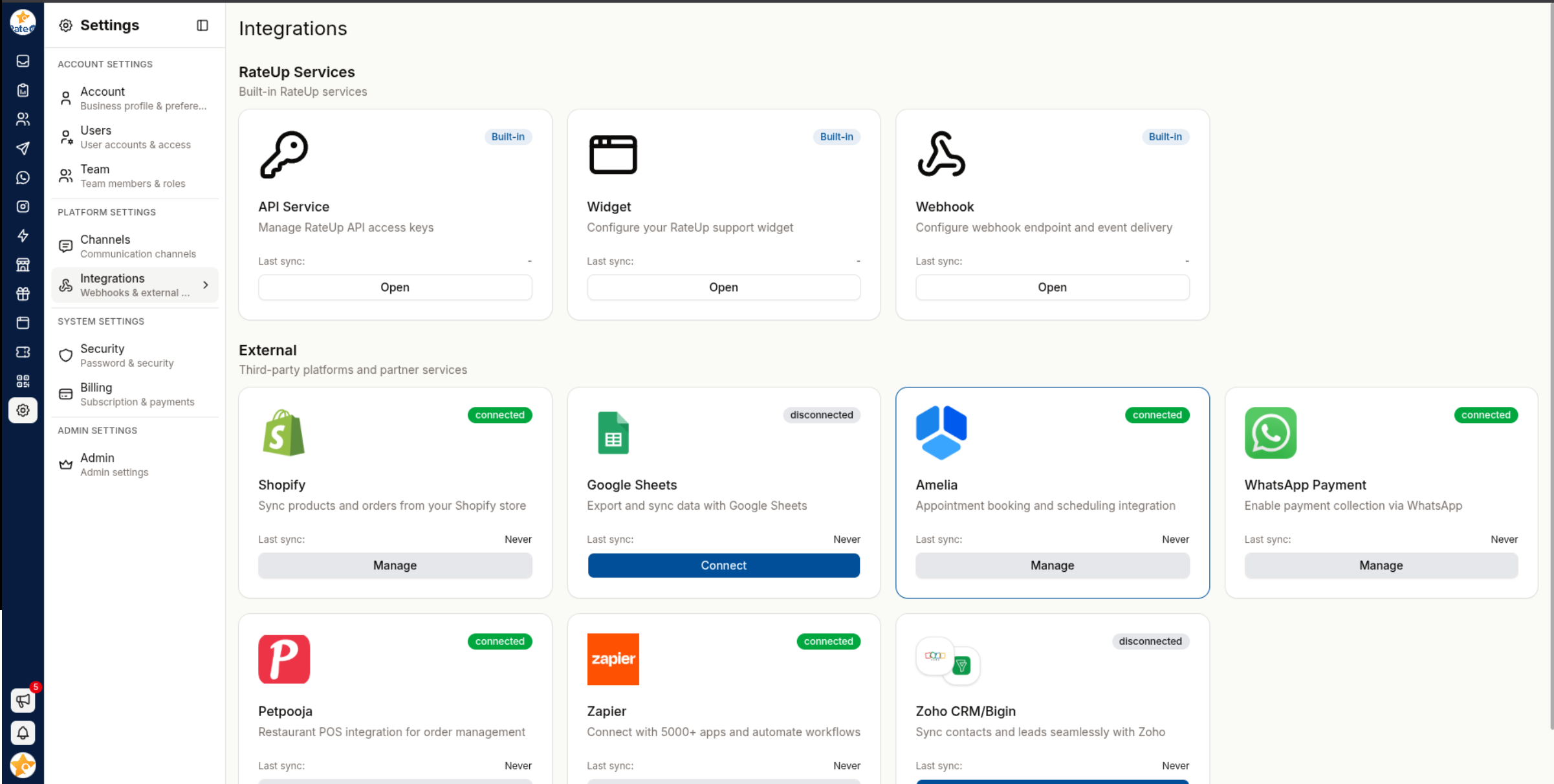
| Section | Contains |
|---|---|
| RateUp services | Built in: API Service (API keys), Webhook and Widget. Each opens with Open |
| Connected services | The outside services already connected, each marked Connected, Needs attention or Not connected. Manage opens one (View if you may only look) |
| Add integration | Picks a new service to connect — search "by name or what it does". The list is grouped: CRM, Stores & POS, Automation, Payments, Bookings, Productivity |
| Category | Services |
|---|---|
| CRM | HubSpot, Pipedrive, Zoho CRM/Bigin, GetLead CRM |
| Stores & POS | Shopify, WooCommerce, Petpooja |
| Automation | Zapier, Make, Pabbly Connect |
| Payments | WhatsApp Payment |
| Bookings | Amelia |
| Productivity | Google Sheets |
Connecting usually sends you to the other platform to authorise RateUp, then brings you back to the service's page here.
Webhook
The Webhook integration sends events to one HTTPS endpoint for the whole organisation, as they happen: WhatsApp message statuses, new inbound messages, contact and lead changes, survey responses and loyalty points. Every delivery is signed and retried.
A web form can also post its own responses to a URL set on that form — see Web Forms → Settings. That is separate from this webhook.
Set it up
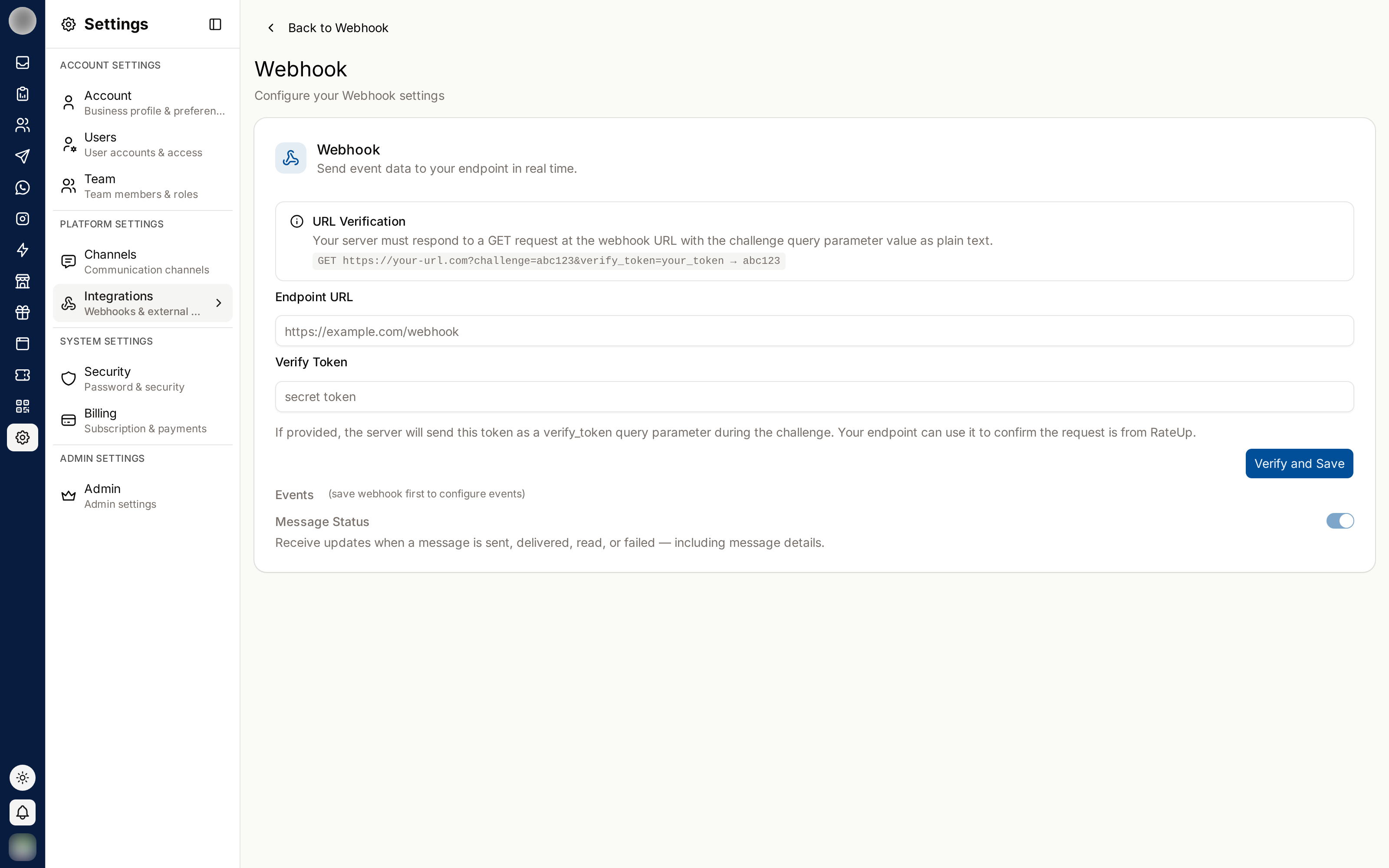
On Settings → Integrations → Webhook, click Set up webhook. (Until then the page says "No webhook yet". Only people who can manage webhooks see the button.)
Create an HTTPS endpoint that accepts POST with a JSON body, and answers a GET for verification. A non-HTTPS URL is rejected with "Webhook URL must use HTTPS", and an address that resolves to a private network is refused.
Handle the verification challenge. When you save, RateUp sends a GET to your URL with your
verify token as the challenge query parameter:
GET https://example.com/webhook?challenge=<your-verify-token>Your endpoint must reply 200 with that exact value as the plain-text body:
app.get("/webhook", (req, res) => {
  res.type("text/plain").send(req.query.challenge);
});
Verification times out after 5 seconds and does not follow redirects. A cold-starting serverless function is a common reason for failing the first attempt and passing on a retry.
Fill in the Endpoint card. Enter the Endpoint URL and a Verify token — type your own, or click Generate for a random one. How the URL check works shows the exact request your server will receive, built from what you typed.
Pick the events in the Events card below — a new webhook starts with Message status (signed envelope) ticked. You need at least one.
Click Verify and save. The button reads Checking the URL… while RateUp calls your endpoint; if the check fails, the error says so ("Webhook URL challenge verification failed") and nothing is saved.
Copy the signing secret from the Signing secret card — click Show, then the copy button — into your endpoint's configuration, and check every delivery against it. The card's Verify a delivery panel has the steps, the header list and ready-to-copy Node.js and Python code; the details are below.
Events you have not ticked are not sent. If your endpoint verifies but receives nothing, an unticked event is the first thing to check.
Choose the Events
The Events card lists every event in seven groups — Messages, Contacts, Conversations, Leads,
Surveys & Flows, Team and Loyalty — each with its name and code (contact.created). Use Search
events to filter, the group's checkbox to tick or clear a whole group, and Select all /
Clear for everything. The card's description counts what you send: "4 of 19 events are sent
to your endpoint."
Ticks are not saved one by one. Once you change something, a bar at the bottom of the card shows Discard and Save events; nothing reaches your endpoint differently until you save. Events marked Envelope arrive in the envelope shape described under Payloads.
| Group | Event | Sent when |
|---|---|---|
| Messages | Message Status (message_status) | A WhatsApp status callback arrives — sent, delivered, read or failed |
Message received (message.received) | Every inbound message, on any channel, with its content | |
Message status (signed envelope) (message.status) | Each new status for an outbound WhatsApp message, in the envelope, with recipient, template, source and campaign | |
| Contacts | Contact created · Contact updated · Contact deleted | A contact is added (by hand, by import or from a conversation), changed, or removed |
| Contact assigned | Someone is newly assigned to a contact's conversation | |
| Lifecycle changed | A contact moves to another lifecycle stage | |
| Added to group | Contacts join a contact group | |
| Conversations | Conversation closed | A conversation in the inbox is closed |
| Leads | Lead created · Lead stage changed | A lead is added, or moves stage — including from a connected CRM |
| Surveys & Flows | Survey response submitted (survey.response_submitted) | A response is filed — ids only |
Survey response created (survey.response.created) | Any survey or WhatsApp Flow response is filed — in the envelope, with its answers | |
Flow response created (flow.response.created) | A WhatsApp Flow is completed — in the envelope, with the flow and its answers | |
| Team | Team member joined | Someone accepts an invitation |
| Loyalty | Points earned · Points redeemed · Points adjusted | A member earns points (purchase, bonus, referral), spends them, or has them corrected or reversed |
The loyalty events cover purchases, signup and referral bonuses, redemptions, approved adjustments and purchase reversals. Points expiry and a programme reset are not announced.
Payloads
Events come in two shapes.
Envelope events — message.status, survey.response.created, flow.response.created and the
three loyalty.points.* events:
{
  "id": "6f1d2c3b-…",
  "type": "message.status",
  "createdAt": "2026-10-16T09:32:03.000Z",
  "orgId": "a1b2…",
  "data": {
    "messageId": "wamid.HBgMOTE5…",
    "status": "failed",
    "timestamp": "2026-10-16T09:32:03.000Z",
    "recipientPhone": "919876543210",
    "channel": "15550100142",
    "templateName": "order_shipped",
    "source": "template",
    "campaignId": null,
    "error": { "code": 131026, "title": "Message undeliverable", "message": "…" }
  }
}
id is unique per event — use it to drop a repeat. message.status announces each status
once, and only statuses Meta actually reported. source says what sent the message
(campaign, inbox, template, automated, …) and is null on older messages.
A loyalty event's data:
{
  "transactionId": "tx_5e6f…",
  "member": { "phone": "919876543210", "cardCode": "ABCDEFGHJ" },
  "points": 125,
  "balanceAfter": 845,
  "type": "earn",
  "source": "purchase",
  "reason": null,
  "referenceId": "1042",
  "idempotencyKey": "pos-store7-order-1042",
  "createdAt": "2026-10-16T09:30:00.000Z"
}
survey.response.created carries { survey: { id, title, type }, platform, response }, where
survey.type is web, whatsapp or waFlow, and response has the same fields as the
External API's survey responses — including empty answers and the
ciphertext in encryptedAnswers when your responses are encrypted.
flow.response.created carries the same fields plus the flow that collected the answers:
{
  "flow": {
    "id": "6f1c2b9e-0000-4000-8000-0000000000a1",
    "metaFlowId": "1234567890123456",
    "name": "Visit feedback",
    "categories": ["SURVEY"]
  },
  "survey": { "id": "…", "title": "Visit feedback", "type": "waFlow" },
  "platform": "WHATSAPP",
  "response": { "id": "…", "phone": "919876543210", "answers": [ … ] }
}
flow.id is RateUp's id for the flow; metaFlowId is the id Meta knows it by, and is null until
the flow has been saved to WhatsApp.
A completed Flow is announced twice — as Survey response created and as Flow response created — because a Flow is a survey underneath. Subscribe to one of them, or you will handle every Flow response twice.
Flat events — every other event — are { "event": "<name>", …fields }. The original
Message Status event looks like this:
{
  "event": "message_status",
  "status": "delivered",
  "messageId": "wamid.HBgMOTE5...",
  "recipientId": "14155552671",
  "timestamp": "1726567200",
  "errors": null
}
The contact events carry contact: { id, name, phone, email, source, lifecycleId }.
New integrations should prefer Message status (signed envelope) over Message Status: it covers every outbound WhatsApp message whatever sent it, says what sent it, and announces each status once. Message Status is the raw callback, so the same status can arrive more than once.
Verify the signature
There is one webhook per organisation, receiving every event you tick, and it is configured
here in the dashboard — it is not tied to an API key. Every delivery is signed with the
organisation's signing secret (whsec_…, from the Signing secret card) and carries these
headers:
| Header | Contains |
|---|---|
X-Rateup-Timestamp | When this attempt was sent, in Unix seconds. Each retry has its own |
X-Rateup-Signature-256 | t=<the same Unix seconds>,v1=<hex HMAC-SHA256 of "<t>.<raw body>"> |
X-Webhook-Id | The same on every retry of one delivery — use it to drop repeats |
X-Rateup-Triggered-At | When this attempt was sent, as an ISO 8601 date |
X-Rateup-Signature | Deprecated. Base64 HMAC-SHA256 of the raw body alone — see below |
To check X-Rateup-Signature-256:
- Read the raw request body — the exact bytes received, before any JSON parsing.
- Split the header on
,and taketandv1. - Reject the request if
tis more than 5 minutes from your clock. This stops a captured delivery from being replayed later. - Compute HMAC-SHA256 over the string
<t>.<raw body>(the timestamp, a full stop, then the body), keyed with the whole secret string exactly as shown,whsec_prefix included, as UTF-8. Hex-encode it (lowercase). - Compare it with
v1in constant time. Accept only on a match. - Drop the delivery if you have already processed its
X-Webhook-Id.
Node.js (Express):
import express from "express";
import { createHmac, timingSafeEqual } from "node:crypto";

const SECRET = process.env.RATEUP_WEBHOOK_SECRET; // "whsec_…", used as-is
const TOLERANCE_SECONDS = 300;

function verifyRateupSignature(secret, header, rawBody, now = Math.floor(Date.now() / 1000)) {
  if (!header) return false;
  let timestamp;
  const signatures = [];
  for (const part of header.split(",")) {
    const [key, value] = part.trim().split("=", 2);
    if (key === "t" && /^\d+$/.test(value ?? "")) timestamp = Number(value);
    if (key === "v1" && /^[0-9a-f]{64}$/i.test(value ?? "")) signatures.push(value.toLowerCase());
  }
  if (timestamp === undefined || signatures.length === 0) return false;
  if (Math.abs(now - timestamp) > TOLERANCE_SECONDS) return false;

  const expected = Buffer.from(
    createHmac("sha256", secret).update(`${timestamp}.`).update(rawBody).digest("hex"),
  );
  return signatures.some((signature) => {
    const given = Buffer.from(signature);
    return given.length === expected.length && timingSafeEqual(given, expected);
  });
}

const app = express();

// express.raw keeps req.body as the bytes received; express.json would break the check.
app.post("/webhook", express.raw({ type: "application/json" }), (req, res) => {
  if (!verifyRateupSignature(SECRET, req.get("X-Rateup-Signature-256"), req.body)) {
    return res.sendStatus(401);
  }
  res.sendStatus(200); // acknowledge first, then work
  const deliveryId = req.get("X-Webhook-Id"); // skip it if already processed
  queue.push({ deliveryId, event: JSON.parse(req.body) });
});
Python (Flask):
import hashlib, hmac, os, time
from flask import Flask, request, abort

SECRET = os.environ["RATEUP_WEBHOOK_SECRET"]  # "whsec_…", used as-is
TOLERANCE_SECONDS = 300

def verify_rateup_signature(secret: str, header: str | None, raw_body: bytes) -> bool:
    if not header:
        return False
    timestamp, signatures = None, []
    for part in header.split(","):
        key, _, value = part.strip().partition("=")
        if key == "t" and value.isdigit():
            timestamp = int(value)
        elif key == "v1":
            signatures.append(value.lower())
    if timestamp is None or not signatures:
        return False
    if abs(time.time() - timestamp) > TOLERANCE_SECONDS:
        return False
    expected = hmac.new(
        secret.encode(), f"{timestamp}.".encode() + raw_body, hashlib.sha256
    ).hexdigest()
    return any(hmac.compare_digest(expected, s) for s in signatures)

app = Flask(__name__)

@app.post("/webhook")
def webhook():
    if not verify_rateup_signature(
        SECRET, request.headers.get("X-Rateup-Signature-256"), request.get_data()
    ):
        abort(401)
    # De-duplicate on request.headers["X-Webhook-Id"], then process request.get_json()
    return "", 200
To test your code, this fixed input must produce this signature:
| Input | Value |
|---|---|
| Secret | whsec_rateup_test_secret |
t | 1760611200 |
| Raw body | {"event":"contact.created","contact":{"id":"c1"}} |
v1 | 024c81925f62daf179ed8b8b5df3058888d43b371b0304522bf376f05c98aa6b |
So the header is t=1760611200,v1=024c8192…c98aa6b (the full 64 hex characters).
Compute the signature over the exact bytes received. Re-serialising parsed JSON changes spacing and key order, and every check fails. A payload that does not verify, or whose timestamp is stale, is not from RateUp — never act on it.
The legacy X-Rateup-Signature header is still sent on every delivery so existing receivers
keep working: the base64 HMAC-SHA256 of the raw body, keyed with the same secret. It does not cover
a timestamp, so a captured delivery verifies forever. It is deprecated — move to
X-Rateup-Signature-256.
Replace secret issues a new signing secret. Deliveries are signed with it straight away, so your endpoint rejects them until it is updated — have the new value ready to deploy first.
Retries
A delivery that does not get a 2xx within 15 seconds — including any 4xx, 5xx, timeout or
redirect — is retried, up to five attempts in all with exponential backoff starting at about
5 seconds. After the fifth failure it is dropped. A URL that resolves to a private address is not
retried.
Acknowledge with a 2xx immediately and process the payload afterwards. Deliveries are independent:
they can arrive out of order, and a retry can arrive after a later event.
Retries cover blips, not outages. If your endpoint is down for longer than the retry window, those events are gone. Treat the webhook as a live feed and reconcile against Message Logs or the External API when you need a complete record.
Change the URL
On the Endpoint card, click Change, edit the URL and enter the Verify token again — saving re-runs the URL check, and RateUp does not keep a token it could show back. Cancel keeps the current endpoint. The events and the signing secret stay as they are.
Remove it
Remove on the Endpoint card asks "Remove the webhook?"; Remove webhook stops all deliveries straight away and deletes the signing secret. Setting the webhook up again issues a new secret.
Troubleshooting
| Symptom | Cause | Fix |
|---|---|---|
| "The URL must start with https://" | HTTP endpoint | Serve over HTTPS |
| "Webhook URL challenge verification failed" | The endpoint does not echo challenge, responds slowly, redirects, or is on a private address | Return the raw challenge as plain text with 200 within 5 seconds, at a public HTTPS URL. Open How the URL check works to see the exact request |
| Verified, but nothing arrives | Event not ticked, or ticked but not saved | Tick it in Events and click Save events |
| Verify and save is greyed out while setting up | No event is picked | Tick at least one event |
| Every signature check fails | Signing parsed JSON, the secret with its whsec_ prefix removed or base64-decoded, or an old secret | Sign <t>.<raw body> with the whole secret string as shown; copy the current secret after any Replace secret |
| Valid signatures rejected as stale | Your server's clock is off, or you check X-Rateup-Triggered-At from an earlier attempt | Sync the clock (NTP); check the t in X-Rateup-Signature-256, which is new on every retry |
| The same event twice | A retry after a slow or failed answer | De-duplicate on X-Webhook-Id (or the envelope's id) |
read never arrives | Recipient has read receipts off | Expected; not a failure |
| Statuses arrive out of order | Independent deliveries | Key on messageId and keep the furthest status |
API Service
API Service is where you create and manage the keys your own systems use to call the External API. It opens from RateUp services → API Service; seeing it needs the API keys abilities, which Owners and Admins have by default — see Members & Roles.
Create a key
Click Create key.
Give it a Name — one per integration, e.g. Production POS.
Choose the API version: v2 (recommended), or v1 (legacy) only for an integration still built on v1. "A key works on its own version only."
For a v2 key, choose the Mode: Live, or Test — "Test keys work like live ones but can't send WhatsApp messages, so you can build against real data safely." v1 keys are always live.
Under Access, keep Full access or pick Only selected features: Contacts, Teams, Campaigns, Surveys, WhatsApp messaging, Loyalty, Webchat widget. See Keys and Access for what each one opens. Webchat widget is only for the Widget — "This key is visible in your page's source, so give it nothing else."
Optionally set an Expiry date — the key stops working at the end of that day.
Click Create key, then copy the key from Copy your new API key and click I've copied it.
You won't see this key again. RateUp keeps only a hash of it. Store it in your server's secret manager; if you lose it, rotate the key to get a new one.
An organisation can hold 20 keys. At the limit Create key is disabled — "Revoke one to create another."
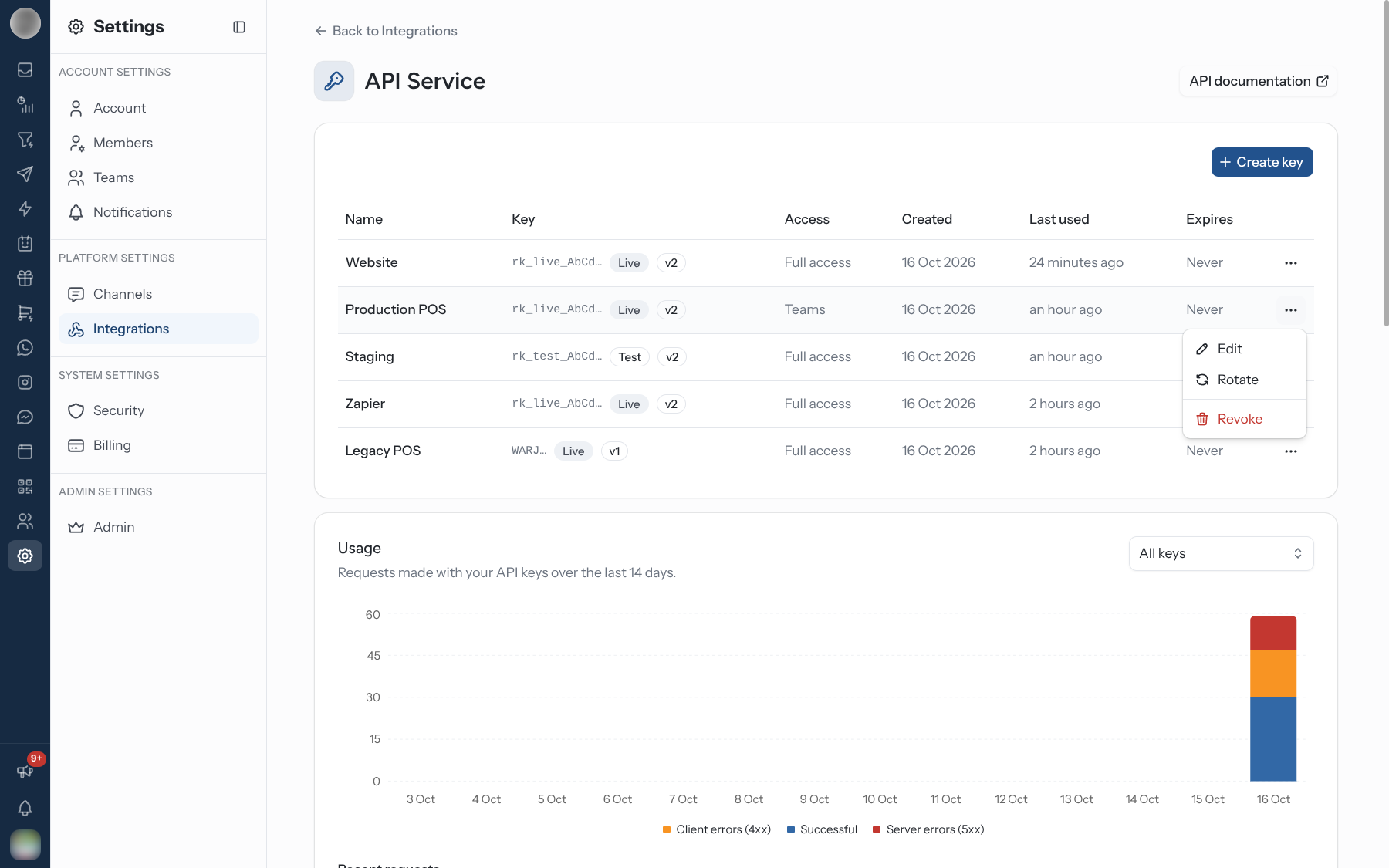
The keys table
| Column | Shows |
|---|---|
| Name | Your label |
| Key | The first characters (rk_live_ab12…), a Live or Test badge, and the version (v1 or v2) |
| Access | Full access, the selected features, or Custom permissions for a key limited to individual permissions before features existed |
| Created · Last used | Never until the key's first request |
| Expires | Never, a date, or a countdown in amber within the last week; Expired in red |
The ⋯ menu on each row:
| Action | Effect |
|---|---|
| Edit | Change the name or access. "Changes apply to the key straight away; its value stays the same." |
| Rotate | Issues a new key with the same name, mode and permissions. Under Old key stops working pick Immediately, After 1 hour, After 24 hours (the default) or After 7 days. Not offered on a key that has already been replaced |
| Revoke | "Requests using this key will be refused straight away. This can't be undone." |
Rotate with a grace period, revoke only when nothing uses the key. Rotating with Immediately, or revoking, breaks every integration still sending the old key at once. Pick a grace period long enough to deploy the new value, then let the old key run out.
Usage
The Usage card charts requests made with your keys over the last 14 days, stacked as Successful, Client errors (4xx) and Server errors (5xx). With more than one key, filter by key. Recent requests lists each call — Method, Route, Status, Latency, Key and Time — 25 to a page, newest first. Calls appear within a few seconds; the log keeps 30 days.
A rising Client errors line after a rotation or a change of access is usually an integration still sending an old key or calling outside its features.
Base URL
The Base URL card shows both endpoints, with copy buttons:
| Field | Value |
|---|---|
| v2 endpoint | …/api/external/v2 — the key names your organisation |
| v1 endpoint (legacy) | …/api/external/v1/<your organisation id> |
API documentation opens the docs. The same keys card also sits on Loyalty → Settings as POS and API access, for a till that awards points directly.
Widget
Widget is a chat button for your own website, shipped as the @rateup/support-widget React
package. Visitors chat from it, and their messages land in your Inbox as Webchat
tickets. It opens from RateUp services → Widget. On Shopify you don't need it — "Add a
WhatsApp button to your store without code" from the Shopify integration instead. On WooCommerce,
use the integration's WhatsApp widget tab (see WooCommerce).
Install the package: npm install @rateup/support-widget.
Create a widget key: click Create widget key. RateUp creates a v2 key named Webchat widget with only the Webchat widget feature, and shows it once in Copy your new API key. The snippet in the next step fills it in for you. Creating it needs the API keys ability.
Render the widget with token (the widget key) and the optional props listed under
Props — whatsappNumber, companyName, backendUrl, webhookUrl, icebreakers. The key
already says which organization it belongs to, so there is no organization ID to pass.
The widget's key is public. It sits in your page's source, where any visitor can copy it. Put a key with only Webchat widget there: with it someone can do what a visitor does in the widget — chat, leave contact details, send the Email tab — and nothing more. A Full access key in the widget still works, but it lets anyone read and change your contacts, send campaigns and move loyalty points through the External API. If your widget uses one today, put a widget key in the snippet, deploy, then revoke the old key or limit its access under API Service.
The widget refuses a key limited to other features (say, only Contacts): its chat does not
connect and its requests answer 403. It also takes only keys that start with rk_, since those
name their organization; an older key answers 401.
WooCommerce
The WooCommerce integration connects one WordPress store. RateUp hears about new orders, order status changes, new customers and product changes, which drive order automations, loyalty points and coupons. Connecting a store also turns Commerce on in Features.
Two parts work together:
| Part | What it is | Needed for |
|---|---|---|
| The connection | A WooCommerce REST API key your store issues to RateUp when you approve it | Everything |
| The RateUp for WooCommerce plugin | A free plugin from WordPress.org, installed in your store | The WhatsApp opt-in at checkout box and the WhatsApp widget button on your store |
Connect your store
In Settings → Integrations, click Add integration and pick WooCommerce.
Under Connect your store, enter the Store address — "The address your customers shop at. It must use HTTPS." — and click Connect.
Your WordPress admin opens. Approve RateUp there.
WooCommerce sends you back to RateUp, which says "WooCommerce is connected."
If you arrive from the plugin's own Connect to RateUp button in WordPress, the store address is filled in for you — you still click Connect.
Install the RateUp plugin
The plugin is listed on WordPress.org as RateUp for WooCommerce. Wherever RateUp needs it, it shows Install the RateUp plugin with the steps:
Click Find it in WordPress. It opens the plugin's page inside your own store's admin (your store
address + /wp-admin/plugin-install.php), with its Install Now button. Or, in WordPress, go to
Plugins › Add New Plugin and search for "RateUp for WooCommerce".
Click Install Now, then Activate Plugin.
Back in RateUp, on the WhatsApp widget tab, click Check again. RateUp confirms "The RateUp plugin is installed." and the card changes to RateUp plugin installed.
Find it in WordPress opens the plugin's page directly (rateup-for-woocommerce), so it
works even when a plugin search in WordPress does not list it yet.
The Connection tab
| Card | Contains |
|---|---|
| Connection | The Store, WooCommerce version, Currency and when it was Connected; What RateUp hears about — New orders, Order status changes, New customers, Product changes, each ticked when its webhook is registered; and Disconnect |
| Customers | Add new customers as contacts — "Each new WooCommerce customer with a phone number becomes a contact. A number that is already a contact is linked to it, not duplicated. Customers from before this is on are not added." |
| WhatsApp opt-in at checkout | Show the box at checkout and the Text beside the box (up to 200 characters, saved with Save). Needs the plugin |
The checkout box is unticked by default and is marketing consent only — order updates are sent either way:
| Shopper | Ticked the box | Left it unticked |
|---|---|---|
| New contact | Consent on | Consent off |
| Existing contact | Consent on | Unchanged |
The Connection card's description names the key RateUp holds — "To revoke RateUp's access from the store side, delete key #… under WooCommerce › Settings › Advanced › REST API."
WooCommerce troubleshooting
| Message | Cause | Fix |
|---|---|---|
| "WordPress answers at that address, but WooCommerce is not active on it." | WooCommerce is not installed or not activated | Activate WooCommerce, then Connect again |
| "We could not reach a WordPress site at that address. Check it, and that pretty permalinks are on (Settings › Permalinks)." | Wrong address, or WordPress uses plain permalinks | Fix the address, or choose any permalink setting other than Plain |
| "WooCommerce was not connected. Try again, and approve RateUp when asked." | You declined in WordPress, or the key did not reach RateUp | Connect again and approve |
| "One webhook is not registered" | RateUp could not register a webhook in the store | Click Register again |
| "Recent store updates failed to process" | Store events are arriving but failing | Read the error shown under it; contact support if it persists |
| "The plugin wasn't found. Install and activate it, then check again." | The plugin is missing or not activated | Install and activate it, then Check again |
Before You Connect
- Check which direction data flows — some integrations write into RateUp, some read out of it
- Check what it syncs — contacts, orders, leads, or several
- Connect with an account that will still exist in six months, not a personal one
Related Pages
- External API — endpoints, errors, retries and the v1 → v2 migration
- Members & Roles — who may manage API keys and webhooks
- Web Forms → Settings — a form's own response webhook
- Message Analytics — the same delivery data, in the dashboard
- Channels