Ice Breakers, Menu & Links
The ways customers start a conversation with you on Instagram — ice breakers, the persistent menu, and ig.me links with open counts and QR codes.
Three tools decide how easy it is for someone to start talking to you on Instagram — and what happens when they do. Each has its own tab on Instagram, and each belongs to the account selected at the top of the page.
Add Ice Breakers
Ice breakers are the suggested questions Instagram shows before a customer types anything — "Up to 4 starter questions shown when users open your Instagram DM."
Open the Ice Breakers tab and click Add question.
Write the Question text as the customer would ask it — "What are your business hours?", not "Business hours".
Set the Payload — "Payload sent when this question is tapped".
Click Save, then Sync with Meta. Saving alone does not change Instagram.
Clear from Meta removes the ice breakers from Instagram. Use the phone preview to see them as a customer will.
Ice breakers are the cheapest support you will ever build. Look at your Inbox, find the questions you answer most, and make them tappable.
Set Up the Persistent Menu
The persistent menu sits in the DM thread permanently, so customers can reach your key options at any point. The Persistent Menu tab holds up to 5 Menu entries.
| Field | Purpose |
|---|---|
| Title | What the customer sees — "Talk to an agent" |
| Type | Postback or Web URL |
| Payload | For a postback: the value sent back when it is tapped — CARE_HELP |
| URL | For a web URL: the link it opens |
Save, then Sync with Meta, exactly as for ice breakers. Keep it short — three useful entries get used more than five vague ones.
Create an ig.me Link
An ig.me link opens a DM with your account and starts the automation you choose — "Links that open a DM with you and start the automation you choose." Put one in your bio, a story, an ad, or on a printed QR code.
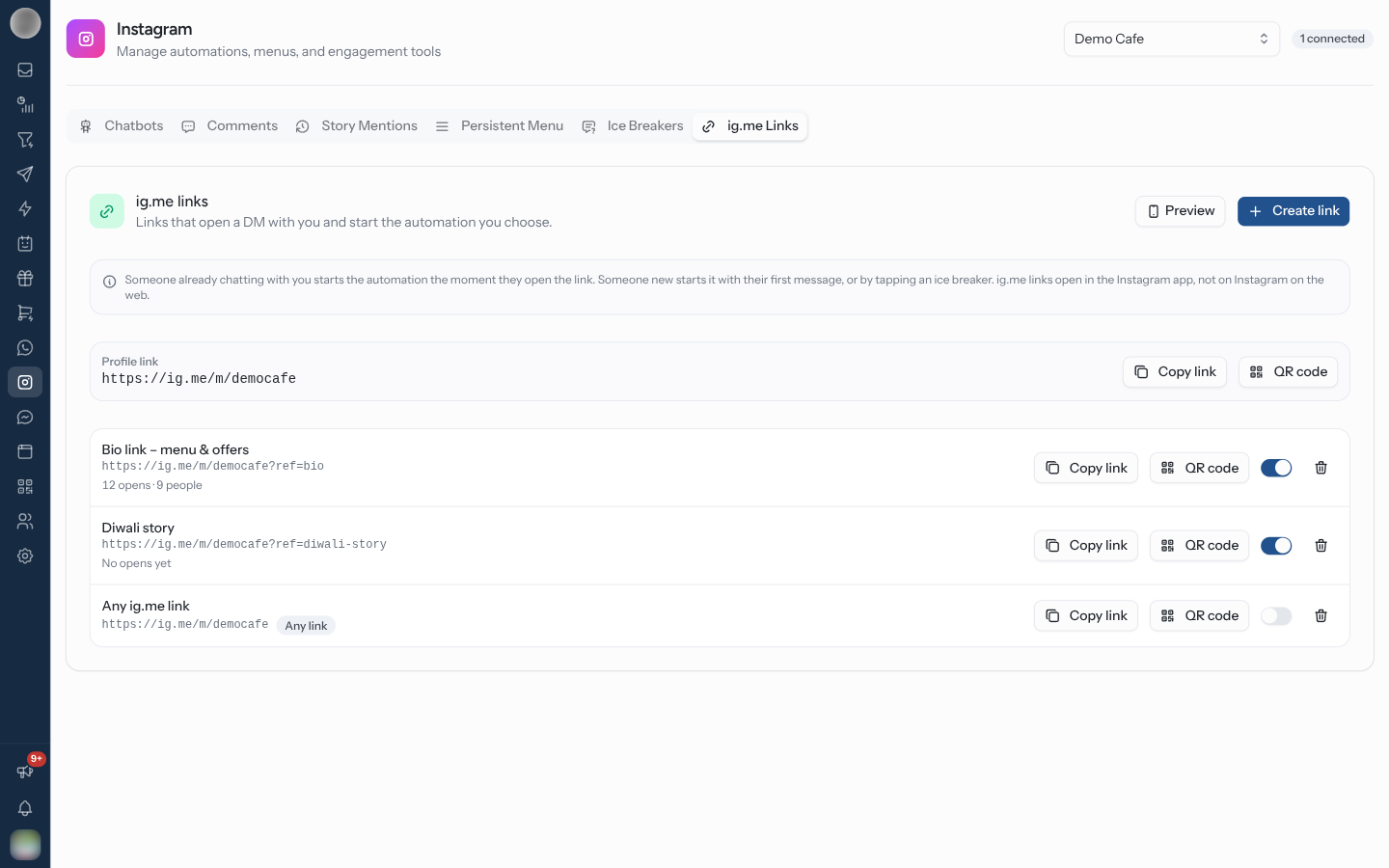
Open the ig.me Links tab and click Create link. The rule builder opens with the ig.me Link Opened trigger and this account selected. On Template, click Start from scratch to keep that trigger and account.
On Conditions, enter a Link name — "Becomes the link's ?ref=", for example summer_sale. The
link appears underneath as https://ig.me/m/<username>?ref=summer_sale, with copy and QR buttons.
On Actions, choose what happens — usually Trigger Chatbot. The ig.me link campaign chatbot example is built for this.
On Review, name the rule and click Activate automation. The link is ready to share; no sync is needed.
| Link name | Rule |
|---|---|
Letters, numbers, -, _ and = only | Anything else is refused — "Use letters, numbers, - _ and = only" |
| Case | Ignored when matching — Summer_Sale and summer_sale start the same rule |
| Left empty | The rule answers every ig.me link, and ads that open the chat with a ref. It shows an Any link badge |
When two rules could answer the same open, the one naming that exact link name wins over an Any link rule.
When the Automation Runs
Meta tells RateUp a link was opened at different moments, depending on who opens it:
| Who opens the link | The automation starts |
|---|---|
| Someone already chatting with you | The moment they open it |
| Someone new | With their first message, or when they tap an ice breaker |
ig.me links open in the Instagram app, not on Instagram on the web. Test a new link on a phone — opening it on a laptop proves nothing.
See How Often a Link Is Opened
Each named link shows its opens underneath — "12 opens · 9 people", or "No opens yet".
| Figure | Counts |
|---|---|
| Opens | Every time a message from that link reached you: a new chat's first message, an ice breaker tap, or an existing chat reopened from the link |
| People | The different contacts behind those opens |
An Any link rule has no name to count, so it shows no figures. Give each placement — bio, each poster, each ad — its own link name and you can tell which one actually works.
Print a Link as a QR Code
Click QR code beside any link to download it as a PNG — 1024 pixels square, ready for packaging,
posters and in-store signs. The file is named after the link, for example ig-me-summer_sale.png.
The Profile link at the top of the tab — https://ig.me/m/<username> with no name — has
Copy link and QR code too. It opens a DM but does not start any particular rule.
A printed code cannot be changed, but the rule behind it can. Point the QR at a link name and you can switch the chatbot it starts from one season to the next without reprinting anything.
Pause or Delete a Link
The switch on each row turns the link's rule on or off. Delete link asks first — "The link stops starting an automation. Anyone who opens it still reaches your DMs." Click the link's name to edit its rule.
Troubleshooting
| Symptom | Cause | Fix |
|---|---|---|
| Ice breakers or menu unchanged on Instagram | Saved but not synced | Click Sync with Meta |
| A link opens Instagram on the web and nothing happens | ig.me links only work in the app | Open it on a phone |
| A new person opens a link but nothing runs | For someone new, the rule runs on their first message | Expect it when they send something or tap an ice breaker |
| "Pick an Instagram account to see the link" in the rule builder | No account ticked on Trigger | Tick the account first |
| A link shows no open counts | It has no link name (Any link) | Give it a name |
Related Pages
- Instagram Chatbots — what a link or ice breaker can start
- Comments & Story Mentions
- Automation
- QR Codes
Comments & Story Mentions
Answer Instagram comments with a private DM and a public reply — on posts, reels and live videos — sell from a comment, and thank people who mention you in their story.
Messenger Overview
Connect a Facebook Page on its own, run chatbots, answer Page comments, share m.me links and set the Get Started button and menu.