Comments & Story Mentions
Answer Instagram comments with a private DM and a public reply — on posts, reels and live videos — sell from a comment, and thank people who mention you in their story.
Not every Instagram conversation starts as a DM. The Comments and Story Mentions tabs respond to public activity and pull it into a private conversation. Both are automation rules underneath — the tabs list the rules for the account selected at the top of the page, and Create opens the rule builder with the trigger already chosen.
Answer Comments Automatically
The Comments tab lists your Comment Automations — "Automatically send private replies when someone comments on your posts."
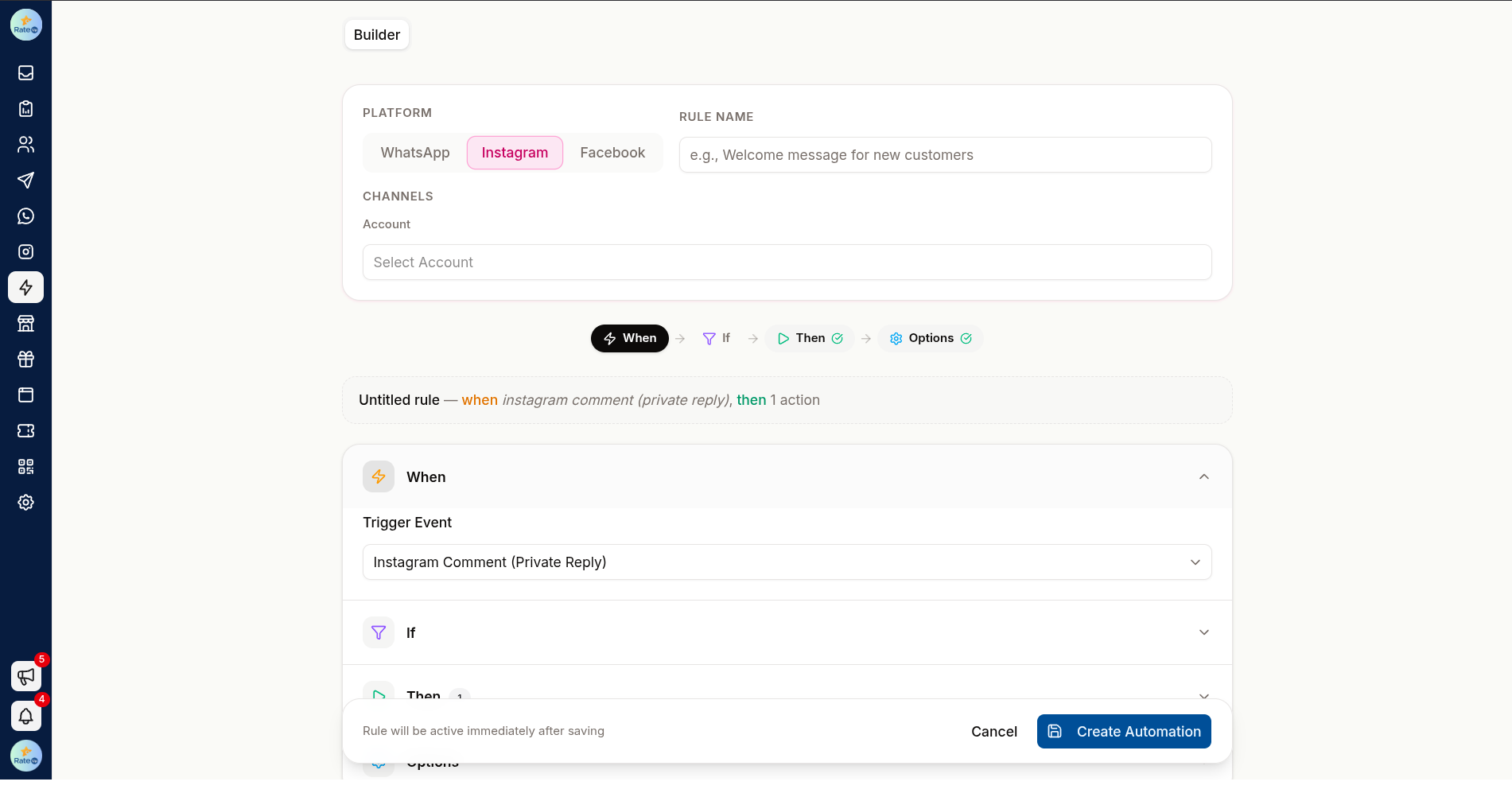
Click Create (or Create automation when the list is empty). The rule builder opens with Instagram as the channel, the Instagram Comment (Private Reply) trigger, and this account selected. On Template, click Start from scratch to keep that trigger and account.
On Conditions, choose Comments on: Posts & reels, Live videos or Both.
For posts and reels, choose Apply to: All posts, or Specific posts and pick them from
Select posts / reels. Add conditions on the comment text — a keyword such as PRICE — if only
some comments should get an answer.
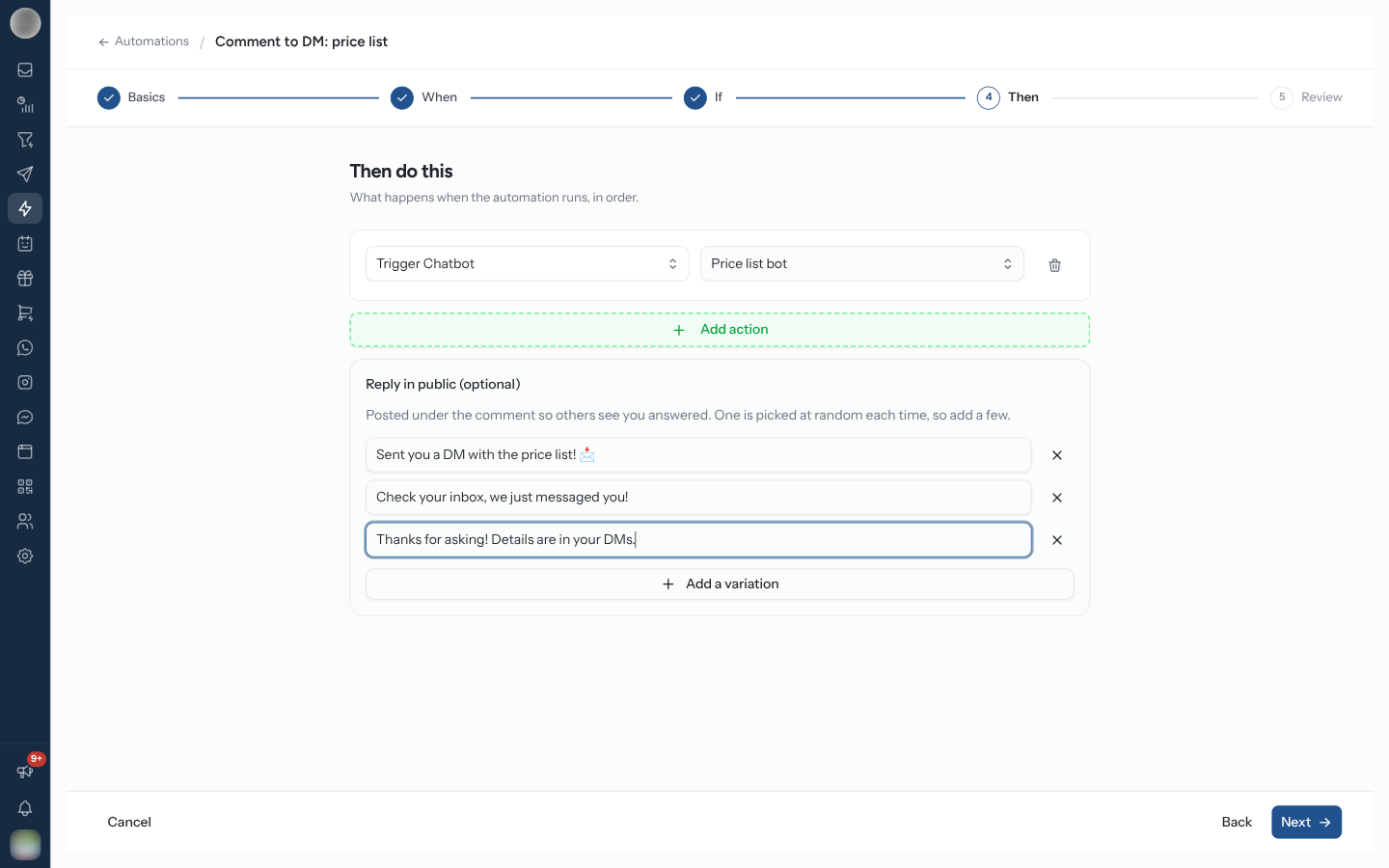
On Actions, add the actions — Send Message, or Trigger Chatbot to start an Instagram chatbot. The first message they send arrives as a private reply to the comment.
Optionally fill in Reply in public (optional) under the actions (below). On Review, name the rule and click Activate automation. No sync is needed — the rule is live once it is saved and active.
Private Replies
The first message a comment rule sends is a private reply: a DM tied to that comment. It reaches people who have never messaged you, which an ordinary DM cannot. It is the pattern behind "comment PRICE and we'll send you the details" — the comment is public marketing, the answer is a private conversation you can work in.
Instagram allows one private reply per comment and nothing more until the person writes back. Keep the first message to a single text that invites a reply. A second message, or a chatbot whose first step is not a Text, is refused for anyone who has not messaged you before.
Reply in Public
Reply in public (optional) posts a comment under theirs, so other people see you answered — "Sent you a DM 📩". Click Add a public reply, then Add a variation for more.
| Rule | Detail |
|---|---|
| Variations | Up to 10. One is picked at random each time, so the replies under a busy post do not all read the same |
| Length | Up to 2200 characters each — "Instagram comments stop at 2200 characters" |
| When | Posted after the rule's actions have run |
| Empty variations | Dropped when you save |
A public reply that fails does not stop the private reply or the rest of the rule.
Comments on Live Videos
Choose Live videos or Both under Comments on to answer comments made during your Instagram lives. Picking Live videos switches Apply to off and back to all posts — a live video is never in the post list, so a post filter would block it.
Sell from a Comment
A comment rule can answer with the product itself. When someone comments a keyword — buy, link, mine — on a post, reel or live, the private reply lists the product with a link to buy it. This needs Commerce set up with the products in your store.
Create a comment rule as above — or, on Template, pick Comment to buy ("Someone comments “buy” → DM them the product with a link to check out.") or Live drop ("Someone comments “mine” on your live → the first 20 get a checkout link.").
On Conditions, set the keywords — the templates use buy, link and price, or mine and
buy for lives.
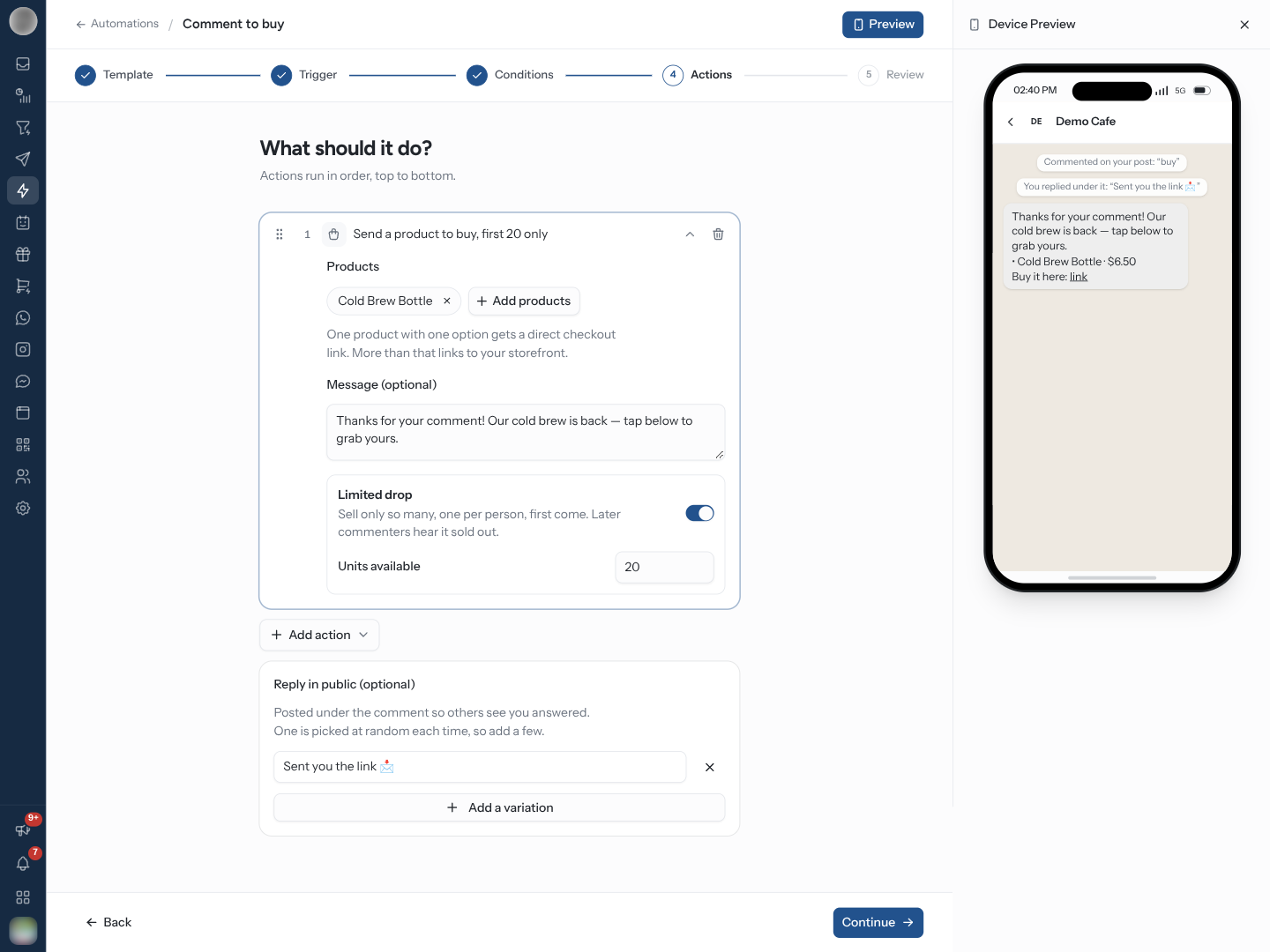
On Actions, add Send products to buy and click Choose products — up to 10. Optionally write a Message (optional), up to 600 characters; without one the reply opens with "Thanks for your comment! Here it is:" (or "Thanks! Here's the edit:" for several products).
For a drop, switch on Limited drop and set Units available (below).
Add a public reply such as "Sent you the link 📩", then name the rule and click Activate automation.
What the link opens depends on what you picked — "One product with one option gets a direct checkout link. More than that links to your storefront."
| You picked | The reply ends with |
|---|---|
| One product with one option that can be sold | "Buy it here:" and a checkout link, starting at the address step |
| One product with several options | "Shop here:" and the product's storefront page |
| Several products | "Shop here:" and your storefront |
| Anything but a direct checkout, storefront off | "Reply here and we'll help you order." — no link |
The reply lists up to 5 products with their prices, and is kept within Meta's 1,000-character limit for a private reply: your message is shortened before the link ever is.
With several products — or one with several options — turn the storefront on in Commerce → Settings first. Otherwise the builder warns "Turn on your storefront in Commerce → Settings, or the reply can only list these products without a link." — and every commenter gets a list they cannot buy from.
Sell a Limited Drop
Limited drop — "Sell only so many, one per person, first come. Later commenters hear it sold out." — caps the rule at Units available (20 when you switch it on).
| Situation | What happens |
|---|---|
| A unit is free | The commenter gets the reply and their checkout link |
| The same person comments again | They get their first checkout back, not a second unit |
| Every unit is taken | The reply reads "Sorry, … has sold out.", plus a link to your storefront when it is on |
| A checkout lapses unpaid | Its unit goes back to the drop and someone else can take it |
A unit is held while its checkout is still open, not by stock: stock is taken only when the order is placed, and an order beyond the limit is refused.
Run a drop on a live by choosing Live videos under Comments on — the Live drop template does this for you. Set Units available to what you can actually ship, not what you hope to sell.
On a Story Mention rule, Send products to buy sends the same message as a DM, followed by the product cards.
Thank People Who Mention You in a Story
The Story Mentions tab lists your Story Mention Automations — "Triggered when someone mentions your account in their Instagram story."
Customers who tag you in a story are your best advocates and the easiest to lose — they get no acknowledgement unless someone happens to see it. An automatic thank-you closes that gap.
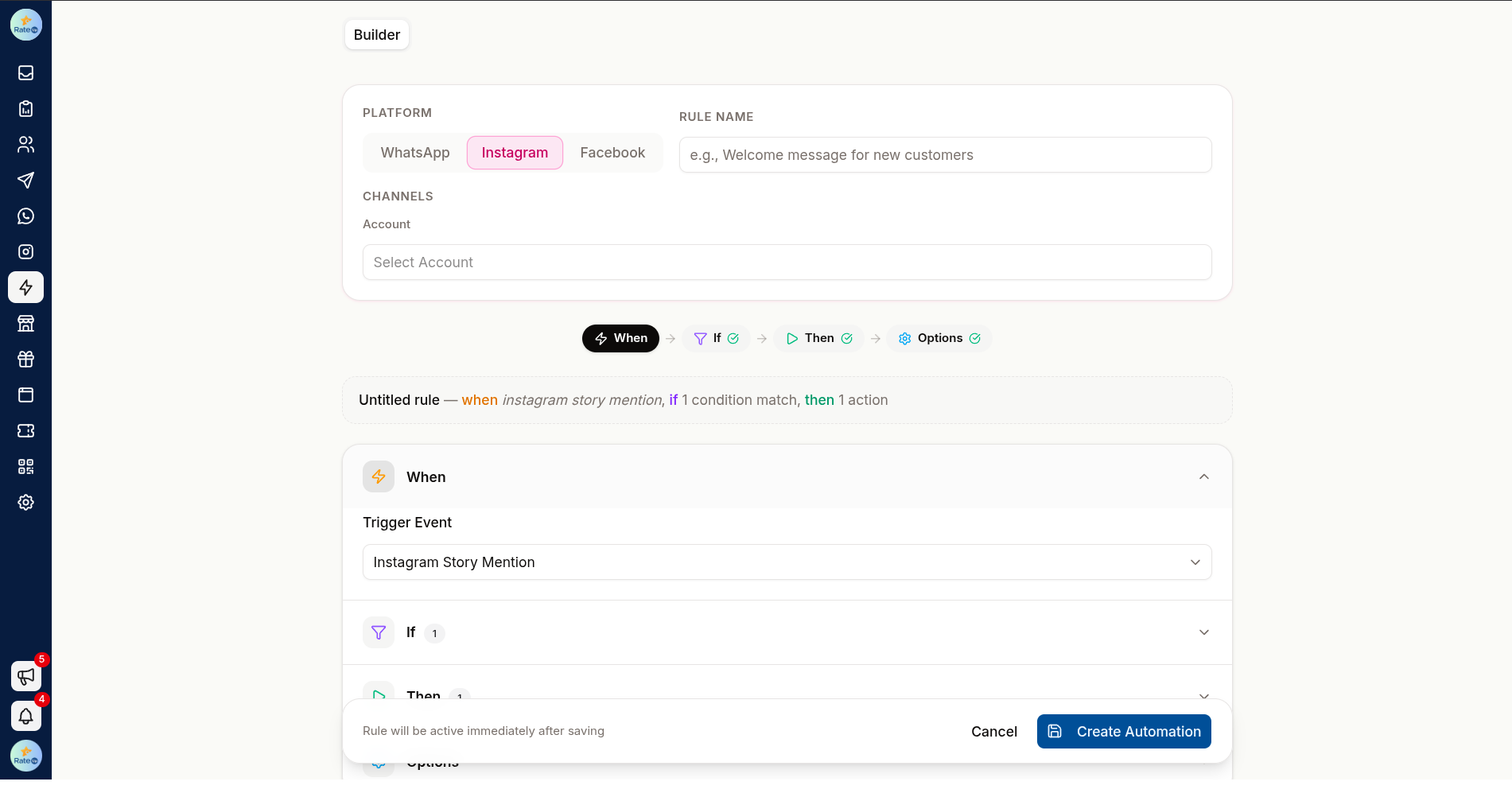
Click Create. The rule builder opens with the Instagram Story Mention trigger and this account selected. On Template, click Start from scratch to keep that trigger and account.
On Actions, add a Send Message with your thank-you, or Trigger Chatbot — the Story mention thank-you chatbot example is a ready-made start.
On Review, name the rule and click Activate automation.
Every story mention matches — there are no post or keyword filters for this trigger.
Turn a Rule On or Off
Each rule appears as a card on its tab. Use the card's switch to pause or resume it, the delete action to remove it, or click the card to edit it in Automation.
Keep Automations Honest
- Reply as a person would, not as a form
- Keep the automatic part short and hand over quickly
- Do not automate a reply to a complaint — route those to a human immediately
- Re-read your public replies occasionally; wording that felt clever six months ago rarely still does
Troubleshooting
| Symptom | Cause | Fix |
|---|---|---|
| A rule you made is not on the tab | It belongs to another account | Switch the account selector at the top |
| Comments on a live get no answer | Comments on is Posts & reels | Choose Live videos or Both |
| Some posts get no answer | Apply to is Specific posts | Add the post, or choose All posts |
| The private reply arrives but nothing after it | Instagram allows one private reply until the person writes back | Make the first message ask them to reply |
| "Instagram comments stop at 2200 characters" | A public reply is too long | Shorten it |
| A comment-to-buy reply has no link | Several products and the storefront is off, or nothing picked is still for sale | Turn the storefront on, or check the products |
| Nothing is sent for a comment-to-buy rule | Commerce is not set up, or none of the products is active | Set up Commerce and check the products |
| Commenters hear "has sold out" too early | Units available is lower than you meant, or open checkouts still hold units | Raise the number; lapsed checkouts free their units |
Related Pages
- Instagram Chatbots — what a comment or story rule can start
- Ice Breakers, Menu & Links
- Automation — the rule builder in full
- Actions — Send products to buy on WhatsApp too
- Commerce — products, storefront and orders
- Inbox
Instagram Chatbots
Build automated DM conversations — from an example or a blank canvas — that carry on when people tap a reply or answer a question.
Ice Breakers, Menu & Links
The ways customers start a conversation with you on Instagram — ice breakers, the persistent menu, and ig.me links with open counts and QR codes.