Instagram Chatbots
Build automated DM conversations — from an example or a blank canvas — that carry on when people tap a reply or answer a question.
An Instagram chatbot handles a DM conversation automatically — answering the questions you get constantly, collecting details, rewarding followers, and handing over to a person when it cannot. They live on the Chatbots tab of Instagram.
Create a Chatbot
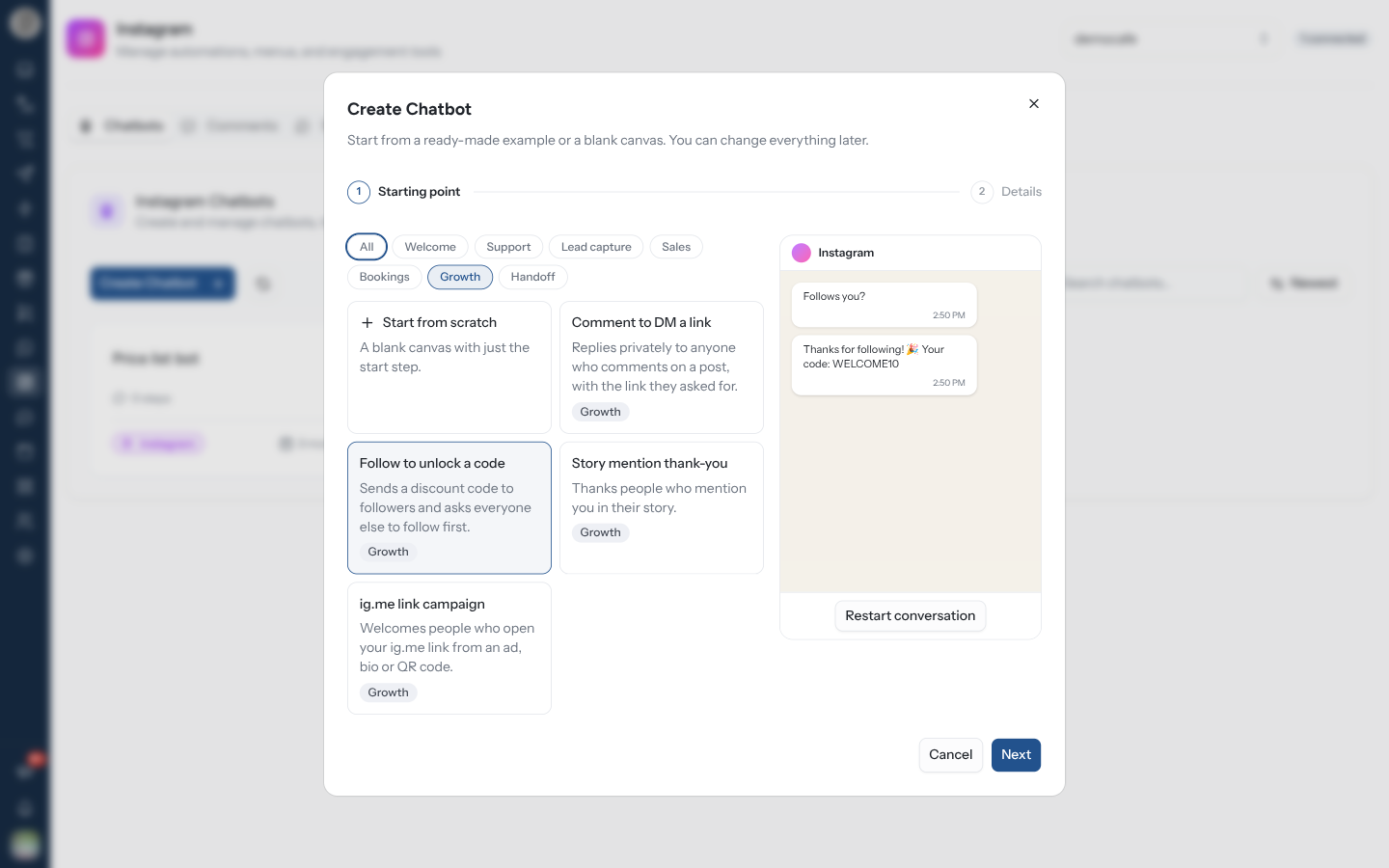
Click Create Chatbot. The wizard opens on Starting point — the channel is already Instagram.
Pick Start from scratch or one of the examples. The chips along the top filter them by use (Welcome, Support, Growth, …). On a wide screen, the selected example plays in a phone preview on the right.
Click Next. Check the Chatbot Name — at least 3 characters, only your team sees it.
Optionally pick an Account — "Optional. Used to set up the rule that starts this chatbot." The chatbot itself is not tied to an account; the rule decides which account it answers on.
Click Create Chatbot. The editor opens with the example laid out. Change the wording, then Save.
With no chatbots yet, the tab offers three examples and Start from scratch as buttons.
Instagram Examples
| Example | Filter | What it does | Usually started by |
|---|---|---|---|
| DM welcome | Welcome | Greets people with quick replies to shop, ask a question or talk to you | A DM that matches a rule |
| FAQ quick replies | Support | Answers your most common questions with one tap each | A DM that matches a rule |
| Lead capture | Lead capture | Asks for a name and a phone number or email, then hands the lead to your team | A DM that matches a rule |
| Product cards | Sales | Shows products as swipeable cards with a link to buy each one | A DM that matches a rule |
| Booking request | Bookings | Picks a service, asks for a preferred time and passes the request to your team | A DM that matches a rule |
| Comment to DM a link | Growth | Replies privately to anyone who comments on a post, with the link they asked for | Instagram Comment |
| Follow to unlock a code | Growth | Sends a discount code to followers and asks everyone else to follow first | A DM that matches a rule |
| Story mention thank-you | Growth | Thanks people who mention you in their story | Instagram Story Mention |
| ig.me link campaign | Growth | Welcomes people who open your ig.me link from an ad, bio or QR code | ig.me Link Opened |
| Talk to a person | Handoff | Lets people ask for a person and assigns the chat to your team | A keyword like “agent” or “human” |
Examples use placeholder links and codes — https://example.com/offer, WELCOME10. Replace them
before you switch the rule on.
Make It Start
A chatbot runs only when an automation rule starts it with Trigger Chatbot. A rule can only start a chatbot of its own platform, so an Instagram rule lists only Instagram chatbots.
After you create from an example, the editor shows a Set up the trigger card. Create the rule opens a new Instagram automation with the right trigger already chosen — Instagram Comment, Instagram Story Mention, ig.me Link Opened or Message Received — and, if you picked an account in the wizard, that account too. Dismiss the card and it does not come back.
A chatbot with no rule never runs. If you dismissed Set up the trigger, create the rule from Automation or from the Comments, Story Mentions or ig.me Links tab.
What an Instagram Bot Can Send
The editor is the same one WhatsApp uses — see the Chatbot Builder for the canvas itself. On Instagram, the Components panel offers:
| Group | Components |
|---|---|
| Basic Messages | Text · Image · Video · Audio |
| Interactive | Input |
| Templates | Cards · Quick Reply · Product Template · Follow Check |
| Flow Control | Pause · Start |
| None Interactive | Assign |
| Component | Detail |
|---|---|
| Quick Reply | A Message Text with up to 13 tappable replies, each up to 20 characters |
| Cards | Up to 10 swipeable cards — a title and subtitle (80 characters each), an Image URL, and up to 3 buttons per card. A button is a URL or an Action |
| Product Template | Up to 10 products from your catalogue |
| Input | Asks a question and saves the answer under Save Answer to Variable — for an email address, a phone number or a name |
| Follow Check | Branches on whether the person follows you — see below |
| Assign | Hands the conversation to your team in the Inbox |
WhatsApp-only parts — Reply Buttons, List, Document, templates, catalogs, flows, Location and Contacts — do not appear.
How a Conversation Continues
A Quick Reply, Cards or Input step stops and waits for the person. When they answer, the bot carries on down the matching branch:
| They… | The bot… |
|---|---|
| Tap one of the step's own buttons | Follows that button's branch |
| Type text that matches a button's title (case does not matter) | Treats it as that button |
| Type anything else at a Quick Reply step | Keeps waiting; the message goes to your rules instead |
| Answer an Input step | Saves the answer and moves on |
A reply that the waiting bot consumes does not also fire your keyword rules. The bot waits for up to 24 hours — Instagram only lets a business message someone within 24 hours of their last message — and after that the next DM is treated as a fresh message.
A tap on an old button from earlier in the thread, or on the persistent menu, is not an answer to the current step. It goes to your rules instead.
Reward Followers with Follow Check
Follow Check sends the person down one of two branches: Follows you or Doesn't follow yet. The Follow to unlock a code example shows the pattern — the code goes out on the first branch, a "Follow us, then send “code” again" nudge on the second.
Instagram only shares who follows you once the person has messaged you. A Follow Check straight after a comment always takes Doesn't follow yet. Put it after a quick reply — "Follow us, then tap Done" — so the person has written to you first.
Chatbots Started by a Comment
When a comment rule starts a chatbot, the bot's first message goes out as a private reply to that comment — the only way to reach someone who has never messaged you. Instagram allows one per comment, and nothing more until the person writes back:
- Only a Text step is sent as the private reply. Make the bot's first step a Text.
- An image, video or audio cannot be a private reply. If one comes first, the bot sends its caption (or "Thanks for your comment!") as the private reply, then tries the media as a normal DM.
- Every step after the private reply is a normal DM. Instagram refuses those to someone who has never messaged you, and a refused message stops the bot at that step.
Keep a comment bot to one Text message — the Comment to DM a link example is built exactly that way.
Test It
Click Preview in the editor to walk the conversation in a phone frame. Check that every reply leads somewhere, that nothing loops, and that a person is reachable within a step or two.
Manage Chatbots
| Action | Notes |
|---|---|
| Search chatbots... | Filters by name |
| Sort | Orders the cards |
| Clone | From More actions. Asks for a name, prefilled "Copy of …" |
| Delete | From More actions, after you confirm |
| Settings | In the editor toolbar. Renames the chatbot |
Editing a chatbot changes it for everyone already part-way through it. Clone, edit the clone, test it, then point the rule at the clone.
Troubleshooting
| Symptom | Cause | Fix |
|---|---|---|
| The bot never runs | No rule starts it | Add Trigger Chatbot to an Instagram rule |
| The bot does not move on after a quick reply | The person typed something that matches no button | Word the buttons so people tap them; a typed message is handled by your rules |
| Everyone gets the "follow first" branch | The Follow Check runs before the person has messaged you | Put a quick reply before it |
| A comment bot sends nothing, or stops after one message | Its first step is not a Text, or it sends more than the one private reply Instagram allows | Start with a single Text step |
| The rule's Trigger Chatbot list is empty | The rule's platform is not Instagram | Set the rule's platform to Instagram |
Related Pages
- Comments & Story Mentions — rules that start a bot from public activity
- Ice Breakers, Menu & Links
- Chatbot Builder — the editor canvas
- Messenger Chatbots
- Automation
- Inbox
Instagram Overview
Automate Instagram DMs, comments, story mentions and ig.me links, and route conversations into the Inbox.
Comments & Story Mentions
Answer Instagram comments with a private DM and a public reply — on posts, reels and live videos — sell from a comment, and thank people who mention you in their story.