Insights
How the agent is doing once it is live — conversations handled, handoffs waiting, connector tool and event performance, and a turn-by-turn trace of one customer's conversation.
Insights shows how the agent is doing once it is live: how many conversations it handled, which chats are waiting on your team, and how your tools and events performed. Everything is read from Meta when you ask for it, never on page load.
It is never ticked on the setup guide — it is something to come back to, and the guide marks it "Most useful once the agent is live."
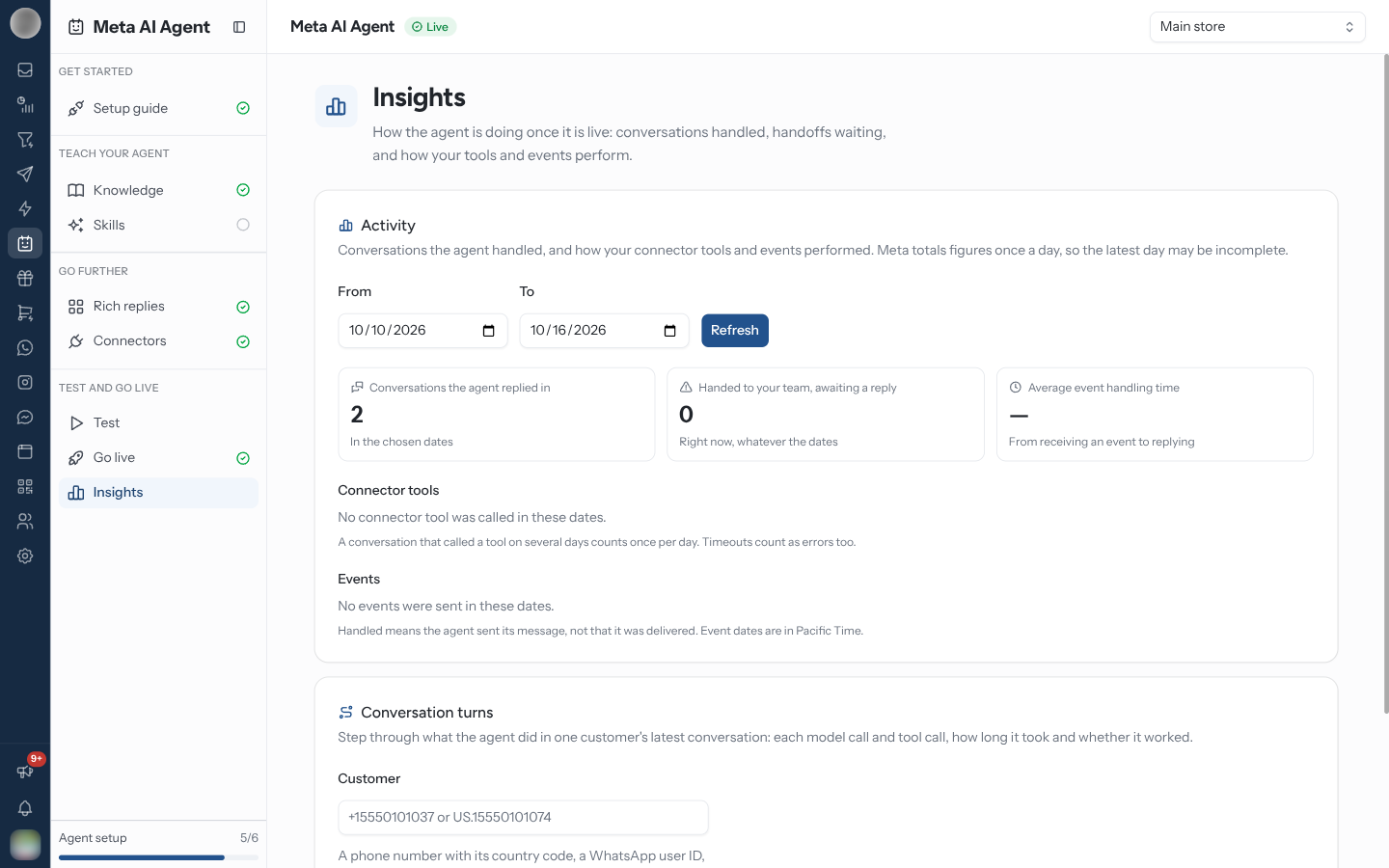
Load the Activity
The range can be up to 30 days, counting both ends, and cannot end in the future. Meta totals figures once a day, so the latest day may be incomplete.
| Tile | What it counts |
|---|---|
| Conversations the agent replied in | Conversations the agent answered in the chosen dates |
| Handed to your team, awaiting a reply | Conversations handed over that nobody has replied to yet — right now, whatever the dates |
| Average event handling time | From the agent receiving a business event to replying |
The Handed to your team tile is the one to act on: each is a customer the agent has stopped answering and your team has not picked up. Find them in the inbox.
Check How Your Tools Performed
Connector tools lists every tool the agent called in the range — your own connectors' and the RateUp connector's.
| Column | Meaning |
|---|---|
| Tool | The tool's name |
| Conversations | Conversations that called it. One that called it on several days counts once per day |
| Avg. response | How long your API took to answer |
| Succeeded | Share of calls that worked |
| Errors | Share that failed. Timeouts count as errors too |
| Timed out | Share that got no answer in time |
Events lists each business event type with how many were Received, how many were Handled and the Avg. time. Handled means the agent sent its message, not that it was delivered. Event dates are in Pacific Time.
Trace One Conversation
Conversation turns steps through what the agent did in one customer's latest conversation — the debugging view for "why did the agent say that?"
+15551234567) or a business-scoped user ID (BSUID). Use the BSUID for customers with a WhatsApp username.Each turn shows its time, how long it took end to end, and its steps in order: Model steps with a preview of what the model wrote, and Tool: … steps with the tool's Input and Output. Each step is marked Worked, Error or Timed out.
Troubleshooting
| Symptom | Cause | Fix |
|---|---|---|
| Load insights is disabled with "Choose 30 days or fewer" | The range is longer than Meta allows | Shorten it |
| Today's numbers look low | Meta totals once a day | Look again tomorrow, or judge by earlier days |
| "No turns found for this customer." | The agent has not talked to them, or they use a WhatsApp username | Try their business-scoped user ID (BSUID) instead of the phone number |
| A tool shows a high Errors rate | Your API is failing or slow | Read the tool's error logs and run it by hand |
Related Pages
- Go live — usage caps, and what happens after a handover
- Connectors — the tools in the table, and their error logs
- Test — test messages and business events
- Inbox — where handed-over conversations wait