Connectors
The one-click RateUp connector for loyalty and CRM data, and your own APIs the agent can call for live answers.
Knowledge is static. A connector is how the agent answers questions whose answer changes by the minute — where is my order, how many points do I have — or acts on the conversation. The page has two panels: the built-in RateUp connector, and Connectors for your own APIs. The step is optional.
A connector is one API. The tools on it are the individual calls the agent may make.
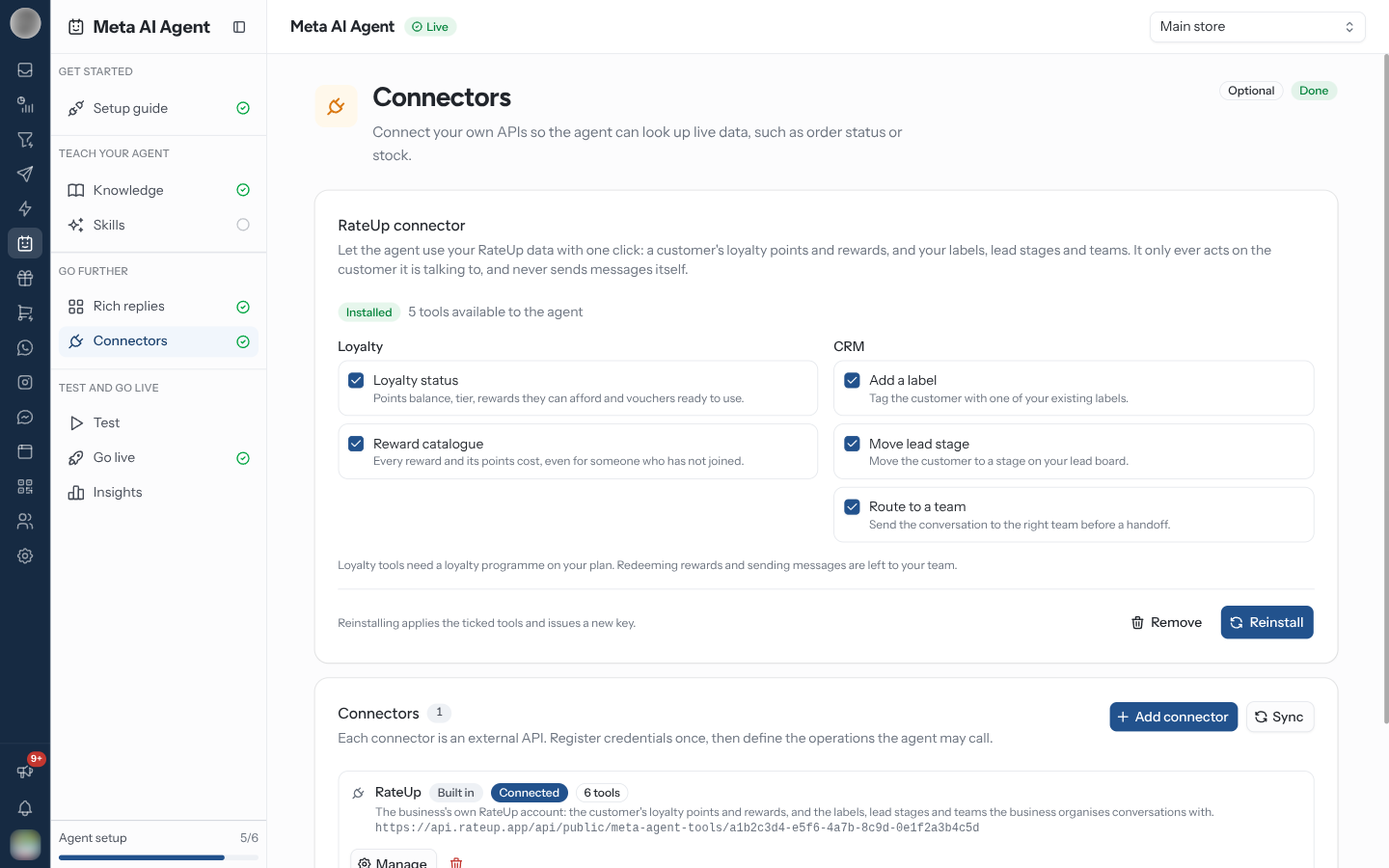
Install the RateUp Connector
The RateUp connector gives the agent your own RateUp data with one click: a customer's loyalty points and rewards, and your labels, lead stages and teams. RateUp creates the connector at Meta, issues it a key and writes each tool for you.
| Group | Tool | What the agent can do |
|---|---|---|
| Loyalty | Loyalty status | Read the customer's points balance, tier, rewards they can afford and vouchers ready to use |
| Reward catalogue | List every reward and its points cost, even for someone who has not joined | |
| CRM | Add a label | Tag the customer with one of your existing contact labels |
| Move lead stage | Move the customer to a stage on your lead board | |
| Route to a team | Send the conversation to one of your teams before a handoff |
What the RateUp connector can and cannot do:
- It only ever acts on the customer it is talking to. Meta fills in the customer's WhatsApp number on every call; the agent cannot choose or change it, whatever the customer types.
- It only uses names that exist. Labels, stages and teams are matched to yours, ignoring case and spacing. The agent cannot create a label or a stage.
- It never sends messages, and never redeems rewards. Those stay with your team.
- The customer must already be a contact for the CRM tools to work.
- Loyalty tools need a loyalty programme on your plan.
The connector appears in the list below with a Built in badge. RateUp owns its key and tools, so Manage opens straight to its Error logs and it has no edit button. To change which tools are installed, tick or untick them and click Reinstall.
Reinstall issues a new key and rewrites the tools at Meta. Remove takes them away entirely, and any skill that tells the agent to look up loyalty or update labels, stages and teams stops working. Only people with the Connect systems and credentials ability can install, reinstall or remove it.
Add Your Own Connector
https.| Auth type | What it is |
|---|---|
| None | A public API that needs no credentials |
| API key | Meta injects fixed header, query or body fields on every call |
| OAuth 2.0 client credentials | One machine-to-machine token Meta refreshes for you |
A connector synced from Meta may also show HTTP Basic, OAuth 2.0 (user) or Custom, but none of them can be chosen from RateUp yet.
Two switches in the same dialog:
- Require mTLS — for an API that demands a client certificate on the TLS handshake.
- Inject the customer's own token — for per-customer auth: Meta adds the customer's stored token
to every request, in the Where and Field name you choose (
Authorizationwith aBearerprefix by default).
Each connector shows its state: Connected, Awaiting credentials, Credentials expired or Error.
Register Credentials
Click Manage on the connector, open Credentials, fill in the form for its auth type and click Save at Meta.
| Auth type | What you enter |
|---|---|
| API key | Send the key as Headers, Query parameters or Body fields, then each Field name, Value and optional Prefix |
| OAuth 2.0 client credentials | Token URL (also https), Client id, Client secret, Scopes and Token request encoding |
| mTLS | Client certificate, Client private key and an optional CA certificate, PEM-encoded |
Add a Tool
A tool is one endpoint the agent may call.
{braces} in the path for path parameters.GET or DELETE, its Request body.A parameter can be pinned to a value Meta fills in from the conversation with a binding, for
example {"kind":"macro","macro":"WHATSAPP_PHONE_NUMBER"} for the customer's number. Use
WHATSAPP_PHONE_NUMBER_NATIONAL for an API that wants the number without the country code.
Tick Requires the customer's own token for a call that must run as the customer — the tool then shows a User auth badge.
Run a Tool Before the Agent Does
The play button on a tool opens Run …. Enter the Input as JSON and click Run: it calls your API for real, with the credentials registered on the connector, and shows the raw response as Meta saw it.
Watch It Work
Manage → Error logs reads straight from Meta over Last 24 hours, Last 3 days or Last 7 days: Calls, Success rate and Failures, then each error by tool, failure and message. It is the first place to look when the agent starts saying it cannot find an order. For tool performance across conversations, see Insights.
A tool's description is the whole of what the agent knows about it. A vague one gets called at the wrong moment; an overstated one gets called for data it cannot return. Deleting a connector removes its credentials and every tool on it — any skill that relied on them stops working.
Troubleshooting
| Symptom | Cause | Fix |
|---|---|---|
| Install and the checkboxes are greyed out — "Only admins can install the RateUp connector." | Your role lacks Connect systems and credentials | Ask a Manager, Admin or Owner |
| The agent says the customer has no loyalty account | They have not joined the programme | Expected — Reward catalogue still works for non-members |
| The agent cannot label or route a customer | They are not a contact yet, or the name does not match one of yours | Check the error logs; add the label, stage or team in RateUp first |
| Route to a team fails | That team has no members | Add members in Teams |
| Move lead stage fails | The business has no lead board | Set one up in Pipeline |
| A connector reads Awaiting credentials | Nothing has been saved on Credentials | Open Manage → Credentials and Save at Meta |
Related Pages
- Skills — tell the agent when to call a tool
- Test — exercise a tool with a test message
- Insights — tool success, error and timeout rates
- External API — RateUp's own API, in the other direction