Abandoned-Cart Reminders
Message Shopify shoppers who left a checkout, follow up with a second rule, and see the orders and revenue the reminders bring back.
An abandoned-cart reminder is an automation rule on the Shopify event On abandoned checkouts. You choose how long a checkout sits untouched before the WhatsApp message goes out, and RateUp stops the reminder the moment the order comes through. The Results tab on the Shopify integration then shows the orders and revenue those reminders recovered.
Before You Start
| You need | Why |
|---|---|
| Shopify connected under Integrations | The checkouts come from your store's webhooks |
| An approved Marketing template | WhatsApp treats cart reminders as marketing; outside the 24-hour window only a template delivers |
| The buyer's phone number on the checkout | A checkout with no phone number is skipped |
Set Up a Reminder
Go to Automation and click Create Automation. On Template, pick Abandoned cart reminder (marked Needs Shopify), or Start from scratch.
On Trigger, keep WhatsApp under Channels, choose the Shopify Event event and On abandoned checkouts under Which Shopify event, then tick the number under Send from.
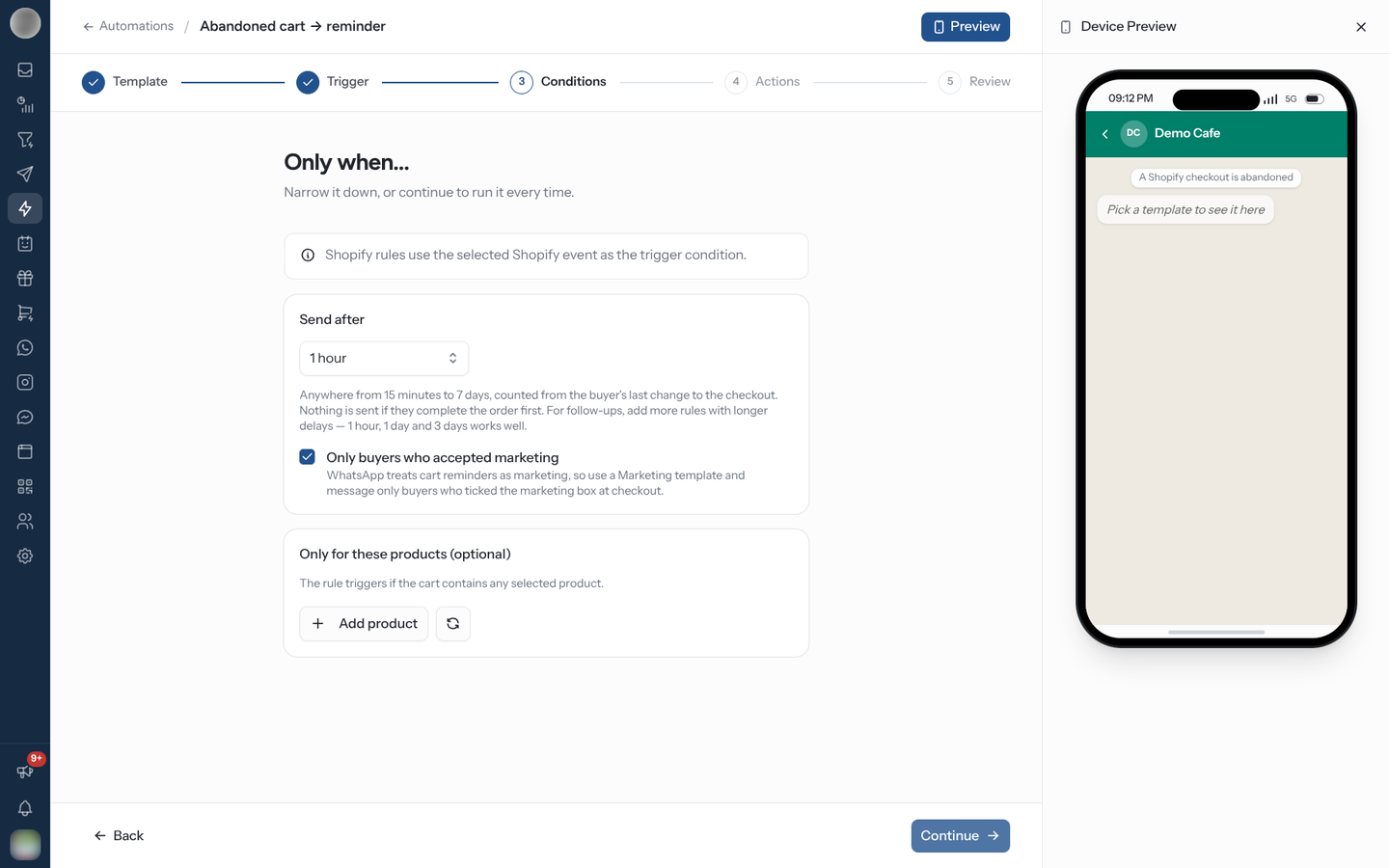
On Conditions, set Send after — 30 minutes, 1 hour, 3 hours, 12 hours, 1 day, 3 days, 7 days, or Custom… for any number of minutes, hours or days. Leave Only buyers who accepted marketing ticked.
Optionally narrow it under Only for these products (optional) — "The rule triggers if the cart contains any selected product." Click Add product, and the refresh button if a new product is missing.
On Actions, add Send Template, pick your template and map its variables. Map the link to Checkout Recovery Link — see Track the Link below.
On Review, name the rule — "Cart reminder – 1 hour" — and click Activate automation.
Follow Up With a Second Rule
One rule sends one reminder. For a follow-up, create another rule with a longer Send after — the app suggests 1 hour, 1 day and 3 days. Each rule reminds each checkout at most once.
When a Reminder Goes Out
| Rule | Behaviour |
|---|---|
| The clock | Send after counts from the buyer's last change to the checkout. Editing the cart pushes a waiting reminder back, so nobody is messaged mid-checkout |
| Limits | Between 15 minutes and 7 days. A custom value outside that is rejected — "Send after at least 15 minutes" / "Send after 7 days at most" |
| The order comes through | Every waiting reminder for that checkout is cancelled |
| The cart changes | A reminder whose product filter no longer matches the cart is cancelled |
| Shopify drops the checkout | Its reminders are cancelled |
| Already sent | An updated checkout is never reminded twice by the same rule |
| Only during business hours | A reminder due outside the hours is pushed back in 30-minute steps until they open |
A reminder is skipped — not sent — when the checkout has no phone number, when Only buyers who accepted marketing is on and the buyer did not tick Shopify's marketing box, or when the contact has opted out.
Unticking Only buyers who accepted marketing messages people who never agreed to marketing. Meta allows marketing messages only to people who opted in, and complaints from those who did not lower your number's quality rating and sending limits.
Checkouts nobody returns to expire after eight days. Their personal details are deleted later, but the results of any reminder sent for them are kept, so revenue reports outlive the customer data.
Track the Link
A reminder only counts as recovering an order if the buyer came back after it was sent. To also see who opened the cart, the link has to go through RateUp's tracked address.
| Where the link sits | What to map |
|---|---|
| In the message body | Checkout Recovery Link — sent as the tracked link automatically |
| On a URL button | Approve the button with the tracked-link address the builder shows, ending in {{1}}, then set Button "…" link ending to Checkout Recovery Link — button code |
The builder spells out the exact address to approve under Button "…" link ending. Tracked links
are tagged utm_source=rateup and utm_medium=whatsapp, with the rule name as the campaign, so
Shopify's own marketing reports credit WhatsApp as well.
A URL button's address is fixed when Meta approves the template. If the button was approved with your shop's own address, it cannot carry the tracked link — clicks will not be counted. Submit a new template with the tracked-link address.
See What the Reminders Recovered
Two places show results:
| Where | Shows |
|---|---|
| The rule's card on the Automation list | Revenue and orders recovered in the last 30 days, or how many reminders were sent |
| Settings → Integrations → Shopify → Results | The full report below |
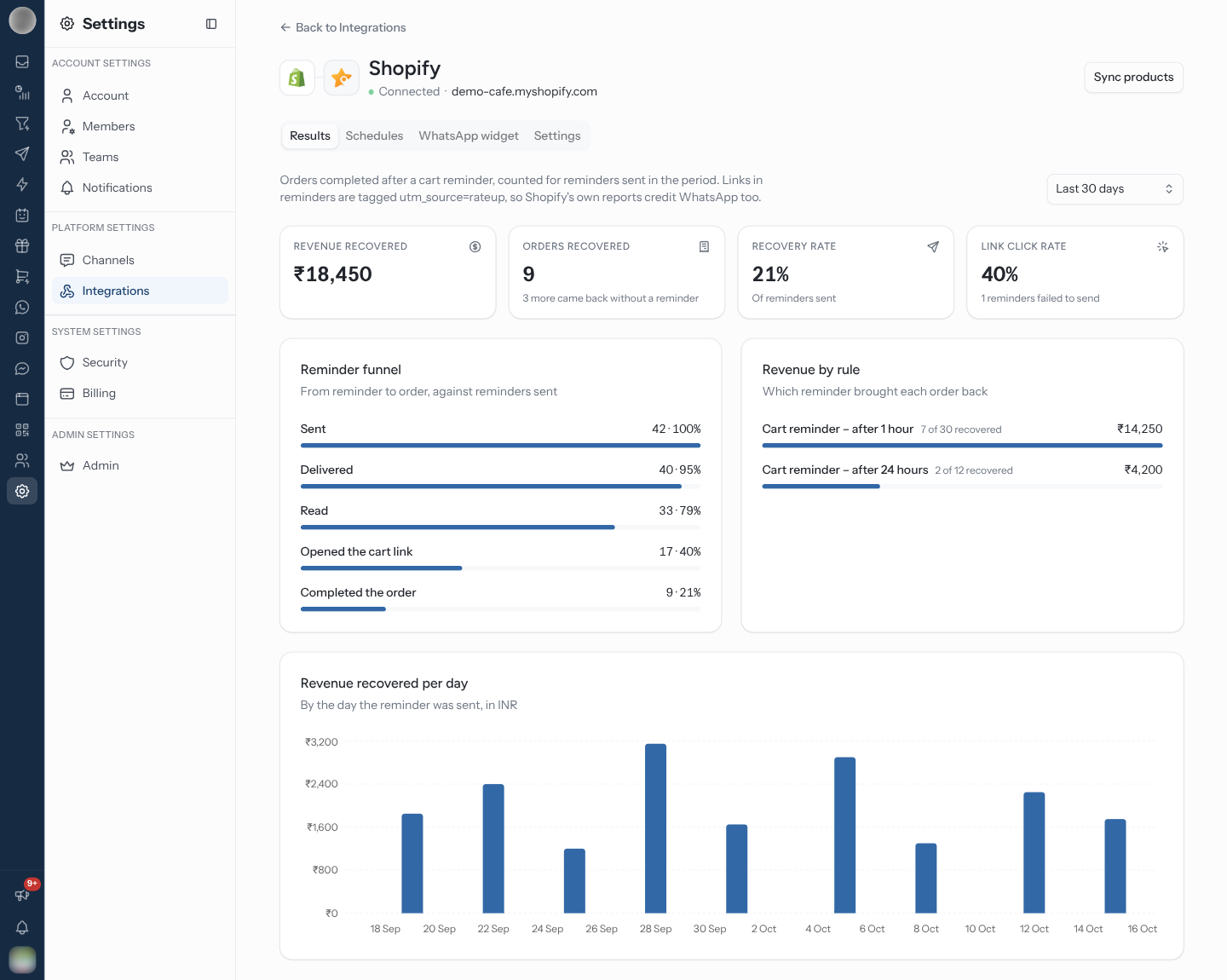
The Results tab opens first on the Shopify page. Pick Last 7 days, Last 30 days or Last 90 days; everything counts reminders sent in that period.
| Figure | Meaning |
|---|---|
| Revenue recovered | Value of orders completed after a reminder, per currency |
| Orders recovered | How many — with a note such as "2 more came back without a reminder" for orders that needed no nudge |
| Recovery rate | Recovered orders as a share of reminders sent |
| Link click rate | Share of reminders whose tracked link was opened — and how many reminders failed to send |
| Reminder funnel | Sent → Delivered → Read → Opened the cart link → Completed the order |
| Revenue by rule | Which rule brought each order back, with "3 of 40 recovered" per rule |
| Revenue recovered per day | By the day the reminder was sent |
An order is credited to the last reminder sent before it was placed. A checkout completed with no reminder sent gets no credit — the buyer came back on their own.
Troubleshooting
| Symptom | Cause | Fix |
|---|---|---|
| "No reminders sent in this period" | No On abandoned checkouts rule is active, or none came due | Check the rule's switch and its Send after |
| Reminders sent to almost nobody | Most buyers did not accept marketing | Expected; do not untick the consent box to compensate |
| Link click rate stays at zero | The link is not the tracked one | Map Checkout Recovery Link, or approve a button with the tracked address |
Related Pages
- Triggers — every Shopify event
- Actions — template variable mapping
- Creating a Rule
- Integrations — connecting Shopify
- Templates