Triggers
The events that start an automation rule — messages, contacts, store events, Instagram, Messenger and ad taps — which channels each runs on, and which need a single channel.
A trigger is the event that starts a rule. Every automation has exactly one, chosen on the builder's Trigger step — "What starts it?" — under Event. The same step sets the Channels the rule runs on and the accounts it uses.
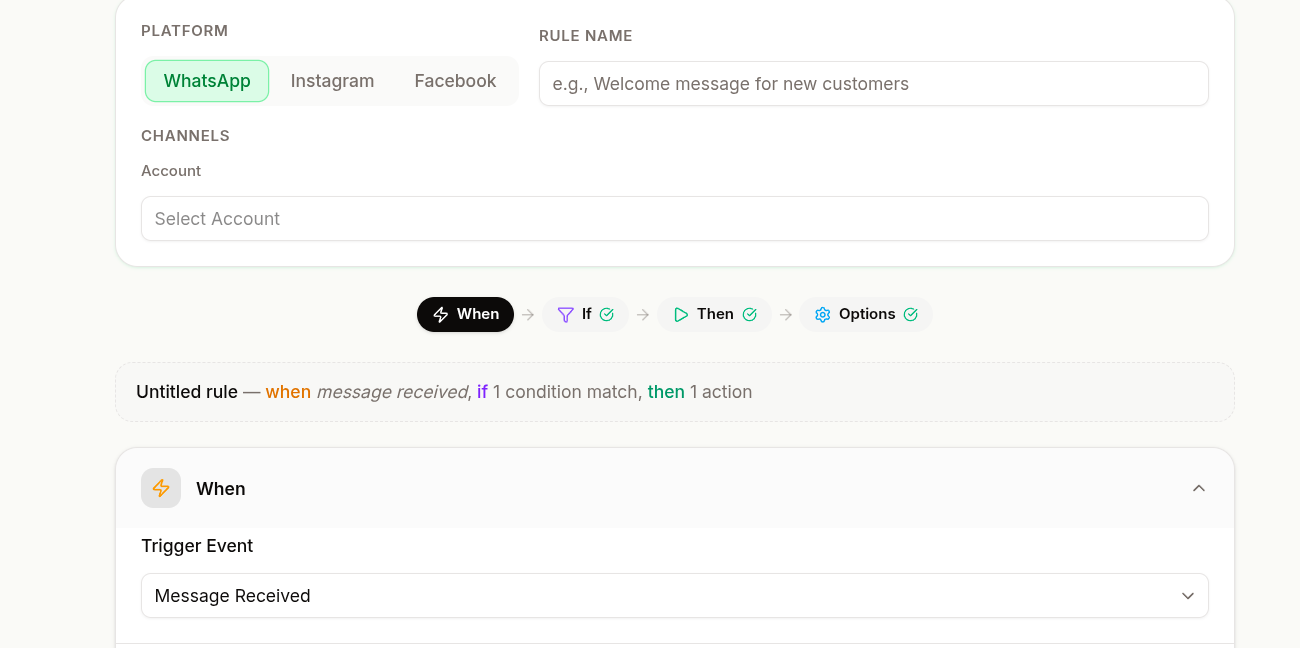
Pick the Trigger on the Trigger Step
Under Channels, switch on every platform the rule should run on — WhatsApp, Instagram, Messenger.
Under Event, pick a card. Each card names the event in plain words and carries a one-line hint.
For a store event, pick Which Shopify event or the Order status.
Tick the accounts under Listen on — or Send from, for the store events, which only send.
The Event list shows only the events that every switched-on channel can fire. Switch on WhatsApp and Instagram together and the events of a single platform — Instagram, Messenger or the WhatsApp ad trigger — and the store events drop out of the list.
Message and Conversation Triggers
| On the rule card | In the builder | Hint | Channels |
|---|---|---|---|
| Message Received | A customer messages you | "Reply to keywords, or to any message." | WhatsApp, Instagram, Messenger |
| Chat Assigned | A chat is assigned | "Tell the customer who is helping them." | WhatsApp, Instagram, Messenger |
| Chat Closed | A chat is closed | "Follow up once your team closes a chat." | WhatsApp, Instagram, Messenger |
Message Received is the workhorse, and the one trigger that requires a condition — a Message Body keyword, or Reply to every message ticked. See Conditions. Use Chat Closed for follow-ups, such as a satisfaction survey after resolution.
Contact Triggers
| On the rule card | In the builder | Hint | Channels |
|---|---|---|---|
| Contact Created | A new contact is created | "Welcome someone the first time they write." | WhatsApp, Instagram, Messenger |
| Lead Stage Updated | A lead moves to a new stage | "React when a lead moves on your board." | WhatsApp, Instagram, Messenger |
| Lifecycle Updated (legacy) | A contact's lifecycle changes (legacy) | "Use lead stages for new automations." | WhatsApp, Instagram, Messenger |
Lifecycle Updated (legacy) is listed only on a rule that already uses it. New rules use Lead Stage Updated, which fires when a contact moves to another stage of a pipeline.
Store Triggers
| On the rule card | In the builder | Then pick | Fires when |
|---|---|---|---|
| Shopify Event | Something happens on Shopify | Which Shopify event | The chosen event happens in your connected Shopify store |
| WooCommerce Event | A WooCommerce order changes status | Order status | An order reaches the chosen status. "The message goes to the phone number on the order." |
Store events message the buyer from one account, so they need a single channel. With two or more channels switched on they are missing from the Event list; with a store event chosen, the other channel chips are dimmed with "Store events send from one channel. Pick a single channel". The account list is headed Send from rather than Listen on.
Shopify events under Which Shopify event:
| Event | Fires on |
|---|---|
| On Orders create | A new order |
| On Orders fulfilled | The whole order fulfilled |
| On Orders paid | Payment captured |
| On Orders cancelled | An order cancelled |
| On Draft Orders created | A draft order created |
| On orders partially fulfilled | Part of the order fulfilled |
| On fulfilled orders cancelled | A fulfilment cancelled |
| On abandoned checkouts | A checkout left untouched — see Abandoned-Cart Reminders |
| On refund issued | A refund |
| On store credit issued | The part of a refund paid out as store credit |
WooCommerce statuses under Order status: Order processing (paid), Order completed, Order on hold, Order cancelled, Order refunded, Payment failed.
Both store triggers take an optional Only for these products (optional) list on the Conditions step: the rule fires only if the order (or, for abandoned checkouts, the cart) contains any selected product.
Continue stays disabled until the event is complete: "Pick a Shopify event to continue" or "Pick an order status to continue".
Instagram Triggers
Listed only when Instagram is the rule's one channel.
| On the rule card | In the builder | Hint |
|---|---|---|
| Instagram Comment (Private Reply) | Someone comments on your post | "Reply privately to comments on your posts." |
| Instagram Story Mention | Someone mentions you in a story | "Thank people who tag you in their story." |
| ig.me Link Opened | Someone opens your ig.me link | "Greet people who arrive from a link you shared." |
- Instagram Comment (Private Reply) fires on comments on your posts, reels, ads or live videos. The first message the rule sends arrives as a private reply to the comment. Which comments it answers, and any public reply, are set on the next steps.
- Instagram Story Mention fires when someone mentions your account in their story.
- ig.me Link Opened fires when someone opens a chat from an ig.me link. You name the link on the Conditions step.
With an Instagram trigger chosen, the WhatsApp and Messenger chips are dimmed with "This event doesn't happen on WhatsApp" (or Messenger). See Comments & Story Mentions for comment sources, specific posts and public replies.
Messenger Triggers
Listed only when Messenger is the rule's one channel.
| On the rule card | In the builder | Hint |
|---|---|---|
| Facebook Page Comment | Someone comments on your Page's post | "Reply privately in Messenger to comments on your Page's posts." |
| m.me Link Opened | Someone opens your m.me link | "Greet people who open your Page from a link." |
- Facebook Page Comment fires on comments on any post of the Page. The Conditions step takes Message Body keywords on the comment text, or none to answer every comment. The first message the rule sends arrives as a private reply in Messenger, so put label and assign actions after it. The Actions step also offers Reply in public (optional). See Facebook Comments.
- m.me Link Opened fires when someone opens a chat with your Page from an m.me link. You name the link on the Conditions step; someone new starts the rule only when they tap the Page's Get Started button. See m.me Links.
Taps on the Get Started button, ice breakers and the persistent menu are not triggers of their own: each sends a keyword that a Message Received rule answers — see Welcome & Menu.
WhatsApp Triggers
Listed only when WhatsApp is the rule's one channel.
| On the rule card | In the builder | Hint |
|---|---|---|
| Came From a Click-to-WhatsApp Ad | Someone taps your click-to-WhatsApp ad | "Show the products an ad promoted to everyone who taps it." |
It runs on the first message after someone taps a click-to-WhatsApp ad, before any keyword rule. On the Conditions step, Ad IDs (optional) — "Find an ad's ID in Ads Manager. Press Enter after each one." — and Or ads whose headline or link contains narrow it to certain ads. "Leave both empty to answer every ad. A rule naming an ad goes before one for every ad." Pair it with Send products to buy to show what the ad promoted.
Why a Channel Chip Is Dimmed
A chip you cannot switch on is dimmed, and its reason shows under the chips and when you hover it.
| Reason shown | Cause | Fix |
|---|---|---|
| "This event doesn't happen on …" | An event of one platform is chosen — Instagram, Messenger or WhatsApp | Pick another event, or keep the rule on that platform |
| "Store events send from one channel. Pick a single channel" | A Shopify or WooCommerce event is chosen | Make a separate rule per channel |
| "“Send Template” can't run on …" | An action does not run on that platform — such as a WhatsApp-only action, or Send Products to Buy on Messenger | Remove the action — see Actions |
| "“Trigger Chatbot” runs on one channel. Remove it, or pick a single channel" | A chatbot action is on the rule | Remove it, or keep one channel |
The last channel that is on cannot be switched off — a rule needs at least one. Switching a channel off removes its accounts from the rule.
Changing the Event clears what belonged to the old one — the Shopify event and products, the WooCommerce status and products, the Instagram post choices, the ig.me and m.me link names and the ad IDs — and, for every event except Message Received and Instagram and Facebook comments, removes the condition groups. Check the Conditions step again after switching events.
Choose the Right Trigger
Pick the narrowest trigger that covers your case. A rule triggered on every message and then filtered down works, but it is harder to reason about than one triggered on the right event in the first place.
| You want to… | Trigger |
|---|---|
| Route incoming questions | Message Received |
| Follow up after resolution | Chat Closed |
| Welcome a new contact | Contact Created |
| React when a lead moves on | Lead Stage Updated |
| React to social activity | Instagram Comment / Story Mention / ig.me Link Opened, Facebook Page Comment |
| Greet people from a link you shared | ig.me Link Opened / m.me Link Opened |
| Answer people who tapped your ad | Came From a Click-to-WhatsApp Ad |
| Confirm or update an order | Shopify Event / WooCommerce Event |
| Win back an abandoned cart | Shopify Event → On abandoned checkouts |
Troubleshooting
| Symptom | Cause | Fix |
|---|---|---|
| An event is missing from the Event list | Not every switched-on channel can fire it, or it is a store event on a multi-channel rule | Switch the other channels off |
| Continue says "Tick a … account, or turn … off" | A channel is on with no account ticked | Tick an account for it, or switch it off |
| Continue says "Tick at least one account to continue" | No account is ticked | Tick one under Listen on or Send from |