Conditions
Narrow a trigger down so the rule fires only when it should.
Conditions decide which occurrences of the trigger the rule acts on. They are set on the builder's Conditions step, whose heading follows the trigger:
| Trigger | Heading | Under it |
|---|---|---|
| Message Received | "Which messages should it reply to?" | "Without a condition it would answer every message — even “thanks”." |
| Instagram Comment (Private Reply), Facebook Page Comment | "Which comments should it answer?" | "Add keywords, or leave it empty to answer every comment." |
| Every other trigger | "Only when…" | "Narrow it down, or continue to run it every time." |
A Message Received rule needs at least one condition. For the other triggers they are optional, and a rule with none fires on every occurrence of its trigger.
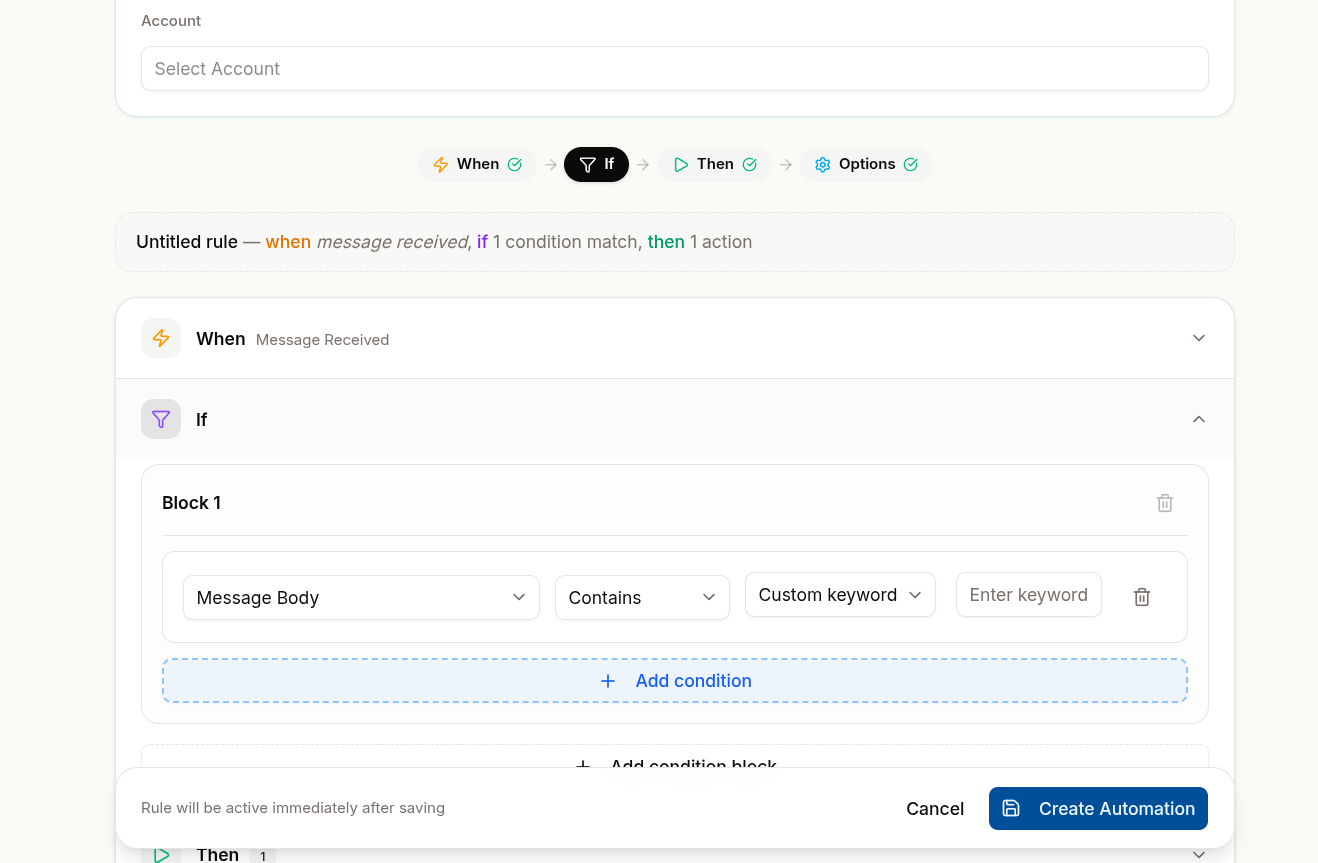
What You Can Test
Each condition is one row: a field, an operator and a value.
| Field | Checks | Operators | Value |
|---|---|---|---|
| Message Body | The text of the message | Contains, Equals, Starts With, Ends With | A word or phrase — "Type a word or phrase, e.g. refund" — or tick Reply to every message |
| Contact Email | The contact's email address | Contains, Equals, Starts With, Ends With | Free text |
| Contact Group | A group the contact belongs to | Equals | Select group |
| Contact Label | A label on the contact | Equals | Select label |
| Lead Stage | The contact's stage on a pipeline | Equals | Select stage |
| Contact Lifecycle (legacy) | The contact's lifecycle stage — listed only on a condition that already uses it | Equals | Select lifecycle |
An Instagram Comment (Private Reply) or Facebook Page Comment rule can test only Message Body — the comment text.
Contains is the right default for message text. Equals on a message body almost never matches — real customers do not send exactly one word.
Combine Conditions in Groups
Conditions live in numbered groups — Group 1, Group 2 — each with its own Add condition button. Add condition group adds another group.
| Where | Appears when | Reads | Meaning |
|---|---|---|---|
| Inside a group | The group has two or more conditions | "Run when all of these conditions match" | Every condition in the group must be true (AND) |
| Inside a group | — | "Run when any of these conditions match" | At least one must be true (OR) |
| Above the groups | There are two or more groups | "Run when all / any of these groups match" | Whether every group, or any one, must pass |
any is how you catch the several ways people phrase the same thing — refund, money back, return. all is how you narrow — a message containing "refund" and a contact labelled VIP.
On a Message Received rule the last group cannot be deleted.
What Stops You Continuing
| Message next to Continue | Cause |
|---|---|
| "Add at least one condition — without one it would answer every message" | A Message Received rule has no condition |
| "Remove the repeated condition" | The same field, operator and value appear twice in one group |
| "Fill in every condition" | A row has no value |
| "Pick at least one post" | Specific posts is chosen on a comment rule but no post is picked |
Conditions for Other Triggers
Some triggers replace the groups with their own settings, or add settings above them:
| Trigger | The Conditions step shows |
|---|---|
| Shopify Event | Only for these products (optional) — and, for On abandoned checkouts, Send after and Only buyers who accepted marketing. No condition groups |
| WooCommerce Event | Only for these products (optional). No condition groups |
| Instagram Comment (Private Reply) | Comments on — Posts & reels, Live videos or Both — then Apply to All posts or Specific posts, then Message Body groups |
| Instagram Story Mention | A note only — nothing to set |
| ig.me Link Opened | The Link name, with the finished link, a copy button and a QR download |
| Facebook Page Comment | A note on how the private reply works, then Message Body groups |
| m.me Link Opened | The Link name, with the finished m.me link, a copy button and a QR download. No condition groups |
| Came From a Click-to-WhatsApp Ad | Ad IDs (optional) and Or ads whose headline or link contains. No condition groups |
Narrow a Store Rule to Certain Products
Click Add product and pick from Product 1, Product 2 and so on; the refresh button reloads the list from your store. The rule fires if the order — or, for abandoned checkouts, the cart — contains any selected product. Leave the list empty to fire on every order.
Abandoned-Checkout Options
| Option | Choices | Default |
|---|---|---|
| Send after | 30 minutes, 1 hour, 3 hours, 12 hours, 1 day, 3 days, 7 days, or Custom… in minutes, hours or days | 1 hour |
| Only buyers who accepted marketing | On or off | On |
"Anywhere from 15 minutes to 7 days, counted from the buyer's last change to the checkout." Nothing is sent if they complete the order first. See Abandoned-Cart Reminders.
Pick Which Posts a Comment Rule Answers
Choose Specific posts, then pick under Select posts / reels. The list loads from the Instagram account ticked on the Trigger step. Live videos hides Apply to — a live video is never in the post list. See Comments & Story Mentions.
Name an ig.me Link
The Link name becomes the link's ?ref=. Use letters, numbers, -, _ and = only. Leave it
empty to answer every ig.me link, and ads that open the chat with a ref. The link appears once an
Instagram account is ticked — "Pick an Instagram account to see the link". See
Ice Breakers, Menu & Links.
An m.me Link Opened rule works the same way for Messenger: the same characters, empty to answer every m.me link to the Page, and "Pick a Page to see the link" until a Page is ticked. See m.me Links.
Write Conditions That Actually Fire
- Test lowercase and common misspellings — customers do not proofread
- Prefer a few broad keywords over many exact ones
- Watch for accidental matches — a rule on "no" will fire constantly
- Use Reply to every message deliberately — combined with a reply action it answers every single message
Related Pages
- Creating a Rule
- Triggers
- Actions
- Labels and Groups — the contact fields you can test
Triggers
The events that start an automation rule — messages, contacts, store events, Instagram, Messenger and ad taps — which channels each runs on, and which need a single channel.
Actions
What a rule does when it fires — reply, assign, label, close or call your own systems — and which channels each action runs on.