Merging Contacts
Combine two contacts that are the same person into one, and review the duplicates RateUp finds for you.
One customer can end up as two contacts: they wrote on Instagram before WhatsApp, typed their phone into your website chat, or were imported twice. Merging turns the two into one contact with a single history. Contacts → Possible duplicates lists the pairs RateUp thinks are the same person, for you to confirm.
What a Merge Does
One contact is kept and the other is merged in, then removed. Everything the removed contact had moves to the kept one:
| What | After the merge |
|---|---|
| Conversations, messages, calls, private notes and mentions | Move to the kept contact. Two open tickets on the same channel stay two tickets |
| Orders, survey responses, ad referrals, Instagram mentions | Move to the kept contact |
| Phones, emails and accounts (identities) | All move. The kept contact's main phone and email stay its main ones |
| Labels, audiences and assignees | Combined — the kept contact ends up with both sets |
| Name, email, address, birthday, gender, notes, lifecycle stage, custom fields | Where the two differ you pick which to keep. Where the kept contact has nothing, the other one's value fills the gap |
| Campaign history | Kept. If both were in the same campaign, only the further-along participation is kept |
| Leads | If both have a lead on the same board, the kept contact's lead stays; the other's is left without a contact |
| Loyalty | If both have an account in the same programme, the larger account (higher balance, then the older) is kept. The smaller one is closed and its points do not move |
| Spam, blocked | If either contact was marked spam or blocked, the merged contact is too |
| Marketing consent | The stricter setting wins: if either had not given consent, the merged contact has not |
By default the older contact is the one kept. You can swap that before you merge.
A merge cannot be undone. The removed contact is deleted for good. If both contacts have loyalty points in the same programme, the smaller balance is lost — check the Before you merge list before you click Merge contacts.
Merge Two Contacts
You can start a merge from three places. They all open the same Merge contacts dialog:
| Where | How |
|---|---|
| The Inbox | In the ticket panel's Identities block, click Merge with… and find the other contact |
| A contact's details | Open the contact, then Merge with… in its Identities block |
| Contacts → Possible duplicates | Click Review on a suggestion — both contacts are already chosen |
Find the other contact
From Merge with…, search with Search by name, phone, email or username and click the contact that is the same person.
Choose which contact to keep
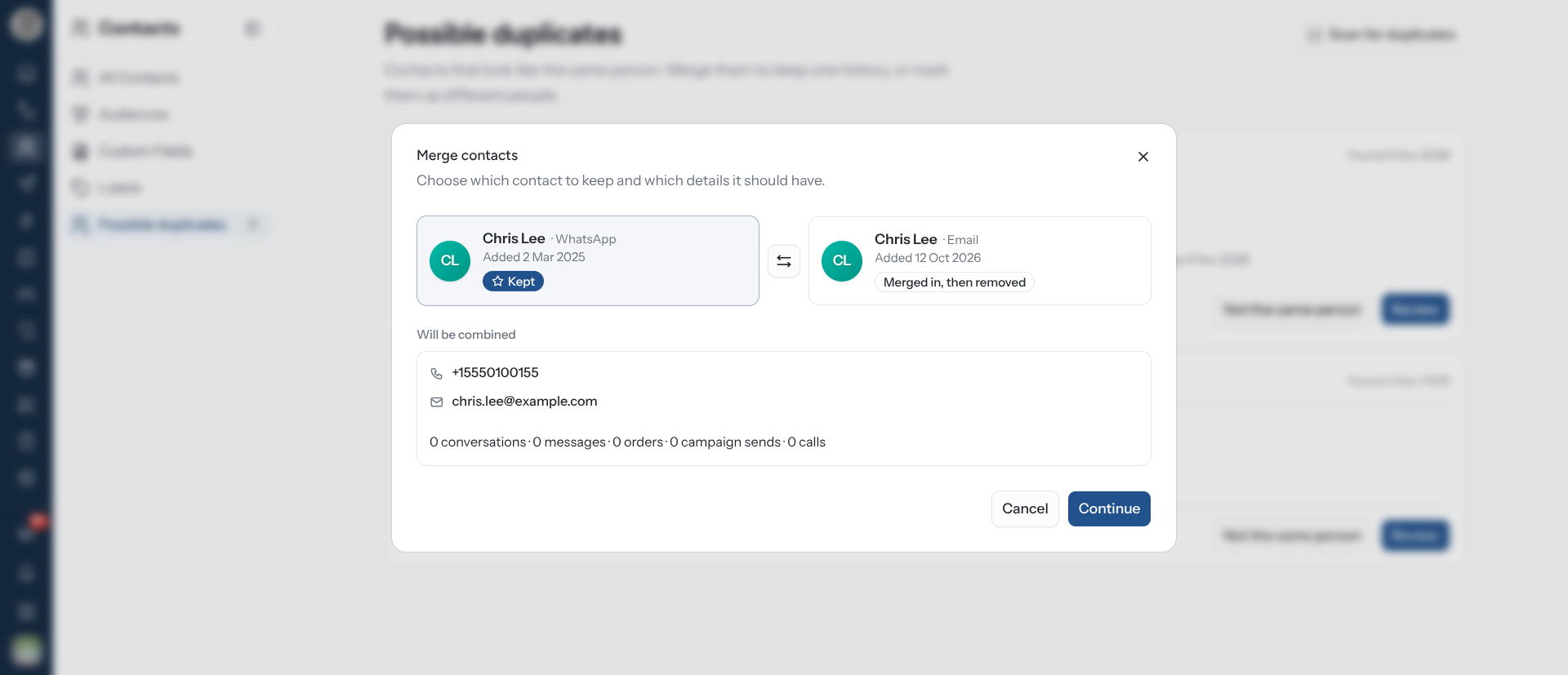
The dialog shows both contacts. One is marked Kept, the other Merged in, then removed. Click Swap which contact is kept to change that.
Will be combined lists everything the merged contact will have: every phone, email and account, labels, audiences, and how many conversations, messages, orders, campaign sends and calls move over.
Pick between details that differ
If the two contacts disagree on a field — two different names, say — These details differ. Pick the one to keep. lists each one. Choose a value per field, then click Continue.
Review and merge
The last step reads Merge removed contact into kept contact, followed by This can't be undone. Before you merge lists anything that will be lost or carried over, such as:
- "Both contacts have a loyalty account in the same programme. The smaller one is closed and its points do not move."
- "Both contacts were in the same campaign. Only one participation is kept."
- "One of these contacts is marked as spam. The merged contact will be too."
- "One of these contacts is blocked. The merged contact stays blocked."
- "One of these contacts has not given marketing consent. The merged contact keeps the stricter setting."
Click Merge contacts. "Contacts merged" confirms it. From Possible duplicates, the kept contact's details open straight away; in the Inbox, the ticket stays open on the kept contact.
The kept contact's Identities block then lists the merge, for example "Merged with Jane Roe by John Doe on 5 Nov 2026".
Review Possible Duplicates
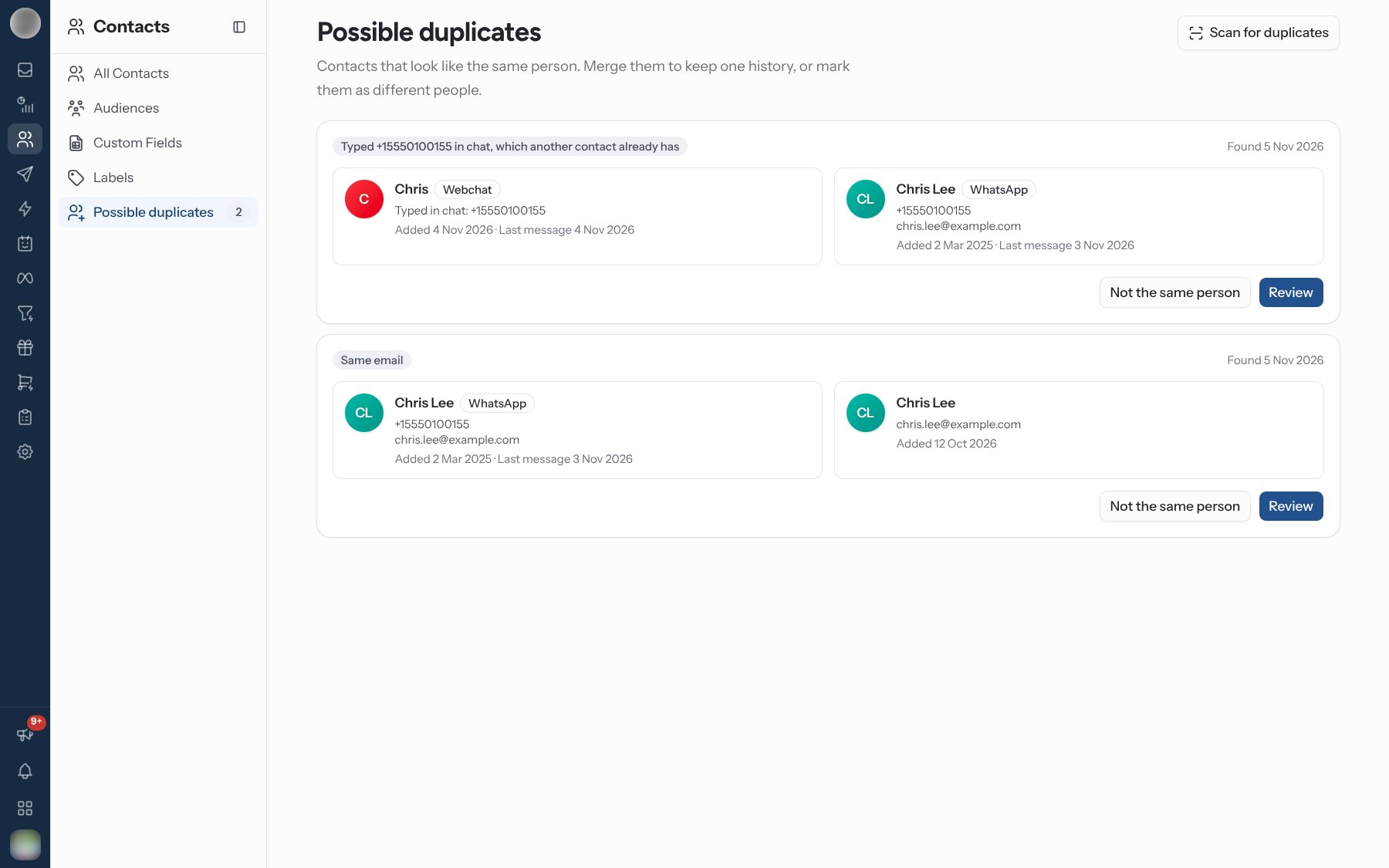
Contacts → Possible duplicates lists pairs of contacts that look like one person. The sidebar entry shows how many are waiting. Each card shows both contacts — their platforms (WhatsApp, Instagram, Messenger, Webchat), every phone and email, usernames, and when each was added and last wrote — plus why RateUp flagged them:
| Badge | Why it was flagged |
|---|---|
| Same phone | A phone you added to one contact already belongs to the other |
| Same email | Both contacts have the same email |
| Same WhatsApp customer | WhatsApp linked a business-scoped user ID (BSUID) on one contact to the phone number on the other |
| Typed value in chat, which another contact already has | A website chat visitor typed a phone or email that belongs to another contact |
For each pair:
- Review opens the merge dialog with both contacts chosen.
- Not the same person dismisses the pair. "Marked as different people" confirms it, and that pair is never suggested again, even if the same signal turns up later.
The same suggestion also shows in the Inbox: the ticket panel's Identities block reads "Possible duplicate of Jane Roe" with a Review link.
Scan the contacts you already have
New duplicates are flagged as they appear — when a message arrives, when you add a phone or email, when a chat visitor writes in. Contacts that were already duplicates before then are only found by a scan. Click Scan for duplicates at the top of the page (it is also in the empty state). It looks for:
| Signal | Notes |
|---|---|
| Contacts sharing an email | An email shared by more than five contacts is treated as a placeholder ([email protected], noemail@…) and skipped |
| Website chat visitors who typed another contact's phone or email | Flagged as Typed … in chat |
When it finishes, a message says how many possible duplicates are waiting, or "No duplicates found". A scan never merges anything, and pairs you marked Not the same person stay dismissed.
Two contacts can never share a phone number, so there is nothing to scan for there — that case is caught the moment it would happen.
When RateUp Merges On Its Own
Only one thing merges contacts without asking you: the Continue on WhatsApp step in an Instagram or Messenger journey. It sends the customer a link carrying a one-time code. When they send that message from WhatsApp, it proves the WhatsApp number and the Instagram or Messenger account belong to the same person, and the two contacts are merged — the older one kept. The contact's history then reads "Linked automatically from a WhatsApp link on 5 Nov 2026".
Website chat contacts are never merged automatically, and you should merge them only when you are sure. The chat widget sits on a public page, so whatever a visitor types as their phone or email is unverified — anyone can type anyone's number. Merging a chat visitor into a WhatsApp customer on the strength of a typed number alone would join a stranger to that customer. RateUp suggests the pair; you decide. Once merged, the widget still only ever shows the website chat, never the customer's WhatsApp or Instagram messages.
Who Can Merge
Merging needs the Merge duplicate contacts permission (contacts.merge). Owners and admins have
it by default; give it to anyone else from their role or member page under
Members & Roles. Without it, Merge with…, Review, Not the same
person and Scan for duplicates are hidden — the duplicates list itself is still visible to
anyone who can see contacts.
Partner integrations can merge too, with an API key that has Merge contacts access — see the External API.
Troubleshooting
| Symptom | Cause | Fix |
|---|---|---|
| Merge with… is missing | Your role does not have Merge duplicate contacts | Ask an owner or admin to add it under Members & Roles |
| Possible duplicates is empty, but you know there are duplicates | Suggestions are raised as things happen; older duplicates need a scan | Click Scan for duplicates |
| A pair you expected is not suggested | It was dismissed with Not the same person, or it shares a placeholder email used by more than five contacts | Merge it directly with Merge with… |
| Loyalty points went down after a merge | Both contacts had an account in the same programme; the smaller one was closed | This cannot be reversed. Adjust the balance by hand from the member's page in Loyalty |
| "Could not merge contacts" | One of the two was changed or merged by someone else meanwhile | Close the dialog and start again from the contact that still exists |
Related Pages
- Phones, Emails and Accounts — what moves in a merge
- Managing Contacts
- Journey Builder — the Continue on WhatsApp step
- Members & Roles — the merge permission
- External API — merging from an integration