Segments
Save a rule over purchases, engagement, loyalty, feedback and leads, and RateUp keeps the list of matching contacts up to date for campaigns and automations.
A segment is a saved rule, such as "2+ orders, nothing in 60 days". RateUp works out who matches for you. A dynamic segment re-checks itself every hour and again just before a campaign sends. You can pick it as a campaign audience, or start an automation when someone joins or leaves it.
Open Contacts → Segments (/dashboard/contacts/segments).
Segments and Audiences Compared
| Audience | Segment | |
|---|---|---|
| Who is in it | The people you put in, by hand, from the contacts list or by import | Whoever matches its rules |
| Kept up to date | Never. It changes only when someone edits it | Dynamic: every hour and before each campaign send. Static: when you save it or click Refresh now |
| Used by | Campaigns, drips, automation Audience conditions | The same places. Each segment keeps an audience of its own, with the segment's name, so it appears wherever you pick an audience |
| Starts automations | No | Yes. A contact joins a segment and A contact leaves a segment, for dynamic segments |
Use an audience for a list you curate, such as Wholesale buyers. Use a segment when the list follows from what people do, such as Bought twice, nothing since summer.
The audience a segment keeps belongs to the segment. If you try to add or remove members on the audiences screens, RateUp refuses with "This audience is kept up to date by a segment. Edit the segment instead."
Create a Segment
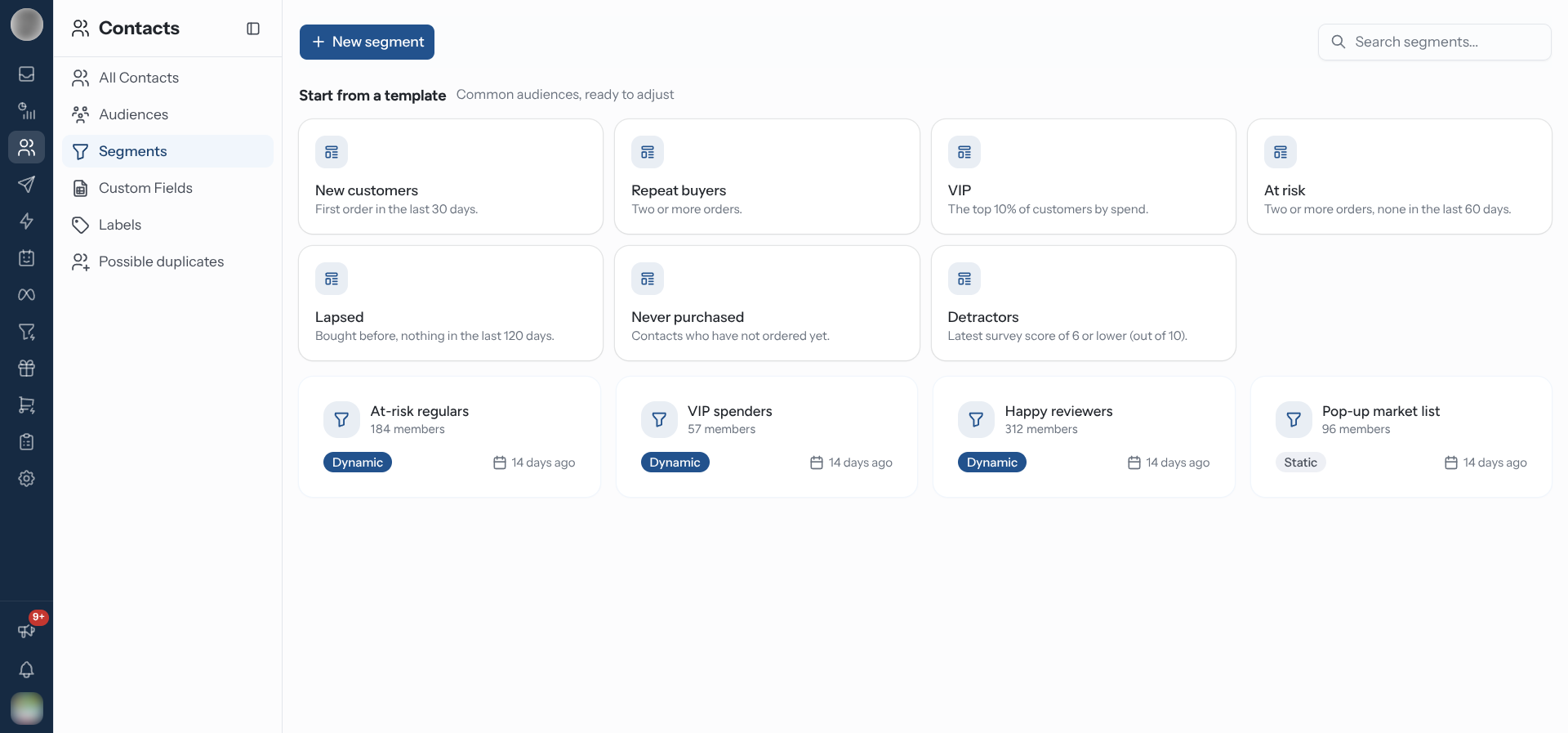
Click New segment, or click a card under Start from a template ("Common audiences, ready to adjust") to start with its rules filled in.
Enter a Name and pick the Team that owns the segment. You can add a Description if you like.
Under Updates, choose Dynamic — keeps itself up to date or Static — a snapshot of who matches now. "Contacts who join or leave a dynamic segment can start an automation."
Build the rules under Who is in it. See Build the Rules.
Check Matches now on the right, then click Save segment.
The team and the type are fixed once the segment is saved. After that, the page shows the type as a Dynamic or Static badge. To change either, create a new segment.
Within one team, two segments cannot share a name. A segment also cannot take the name of an audience that already exists in the team: "An audience named "…" already exists in this team. Choose another name."
Without the Add, edit and import contacts ability you can open segments and see their members, but New segment, the templates and every edit control are hidden or disabled.
Templates
| Template | Starts with |
|---|---|
| New customers | "First order in the last 30 days." Order count is 1 and First order is in the last 30 days |
| Repeat buyers | "Two or more orders." |
| VIP | "The top 10% of customers by spend." Total spent is at least the spend of your top 10% of buyers, in the currency most of them paid in |
| At risk | "Two or more orders, none in the last 60 days." |
| Lapsed | "Bought before, nothing in the last 120 days." |
| Never purchased | "Contacts who have not ordered yet." |
| Detractors | "Latest survey score of 6 or lower (out of 10)." |
The day counts and amounts are only starting points, so change them to suit your business. If nobody has bought anything yet, VIP starts at 1,000 USD.
Build the Rules
The rules sit in a group that reads Match all of these or Match any of these. Each rule is a field, a condition and a value.
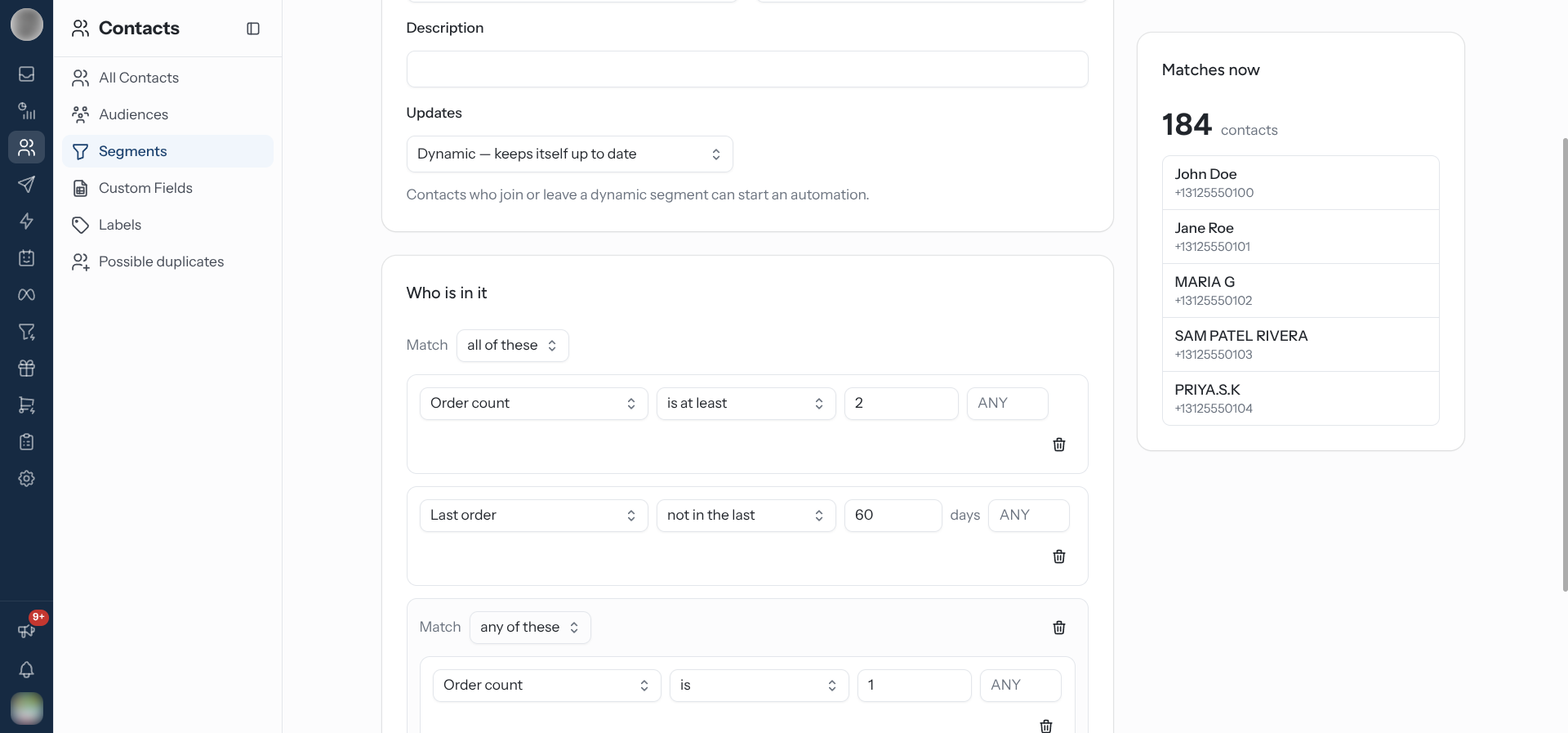
| Control | What it does |
|---|---|
| all of these / any of these | Whether every rule in the group has to be true, or just one |
| Add rule | Adds a rule to the group |
| Add group | Adds a nested group that uses the other match. Inside an all group it is an any group, and the other way round |
| 🗑 Remove rule / Remove group | Removes that rule or group |
A segment can have up to 40 rules and four levels of groups (the outer group plus three nested ones).
Fields You Can Use
The Field list is grouped:
| Group | Fields |
|---|---|
| Purchases | Order count, Total spent, Average order value, Last order, First order, Returns, Bought product, Bought from collection, Ordered on (WhatsApp, Instagram, Messenger, Storefront, Manual) |
| Engagement | Last message from them, Last campaign received, Clicked an ad, Reachable on (WhatsApp, Instagram, Messenger) |
| Profile | Label, Lifecycle stage, Custom field, Marketing consent, Contact created, Source |
| Loyalty | Loyalty tier, Points balance, Last redemption |
| Feedback | Latest survey score (0–10) |
| Pipeline | Has an open lead, Open lead in stage |
Only paid orders count, including partly refunded ones. A fully refunded order drops out. Spend is the order total, the same figure the orders page shows.
Latest survey score (0–10) reads the contact's most recent Opinion Scale or Rating answer. A 1–5 rating is doubled to fit the 0–10 scale.
Conditions
| Field type | Conditions |
|---|---|
| Numbers (counts, amounts, points, score) | is, is not, is more than, is at least, is less than, is at most, is between |
| Dates | in the last … days, not in the last … days, before, after, has any value, is empty |
| Lists (products, collections, channels, labels, tiers, stages) | is any of, is none of |
| Yes or no (consent, open lead) | is yes, is no |
| Text (source, custom field) | is, is not, contains, has any value, is empty |
not in the last also matches people who never did the thing. Last order not in the last 60 days includes contacts who have never ordered, so add Order count is at least 1 to leave them out.
Currencies
Order count, Total spent, Average order value, Last order, First order and
Returns have a three-letter currency box. Total spent and Average order value need a
currency, such as USD, because amounts in different currencies cannot be added together. For the
other four the box is optional. Leave it on Any to count orders in every currency.
Check Who Matches
Matches now shows how many contacts match the rules as they stand, and up to 20 of them. It updates about half a second after you stop typing. Until every rule has a value, it reads "Finish the rules to see who matches." A rule set that takes more than 10 seconds to check shows an error rather than a count. If that happens, simplify the rules.
Open a Segment
Click a segment's card to open it at /dashboard/contacts/segments/<id>.
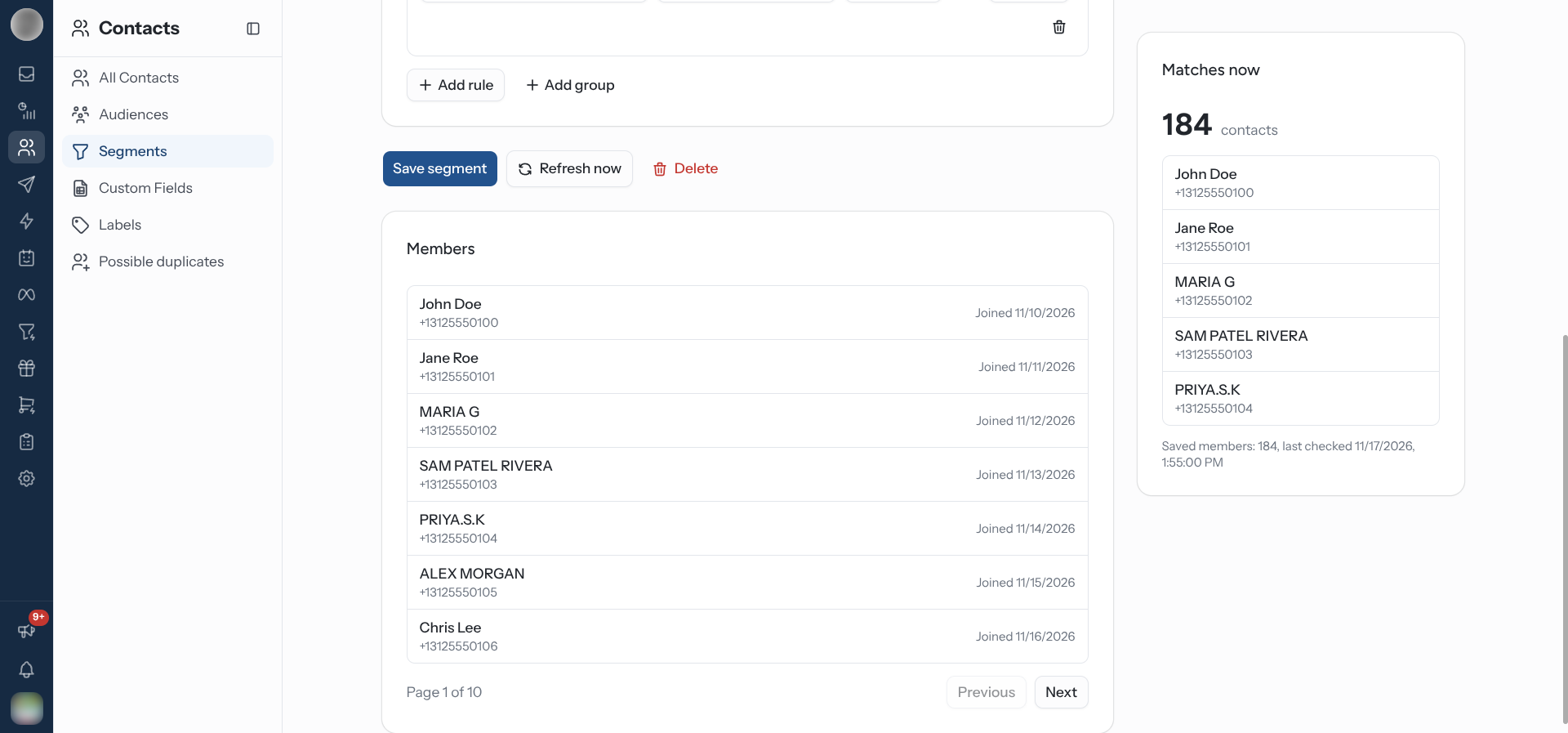
| Control | What it does |
|---|---|
| Save segment | Saves your changes to the name, description or rules. The members are worked out again straight away |
| Refresh now | Checks the rules again now, without waiting for the hourly check |
| Delete | Deletes the segment. See below |
| Members | The contacts in the segment, with the date each one Joined |
| Saved members: …, last checked … | How many members the segment held at its last check, and when that was |
Matches now and Members can differ. Matches now checks the rules as you open the page. Members is the list from the last check, and that list is what campaigns and automations use.
Delete a Segment
Delete asks first: "Its audience is deleted too. Campaigns that already sent keep their history." The segment's audience goes with it, so check that no draft campaign, drip or automation condition still uses it.
When a Segment Is Checked
| When | Dynamic | Static |
|---|---|---|
| You save it, or save new rules | Members worked out. No automations start | Members worked out |
| Every hour (at 25 minutes past) | Checked. Each contact who joins or leaves starts a join or leave automation once | Not checked |
| Refresh now | Checked, and join and leave automations start | Checked. No automations start |
| A campaign using it is about to send | Checked. New members are added to the campaign and members who left are dropped | Not checked |
| A running drip uses it | After each hourly check, new members join the drip and members who left are dropped | Not checked |
Just before a campaign sends, RateUp only drops people the campaign has not messaged yet. Anyone already sent to stays in it. If that last check fails, the campaign still goes out to the members found at the previous check.
Saving a segment never starts a join automation, even for contacts who match from the start. Only someone who joins at a later check counts as joining. To message everyone who matches now, send a campaign to the segment.
Use a Segment
| Where | How |
|---|---|
| A campaign or drip | Pick the segment's audience. It has the segment's name and sits beside your hand-made audiences |
| An automation trigger | A contact joins a segment or A contact leaves a segment. See Triggers |
| An automation condition | Segment, which checks whether the contact is in the segment. See Conditions |
Under Commerce → Orders, Save shoppers as an audience saves a static segment of the shoppers you pick. Its Build a segment that keeps itself up to date link opens a new dynamic segment instead. If you save shoppers again under the same name, RateUp updates the static segment you saved before rather than making a second one.
Plan Limits
Your plan caps how many dynamic segments you can have. Static segments do not count towards it.
| Plan | Dynamic segments |
|---|---|
| Free | 1 |
| Starter | 5 |
| Growth | 25 |
| Scale, Enterprise | Unlimited |
At the cap, saving another dynamic segment fails with "You have reached the maximum limit of … dynamic segments." Delete one, save the new one as static, or change your plan.
Troubleshooting
| Symptom | Cause | Fix |
|---|---|---|
| Save segment stays disabled | The name is empty, or a rule has no value | Fill in every rule |
| "Choose a team" | A new segment needs a team | Pick one under Team |
| "A segment named "…" already exists in this team." | Names are unique within a team | Choose another name |
| "An audience named "…" already exists in this team. Choose another name." | The segment's audience would clash with an audience you made | Rename the segment or the audience |
| Total spent or Average order value never matches anyone | The currency is missing or wrong | Enter the currency your store charges in |
| A join automation did not run for people who matched straight away | Saving a segment never starts automations | Send a campaign to them instead |
| A segment is missing from the trigger's Which segment list | Only dynamic segments start automations | Create a dynamic segment with the same rules |
| The member count is behind Matches now | Members change only when the segment is checked | Click Refresh now |
| "This audience is kept up to date by a segment. Edit the segment instead." | You tried to change a segment's audience on the audiences screens | Change the segment's rules |
Related Pages
- Audiences: lists you put contacts into yourself
- Customer Timeline: one contact's spend, loyalty and history
- Creating a Campaign
- Triggers and Conditions
- Orders
- Billing & Subscription