Phones, Emails and Accounts
Every way a contact is known — several phones and emails, their WhatsApp, Instagram and Messenger accounts — and how to edit them.
A contact is one person, and one person can be reached in several ways: a work and a personal number, two emails, WhatsApp, Instagram, Messenger, your website chat. RateUp keeps all of them on the one contact. Each is an identity, and they are listed wherever you see the contact.
What a Contact Can Hold
| Identity | Shown as | Notes |
|---|---|---|
| Phone | +919188346187 | Any number of them. One is the main phone |
[email protected] | Any number of them. One is the main email | |
| The customer's WhatsApp name, their business-scoped user ID (BSUID) under it, and the business it belongs to | A customer who hides their number is known by a BSUID. Meta issues a different BSUID for each business, so a contact can hold one per business | |
@username and the Instagram account it came in on | One per Instagram account you connected — Instagram gives each account its own id for the same person | |
| Messenger | The customer's name and the Facebook Page | One per Page, for the same reason |
| Web visitor | Web visitor | Someone who wrote through your website chat widget |
| External ID | The id, labelled External ID | Set from the contact form, an import or an integration |
A contact keeps at least one identity — the last one cannot be removed ("A contact needs at least one way to reach it").
What "main" means
The main phone and email are the ones RateUp shows as the contact's phone and email: in the
contacts table, the contact's header, exports, automations, Zapier and CRM syncs, and the External
API's phone and email fields. The main phone is also the number WhatsApp messages go to. The
other phones and emails still find the contact — in search, when that number writes in, or when an
import or integration matches on it.
Where Identities Show
| Where | What you can do |
|---|---|
| The Inbox ticket panel, Identities | See them all, add a phone or email, edit, make main, remove. Changes save immediately |
| A contact's details, Identities | The same block |
| Edit Contact | Phone numbers and Emails lists, saved with the rest of the form. WhatsApp, Instagram and Messenger accounts are listed under Accounts |
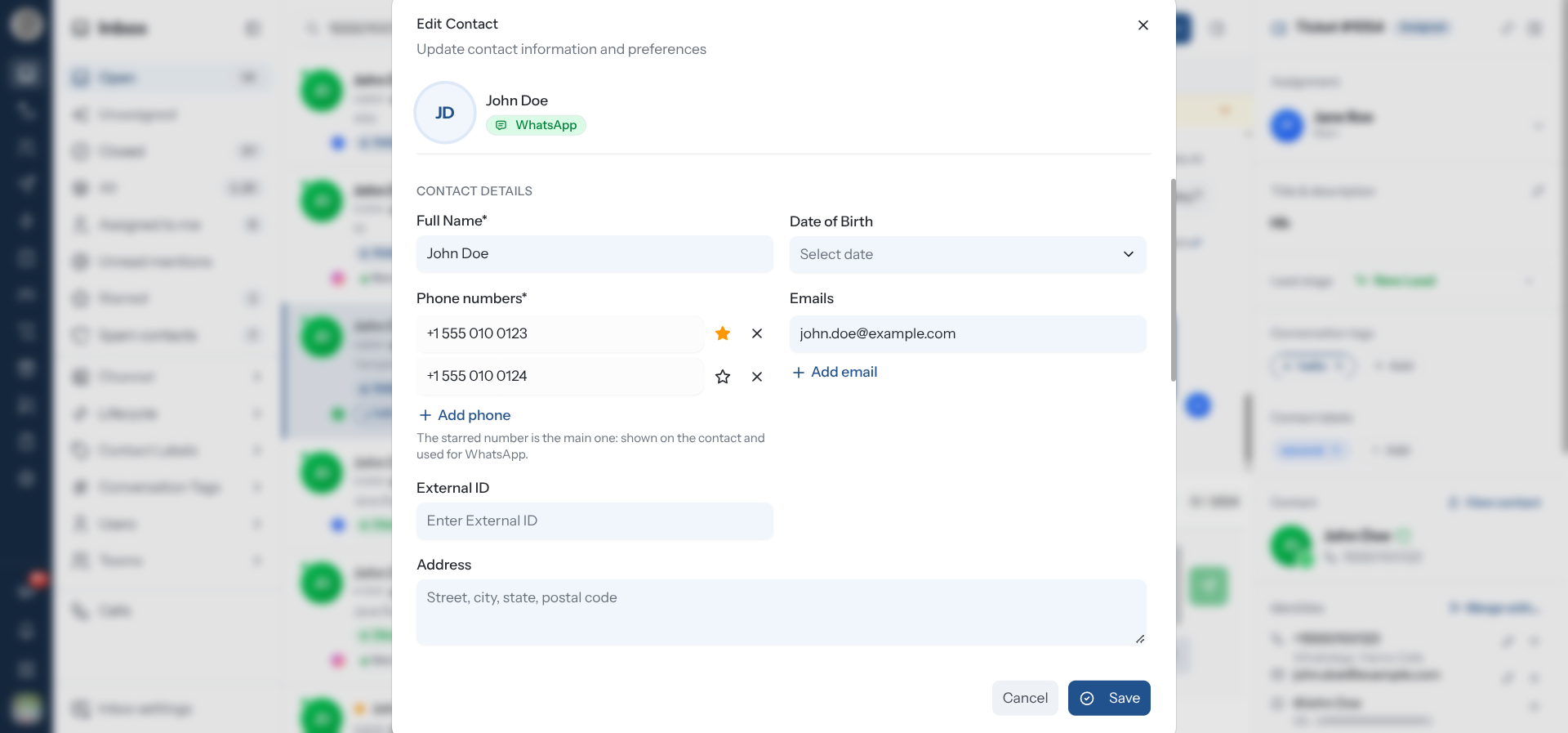
Edit Phones and Emails in the Contact Form
Open Edit Contact
From the contacts table, ⋮ → Edit, or Edit in the contact's details.
Change the lists
Under Phone numbers and Emails, each value has its own row:
| Control | What it does |
|---|---|
| Type in a row | Changes that phone or email |
| ☆ Make main | Moves that row to the top, making it the main one |
| ★ (filled) | Marks the current main one — Main number / Main email |
| ✕ Remove | Takes that row off |
| + Add phone / + Add email | Adds an empty row |
The star and ✕ appear only when there is more than one row. At least one phone number is required for a contact you added by hand.
Save
Click Save. Every change in the lists is applied together with the rest of the form.
Below the form, Accounts lists the contact's WhatsApp, Instagram and Messenger accounts and its merge history, with Merge with…. Changes made there save straight away, separately from Save.
The form only sends a phone, email or external ID you actually changed. If you make another number the main one under Accounts or in the Inbox while the form is open, pressing Save does not put the old number back.
Edit Them From the Inbox or the Contact's Details
The Identities block saves each change the moment you make it.
| Control | What it does |
|---|---|
| Add phone or email | Type a phone (with country code) or an email and click Add |
| ✏️ Edit | Turns the row into a field — Save or ✕ to cancel (Enter / Esc work too) |
| ⭐ Make main phone / Make main email | Makes it the main one. "Main phone changed" confirms it |
| Main | Marks the main one, when there is more than one of the kind |
| ✕ Remove | Asks "Remove +919000000001?" — "This contact will no longer be matched or reached on it." |
Only phones and emails can be edited. WhatsApp, Instagram, Messenger and web visitor identities come from the platforms themselves, so they have no edit button — only ✕.
When Another Contact Already Has It
A phone or email can belong to only one contact. Adding or editing one that another contact already has is refused with "Another contact already has this" and the message "+919000000001 belongs to a different contact. If they are the same person, merge the two." — click Merge with that contact to open the merge for that pair. The pair is also added to Possible duplicates.
Saving Edit Contact with such a value is refused too — "Another contact already has this. Merge them instead." — and the dialog stays open. Adding a new contact whose phone or email another contact already holds is refused as well.
Finding a Contact by Any of Them
Search matches every identity, not only the main ones:
- The Inbox search box finds a ticket by any phone the contact has (with or without
+and spaces), any email, or a WhatsApp or Instagram username. - The contacts table's Search by name, phone, or email... matches every phone and email too.
Troubleshooting
| Symptom | Cause | Fix |
|---|---|---|
| "Another contact already has this" | That phone or email belongs to a different contact | If it is the same person, click Merge with that contact |
| "That doesn't look like a valid phone number or email" | A phone without its country code, too short or too long, or a malformed email | Type the number with its country code — 447700900123, not 07700900123 |
| "This contact already has that" | You edited a value into one this contact already holds | Remove the duplicate row instead |
| The ✕ is missing on the last identity | A contact needs at least one way to reach it | Add another phone or email first |
| No edit button on a WhatsApp or Instagram row | Platform ids cannot be edited by hand | Remove it if it is wrong; it is added back if the customer writes in again |
Related Pages
- Merging Contacts
- Managing Contacts
- Ticket Details — the Identities block in the Inbox
- Channels — WhatsApp numbers and the businesses they belong to