Rewards
The Rewards page allows administrators to manage all reward types in the loyalty program. Rewards can be created using points, coupons, free gifts, or referral incentives to encourage customer engagement and repeat purchases.
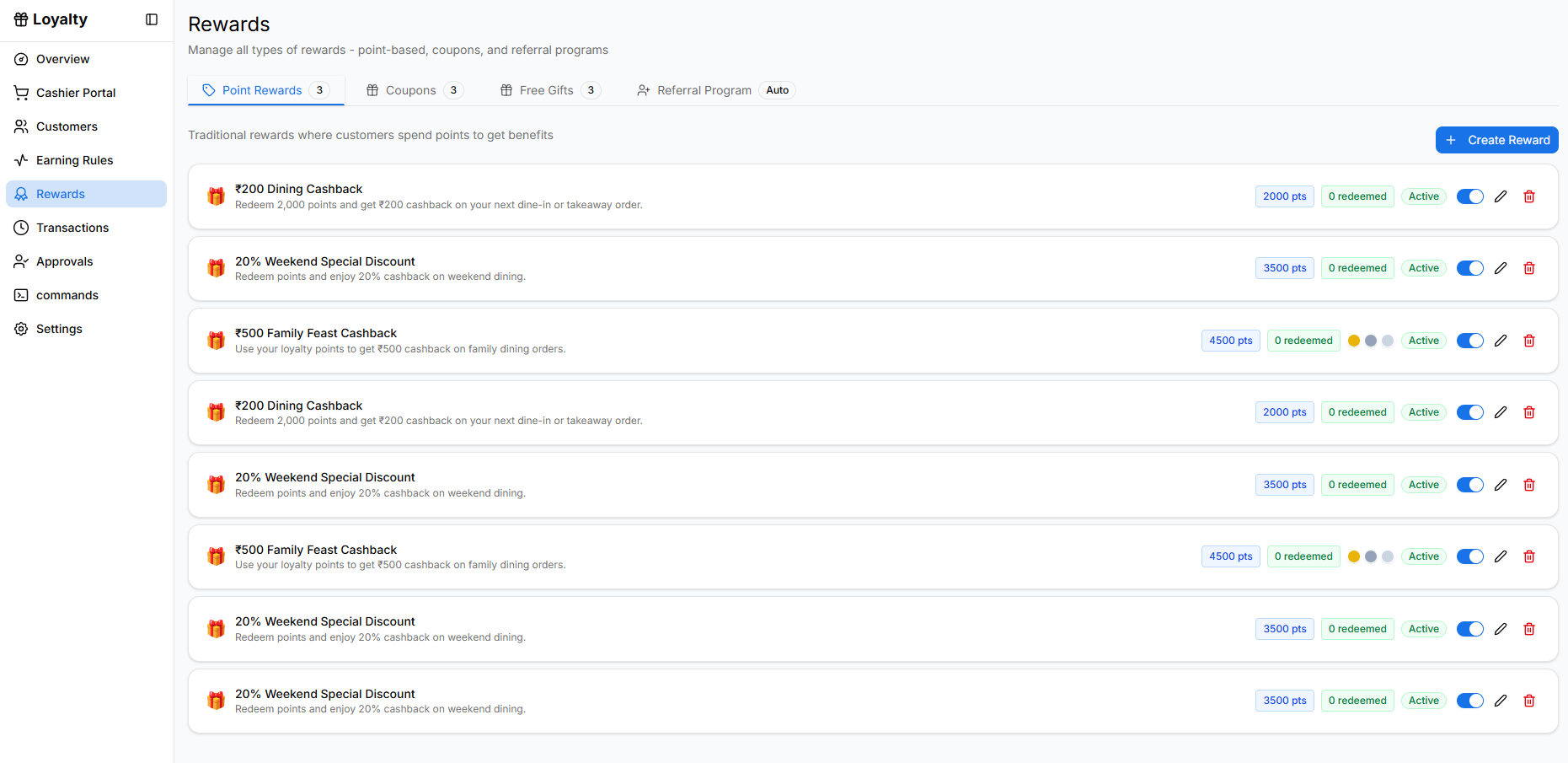
Opening the Rewards Page
To access the rewards management section:
- Open the Loyalty module from the sidebar.
- Click Rewards.
The page loads with different reward categories that can be managed from tabs.
Reward Categories
The Rewards page contains multiple tabs for managing different reward types.
Point Rewards
The Point Rewards tab contains rewards that customers can redeem using loyalty points.
Examples:
- Cashback rewards
- Percentage discounts
- Free items
- Complimentary services
Each reward card displays:
- Reward name and description
- Points required to redeem
- Redemption statistics
- Status (Active / Disabled)
Administrators can also:
- Edit rewards
- Enable or disable rewards
- Delete rewards
To create a new point-based reward, click Create Reward.
The reward creation process is explained in the Create Reward page.
Coupons
The Coupons tab allows administrators to create promotional coupons that customers can redeem without using loyalty points.
Coupons typically include:
- Discount offers
- Promotional campaign codes
- Limited-time deals
Examples:
- 20% Weekend Dining Offer
- 10% Welcome Offer
- Flat ₹300 Dinner Discount
Each coupon includes:
- Coupon code
- Description
- Usage limits
- Status toggle
To create a new coupon, click Create Coupon.
Coupon creation will be explained in the Create Coupon page.
Free Gifts
The Free Gifts tab allows administrators to create gift rewards that can be assigned to customers.
These gifts typically include:
- Complimentary food items
- Free beverages
- Special event rewards
Examples:
- Free Chocolate Lava Cake
- Complimentary Signature Mocktail
- Birthday Celebration Cake
Gift rewards are usually generated with individual redemption codes.
To create a new gift reward, click Create Gift.
The creation process is explained in the Create Gift page.
Referral Program
The Referral Program allows businesses to reward customers for inviting friends to join the loyalty program.
To learn how to configure referral rewards, triggers, and reward types, see Referral Program Settings.
Why Rewards Matter
Rewards help businesses:
- Encourage repeat purchases
- Increase customer engagement
- Promote special offers
- Grow their customer base through referrals
A well-structured rewards program strengthens customer loyalty and improves retention.