Instagram Funnels
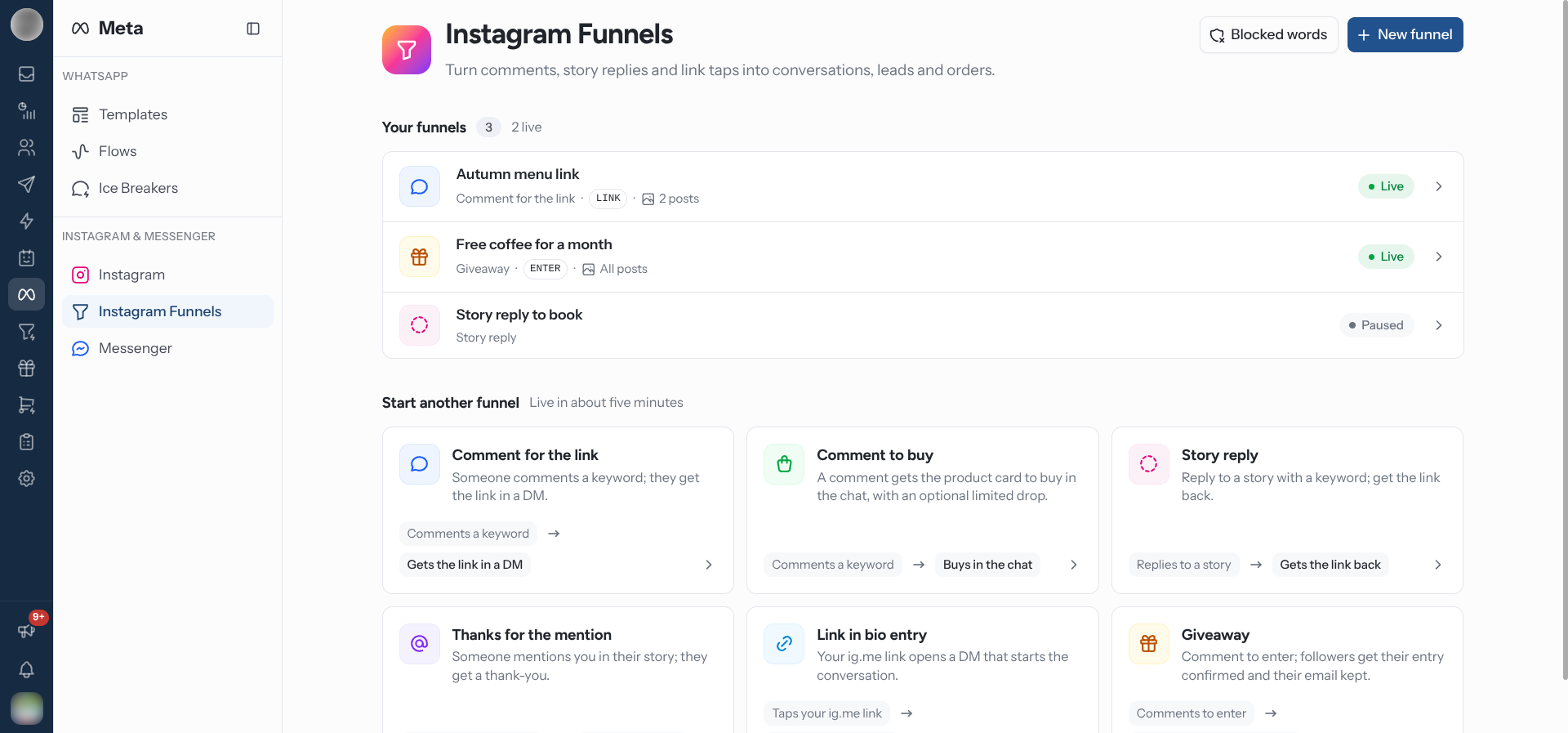
Turn comments, story replies, story mentions and ig.me link taps into DMs, follows, captured emails and orders from six templates, and see comments → DMs → clicks → orders for each funnel.
A funnel is a ready-made Instagram automation: someone comments a keyword, replies to a story, mentions you or taps your ig.me link, and they get a DM — with a link, a product to buy, a follow check or a question for their email on the way. You pick one of six templates, adjust the words, and click Launch funnel. Each funnel then shows its own numbers, from the first comment to the orders it brought in.
Where to Find It
Instagram Funnels sits in the sidebar's Meta group, in the Instagram & Messenger
section, between Instagram and Messenger (/dashboard/growth/instagram). Like the
Instagram page, it follows the See automation rules ability. Launching, editing, pausing and
deleting funnels — and the template gallery itself — need Create and edit automation rules;
without it you see the funnels and their numbers but the builder is read-only. See
Members & Roles.
You need an Instagram account connected first. WhatsApp is not needed.
Two other screens open the builder for you:
| From | Link | Opens |
|---|---|---|
| The Stories tab of Meta → Instagram | Build a story-reply funnel with tracking and a report | A new Story reply funnel |
| A live product in Commerce → Products | As a funnel (next to Sell on Instagram) | A new Comment to buy funnel |
The Six Templates
Until you have a funnel, the page opens on "Pick a template to start" — "Live in about five minutes". Once you have one, your funnels come first and the gallery moves below them as Start another funnel.
| Template | The customer… | …and gets | Starts from |
|---|---|---|---|
| Comment for the link | Comments a keyword | The link in a DM | Keyword LINK, a public reply "Sent it to your DMs!" and a link button |
| Comment to buy | Comments a keyword | The product card, to buy in the chat | Keyword BUY, products you pick, an optional Limited drop |
| Story reply | Replies to a story | The link back | No keyword (every reply), a link button |
| Thanks for the mention | Mentions you in a story | A thank-you | A thank-you message |
| Link in bio entry | Taps your ig.me link | A conversation | The ref bio, so the link is ig.me/youraccount?ref=bio |
| Giveaway | Comments to enter | Their entry confirmed, their email kept | Keyword ENTER, Ask them to follow first on, and a question for their email |
Every template is a starting point: all its words, keywords and options can be changed before you launch.
Launch a Funnel
Open Meta → Instagram Funnels and click a template, or New funnel (which starts on Comment for the link).
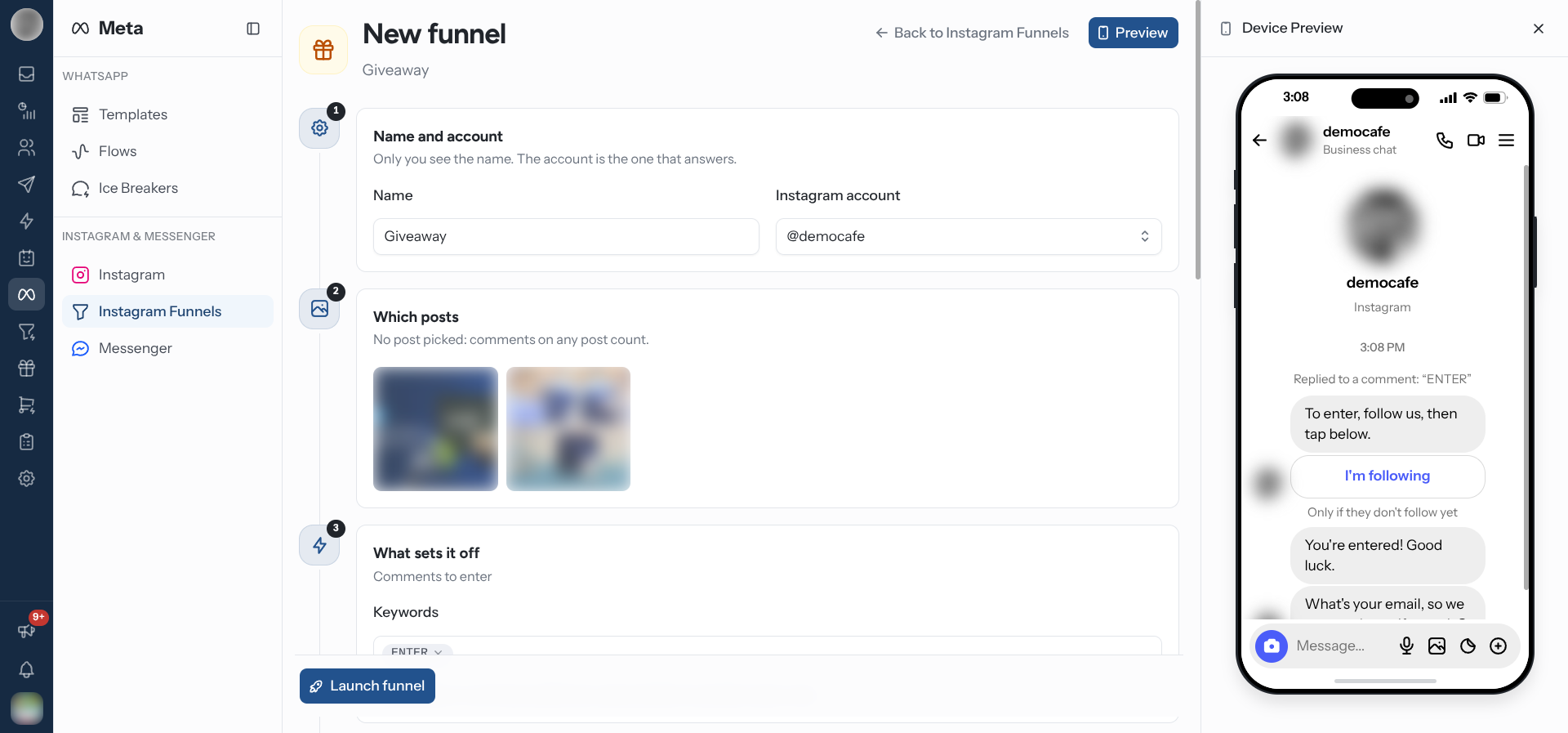
Work down the numbered steps. Which ones appear depends on the template — see the table below.
Check the DM in the phone preview on the right. It opens with the page; the phone button at the top opens it again.
Click Launch funnel. RateUp shows "Funnel is live" and opens the funnel's own page. The button stays disabled until an Instagram account is picked and the DM has a Message.
The steps
| Step | Shown for | What you set |
|---|---|---|
| Name and account | Every funnel | Name (only you see it) and the Instagram account that answers |
| Which posts | Comment for the link, Comment to buy, Giveaway | Tap post thumbnails to pick them. "No post picked: comments on any post count." |
| What sets it off | Every funnel | Keywords for comment and story-reply funnels — "Press Enter or comma to add one. Leave empty to answer every one." ig.me link ref for Link in bio entry. Nothing for Thanks for the mention: "Runs whenever someone mentions your account in their story." |
| Reply under the comment | Comment funnels | Public replies, one per line; "one is picked at random under the comment." Leave it empty to reply only by DM |
| Ask them to follow first | Every funnel except Comment to buy | A switch. "Followers get it straight away; others are asked to follow, then tap." Set the Message and the Button (default I'm following) |
| Send the DM / Send the product | Every funnel | The Message, then either a Link (with Card title and Button) or, for Comment to buy, the Products (up to 10) and an optional Limited drop |
| Collect a detail | Every funnel except Comment to buy | Ask for: Don't ask, Email, Phone number or A custom field; the Question; for a custom field, Keep it in; and Then label them |
| Hand over to your team | Every funnel except Comment to buy | A team. Leave it unset to keep the conversation automated |
A comment-to-buy funnel sends the products at once, so it has no follow check, no question and no hand-off. Its Limited drop works like the one on a comment rule — see Sell from a Comment.
What the Customer Gets
In order, a funnel:
| # | Does | Notes |
|---|---|---|
| 1 | Replies under the comment | Comment funnels with public replies only |
| 2 | Checks whether they follow you | Only with Ask them to follow first. Someone who does not follow gets your follow message and button; tapping the button checks again, and asks again if they still do not follow |
| 3 | Sends the Message | As a private reply to the comment, or a DM |
| 4 | Asks the Question | Only with Collect a detail. An email or phone number that does not look right is asked for again. A valid answer is saved on the contact — an email or phone becomes one of the contact's identities, a custom field is filled in — and the label is attached |
| 5 | Sends the link card or the products | The link button goes through RateUp first so the click can be counted, then opens your link |
| 6 | Hands the ticket to the team | Only with Hand over to your team; assigned round-robin within the team |
When a funnel asks a question, the link is sent after the customer answers it, not with the first message as the phone preview shows. Someone who never answers never gets the link.
The conversation arrives in the Inbox like any other Instagram DM.
Read a Funnel's Numbers
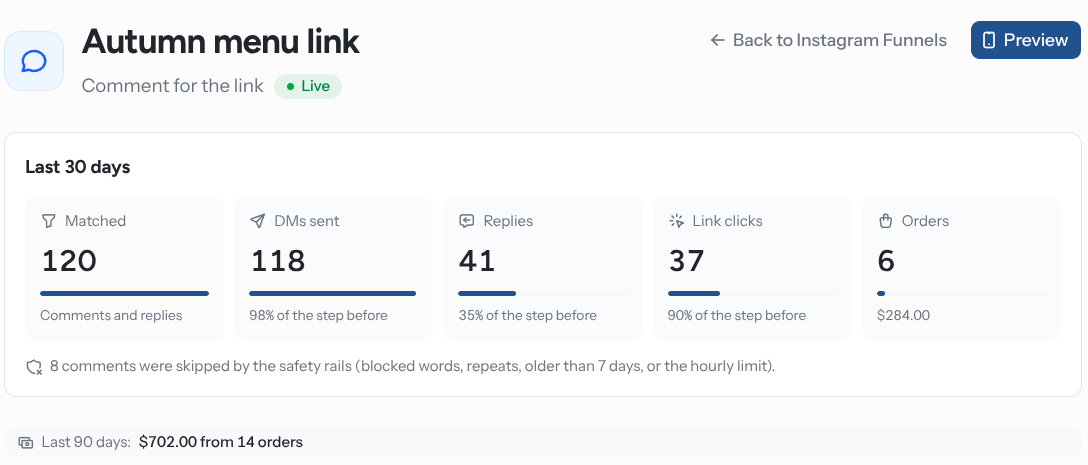
Open a funnel from Your funnels. Its page starts with Last 30 days:
| Box | Counts |
|---|---|
| Matched | Comments and replies the funnel answered |
| DMs sent | DMs it sent |
| Replies | Replies the customer sent back inside the funnel's conversation |
| Link clicks | Taps on the link button |
| Orders | Orders credited to the funnel, with their revenue underneath |
Each box after the first also shows how many of the step before made it — "40% of the step before". When the safety rails held some back, a line below says how many — "3 comments were skipped by the safety rails (blocked words, repeats, older than 7 days, or the hourly limit)."
If you can see analytics and the funnel has sold something, a chip under the box — "Last 90 days: … from 4 orders" — opens Analytics → Revenue.
Safety Rails
Every funnel checks these before it answers anyone. A skipped comment or reply gets nothing.
| Rail | Rule |
|---|---|
| Blocked words | A comment or reply containing one of your blocked words is ignored by every funnel |
| 7-day window | Instagram allows a private reply only within 7 days of the comment; older comments are skipped |
| One reply per comment | A comment is answered once |
| One answer per person | A funnel never answers the same person twice, however often they comment |
| Hourly limit | At most 180 funnel DMs per Instagram account per hour; the rest are skipped |
To set the blocked words, click Blocked words at the top of Instagram Funnels, enter one per line — "No funnel answers a comment or reply containing one of these." — and click Save. The list is shared by all your funnels.
Pause, Edit or Delete a Funnel
On the funnel's page:
| Control | Effect |
|---|---|
| Save funnel | Saves your changes; they take effect at once |
| Pause / Resume | Stops or restarts the funnel. The pill reads Live or Paused |
| Delete | "Its rule and journey are deleted too. Its report goes with it." |
Behind the scenes a funnel is an ordinary automation rule and an Instagram journey, both named after it — a funnel called Spring drop runs as Funnel · Spring drop (the rule's name also ends in a short id).
Edit a funnel only from its own page. Saving the funnel rewrites its rule and journey, so changes made to them in Automation → Rules or Automation → Journeys are lost the next time anyone clicks Save funnel.
Troubleshooting
| Symptom | Cause | Fix |
|---|---|---|
| Launch funnel stays greyed out | No Instagram account picked, or the Message is empty | Connect an account under Channels, pick it, and write the message |
| The account picker says "Connect an Instagram account first" | No Instagram channel | Connect one under Settings → Channels |
| Which posts says "No posts on this account yet." | The account has no posts | Leave it empty to answer comments on any post |
| A comment got no DM | It was older than 7 days, contained a blocked word, the person had already been answered by this funnel, or the hourly limit was reached | Check the skipped line under Last 30 days |
| Someone got the follow message again | They tapped I'm following without following | Expected — they are asked until they follow |
| The link never arrived | The funnel asks a question, and they have not answered it validly | Their answer has to pass before the link is sent |
| No template gallery, and the fields cannot be edited | Your role lacks Create and edit automation rules | Ask an admin — see Members & Roles |
| Instagram Funnels is not in the sidebar | Your role lacks See automation rules | Ask an admin for it |
Related Pages
- Instagram Overview — connecting accounts and the other Instagram tools
- Comments & Story Mentions — comment rules and comment-to-buy without a funnel
- Ice Breakers, Menu & Links — ig.me links
- Instagram Journeys — the journeys funnels run on
- Custom Fields and Labels — where captured details go