Setup Guide
Check whether a WhatsApp number can run Meta's Business Agent, create the agent, and follow the guide to going live.
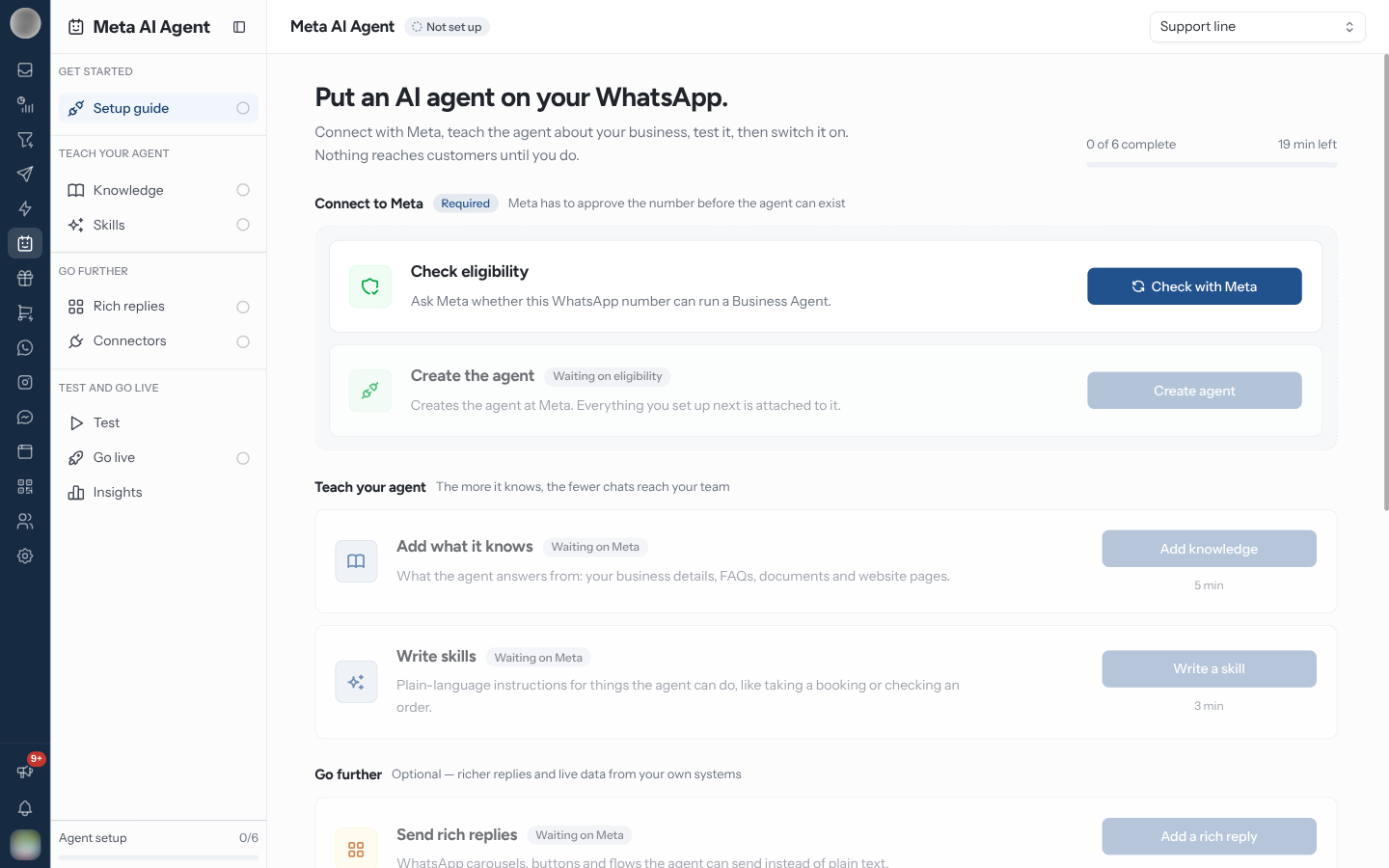
Meta AI Agent opens on the setup guide. It shows how far along this number's agent is — "x of 6 complete" and the minutes left — and lists every step as a row that opens the page where you finish it. Nothing reaches customers until you switch the agent on.
Connect to Meta
The Connect to Meta well is required, and strictly ordered: Meta has to approve the number before the agent can exist. Each button calls Meta once, when pressed — nothing runs on page load.
Create agent stays disabled, with a Waiting on eligibility badge, until the number passes the check. Check again re-asks Meta at any time — eligibility can change without you doing anything. Show agent ID reveals the agent's Meta id, which you only need for support.
If the number is not eligible, the row explains what decides it: your business vertical and country, and whether the Meta Business Agent terms are accepted in WhatsApp Manager. Fix those, then Check again.
Re-create agent repeats the call for a number whose agent already exists — use it if the agent at Meta was removed or has to be rebuilt.
Follow the Steps
Below the Meta steps, the guide groups the rest. Until the agent exists, every row is muted with a Waiting on Meta badge.
| Group | Row | Done when | Time |
|---|---|---|---|
| Teach your agent | Add what it knows → Knowledge | A business description, an FAQ, a file or a website is saved | 5 min |
| Write skills → Skills | At least one skill exists | 3 min | |
| Go further (Optional) | Send rich replies → Rich replies | At least one rich reply exists | 3 min |
| Connect your systems → Connectors | At least one connector exists | 5 min | |
| Test and go live | Test the agent → Test | Never ticked — you come back to it | 2 min |
| Switch it on → Go live | The agent exists and Agent is on is switched on | 1 min | |
| See how it is doing → Insights | Never ticked — "Most useful once the agent is live." | 1 min |
The same ticks appear on the sidebar rows, and the Agent setup meter at the foot of the sidebar counts the six steps that can be finished — Test and Insights are left out.
Once the agent is live, the heading becomes Your agent is live. with an Open test console button. Keep editing from the rows below it — every change reaches Meta as soon as you save.
Creating the agent does not switch it on. It exists but answers nobody until you turn on Agent is on in Go live. Give it knowledge and skills first.
Delete the Agent
Once an agent exists, a Delete the agent card sits at the foot of the guide. Delete agent asks you to confirm "Delete this Business Agent?", then removes the agent at Meta and clears every knowledge item, skill and connector mirrored in RateUp. The number is checked for eligibility again before a new agent can be created.
Deleting cannot be undone. Meta drops the business info, FAQs, files, websites, skills, rich replies and connectors with the agent, and you would have to set it all up again from scratch. Only people with the Connect systems and credentials ability can delete it.
Troubleshooting
| Symptom | Cause | Fix |
|---|---|---|
| Every page says Connect WhatsApp first | No WhatsApp number is connected | Connect one in Channels |
| Create agent is greyed out | The number has not passed Check eligibility | Run Check with Meta first |
| Not eligible | Meta's decision — vertical, country or unaccepted terms | Accept the Business Agent terms in WhatsApp Manager, then Check again |
| A step page shows Create the agent first | The agent does not exist yet for this number | Click Open setup guide and create it |
| "Meta took too long to respond. Sync to check whether the change went through." | Meta did not answer within 45 seconds | Click Sync on the panel you saved before trying again, so you do not repeat a change that landed |
Related Pages
- Meta AI Agent
- Knowledge — the first step after creating the agent
- Go live — switching the agent on
- Channels — the numbers you can choose from