List
Every lead as a row, grouped by stage, with bulk moves and bulk reassignment.
List shows the same leads the board does, as rows you can scan, sort through and act on in bulk. It is the view to use when you are tidying up rather than working one deal.
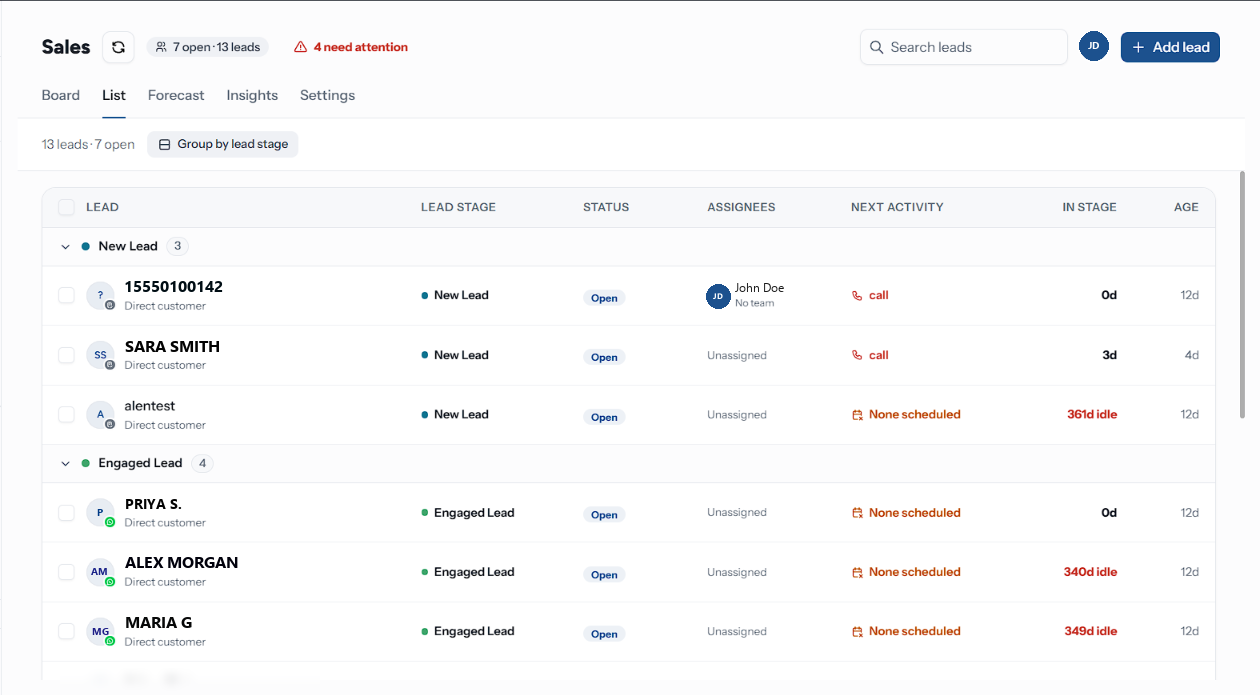
The Columns
| Column | Shows |
|---|---|
| Lead | Avatar, name, and the company or Direct customer. Headed Ticket, Task or Card on other board types |
| Lead stage | The column it sits in. A lost lead reads "{stage} (lost)". Headed Stage on other board types |
| Status | Open, Won or Lost, tinted to match the board's bands — or the board type's own closing words |
| Assignees | Up to two avatars, then the name or {n} assignees |
| Next activity | What is due. Red when overdue, amber when None scheduled, an em dash on a closed lead |
| In stage | Days in the current column, or {n}d idle in red on a stalled lead |
| Age | Days since the lead was created |
Below lg widths the seven columns fold away and each row carries a summary line instead — stage,
next step, and how long it has sat.
Above the table sits {n} leads · {n} open, and a sticky footer totals the board: the lead count, how many stages, how many distinct assignees, {n} without a next step in red, and the average time in stage and lead age. Both are counted on the server over every lead, so they describe the board rather than the rows you have loaded.
Loading More
Rows arrive fifty at a time. Load more at the bottom fetches the next page, and reads Loading… while it does. Grouped mode pages each stage on its own, so a quiet column is not held back by a busy one.
Grouping
Group by lead stage is on by default: one collapsible heading per column, in board order, with a count. Stages with no matching leads are dropped rather than shown empty. Turn it off for one flat All leads list.
Acting in Bulk
Tick the checkbox on any row — or the one in the header, which takes the rows loaded so far — and a bar appears at the bottom of the screen.
| Control | Does |
|---|---|
| → {stage} | Moves every selected lead to that column. The first three columns are offered |
| An assignee button | Assigns every selected lead to that person. The first three members are offered |
| Delete | Deletes every selected lead after a confirmation. Only shown to people whose role can Delete boards or move them between teams — Owners and Admins by default |
| ✕ | Clears the selection |
A bulk move onto a Won or Lost column does not ask for confirmation or a lost reason the way a single close does — it just moves them. Close deals one at a time if you want the reason recorded, and use the bulk move for open columns.
Assigning in bulk replaces the assignees on each selected lead rather than adding to them.
A bulk delete takes every selected lead's notes, tasks and history with it, and cannot be undone. For leads that were real but did not work out, close them as lost instead, so they still count in your insights.
Troubleshooting
| Symptom | Cause | Fix |
|---|---|---|
| No leads match these filters. | A sidebar facet or the search box is narrowing everything out | Click Clear filters under the header, or empty Search leads |
| A stage heading you expected is missing | Grouping hides stages with no leads | Turn Group by lead stage off to see the flat list |
| The bulk bar does not offer the column you want | Only the first three columns are offered | Drag on the Board, or open each lead |
| The header tick selected fewer leads than the count above the table | It takes the loaded rows, not the whole board | Load more until everything is in, then tick again |