Import and Export
Bring cards onto any board from a CSV or Excel file, and download a board as a spreadsheet.
Import puts a spreadsheet of leads, tickets or tasks onto a board in one go; Export downloads a board as a spreadsheet. Both buttons sit in the board's header, beside Add lead.
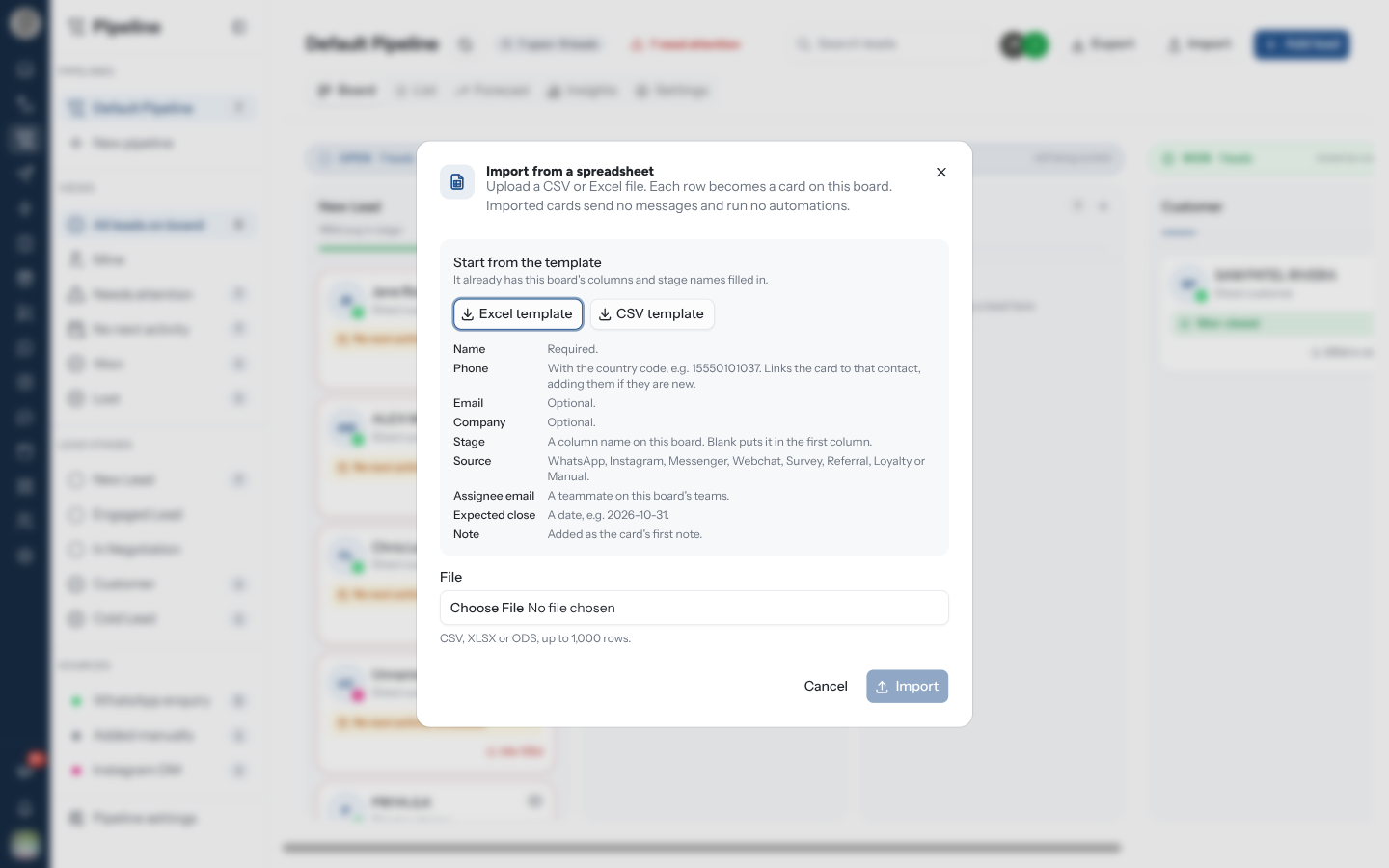
Import Cards From a Spreadsheet
Open the board you want to fill and click Import in the header.
Under Start from the template, download the Excel template or the CSV template. It already has this board's columns and stage names filled in.
Fill in one row per card. Only Name is required.
Choose the file under File and click Import. CSV, XLSX and ODS files are accepted, up to 1,000 rows and 10 MB.
Read the result: how many cards were added, and a table of any rows that were left out, with the reason for each. Fix those rows and use Import another file, or click Done.
"Imported cards send no messages and run no automations." An import is safe to run on a live board: nobody is messaged, no rule fires, and nothing is pushed to a connected CRM.
The Columns
Headers are matched loosely, so Assignee email, assignee_email and ASSIGNEE-EMAIL all work. Columns the importer does not recognise are ignored.
| Column | Notes |
|---|---|
| Name | Required. The lead's name, or the card's title on other board types |
| Phone | With the country code, e.g. 919876543210. Links the card to that contact, adding them to your contacts if they are new |
| Optional | |
| Company | Optional. Leads boards only |
| Stage | A column name on this board, in any case. Blank puts the card in the board's first open column |
| Source | Leads boards only: WhatsApp, Instagram, Messenger, Webchat, Survey, Referral, Loyalty or Manual. Blank means Manual |
| Assignee email | A teammate on this board's teams. One person per row |
| Expected close | Leads boards only. A date, e.g. 2026-10-31 |
| Note | Added as the card's first note, written by you |
Why a Row Was Left Out
A bad row never stops the rest of the file: an upload of 400 rows with three typos adds 397. The Row number in the result counts the header as row 1, so it matches what you see in your spreadsheet.
| Problem | Fix |
|---|---|
| No name | Fill in Name |
| … is not a valid phone number with a country code | Add the country code, digits only |
| … is not a valid email | Correct or clear the email |
| This board has no stage called … | Use a column name exactly as the board spells it, or leave Stage blank |
| … is not a source RateUp knows | Use one of the eight source words above |
| … is not on this board's teams | Use the email of someone on a team attached to the board, or add their team in Settings |
| … is not a date | Write the date as 2026-10-31 |
| Already on this board | That phone number's contact already has a card here. A contact can hold one card per board |
| Could not be saved | Something else went wrong with that row. Try importing it again |
A file with no rows, no Name column, more than 1,000 rows, or more than 10 MB is refused as a whole, before anything is added.
Re-importing the same file is only safe for rows with a phone number: those are skipped as Already on this board. A row with a name and no phone has no contact to match on, so it is added again as a duplicate card every time you import it.
Export a Board
Export in the header downloads the board as a spreadsheet. Pick Download as Excel or Download as OpenDocument (ODS).
| The menu says | You get |
|---|---|
| Every card on this board | All cards, open and closed |
| Cards matching the current filters | Only what the sidebar views, facets and search are showing |
Rows come out in board order, column by column. The first columns are the import template's, headed the same way, so you can edit an export and import it again; Status, Labels and Created follow after them. A card with several assignees exports only the first in Assignee email.
Who Can Import and Export
| Action | Who |
|---|---|
| Export | Anyone who can open the board |
| Import | People whose role can Edit stages and move leads: Staff and above by default. The button is hidden for everyone else |
See Members & Roles.