Stages
Your board's columns — their status, win probability, rotting window, colour and order.
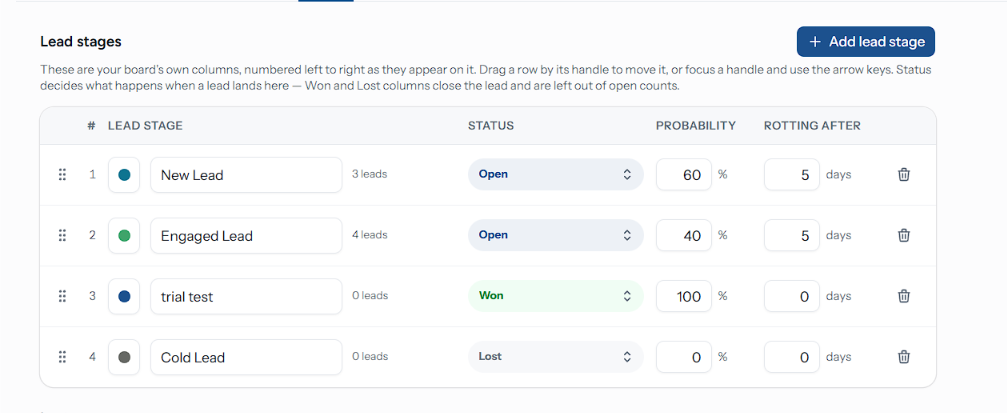
Stages are the columns of your board, and they are the board's own — a stage exists on one pipeline and nowhere else. Manage them under Lead stages, at the top of Pipeline settings. On Support, Projects and Custom boards the section is called Stages, the button Add stage, and there is no Probability column.
What a Stage Carries
| Field | Does |
|---|---|
| Colour | The left edge of every card in the column, and the dot beside its name. Picked from a fixed palette |
| Lead stage | Its name, everywhere on the board. Blanking the field reverts it |
| Status | Open, Won or Lost — what landing here does to a lead |
| Probability | 0–100. Weights the Forecast and shows as "{n}% likely" on the lead's stage stepper |
| Rotting after | Days of silence before a lead here is flagged. 0 means never |
The row also shows how many open leads the column holds — a won or lost lead sitting in it is not counted, the same way the board leaves closing columns out of its open totals. Number and text fields save when you click away from them; the colour and status selects save immediately.
Status is the one field that changes behaviour rather than presentation. Switching an ordinary column to Won or Lost makes every future drop onto it close a lead — and leaves the leads already sitting there untouched, so the column's status and its contents can disagree until they are moved.
What a New Board Starts With
Creating a Leads pipeline gives you seven columns and five lost reasons. All of them are editable, and none of them are special. The other board types start with their own columns — see Board Types.
| Stage | Status | Probability | Rotting after |
|---|---|---|---|
| New Lead | Open | 10% | 3 days |
| Contacted | Open | 25% | 4 days |
| Qualified | Open | 45% | 5 days |
| Demo / Proposal | Open | 65% | 7 days |
| Negotiation | Open | 80% | 5 days |
| Won | Won | 100% | — |
| Lost | Lost | 0% | — |
An organisation that had lifecycle stages before the pipeline shipped gets a board whose columns carry those names instead, sorted into open, then won, then lost.
Adding and Ordering
Add lead stage appends a column called New stage at 50% and a 5-day rotting window. Rename it in place straight away — the name is stored, so the whole organisation sees whatever you leave there.
Set its Status. This is the field to get right: a new stage defaults to Open.
Reorder by dragging a row's grip handle, or by focusing the handle and pressing the arrow keys. The number on the left is the column's position, left to right on the board.
A one-column board offers no handles and no delete — there is nothing to reorder, and a pipeline must keep at least one stage. The delete button's tooltip says so: "A pipeline needs at least one lead stage".
Deleting a Stage
Deleting asks where the leads in it should go: Move its leads to a column you pick. Nothing is deleted with the stage, and the leads keep their notes, timelines and assignees — they simply land somewhere else.
With Zoho or GetLead connected, the dialog warns "{crm} will not be updated". Leads moved out of a deleted column keep the status they already had in the CRM. Move each lead again on the board to sync it, or update it in the CRM directly.
Lost Reasons
Under the stages table, Lost reasons is the list your team picks from when marking a lead lost. Each row shows how many leads have been attributed to it. Add reason appends one; the bin removes it.
A new board starts with Price too high, No response, Chose a competitor, Not the right fit and Timing — revisit later.
Deleting a reason is not blocked by the leads already using it, and the count beside it is your only warning. Rename a reason you have outgrown rather than deleting it, or its share of your historical losses becomes unattributable.
Choosing Windows That Work
- Match the window to the step, not the board. A first reply is late after two days; a proposal under review is not late after two weeks.
- Leave closing columns at zero. Nothing in them can be late — the lead is already done.
- Set probabilities that step up. They drive the forecast, and a board where three consecutive stages all read 50% forecasts nothing useful.
- Fewer columns than you think. Every column is a decision someone has to make about which one a lead belongs in.