The Board
Columns, cards and the drag that moves a lead — the view most of the work happens in.
The Board is the default view: your columns left to right, and a card for every lead sitting in one of them.
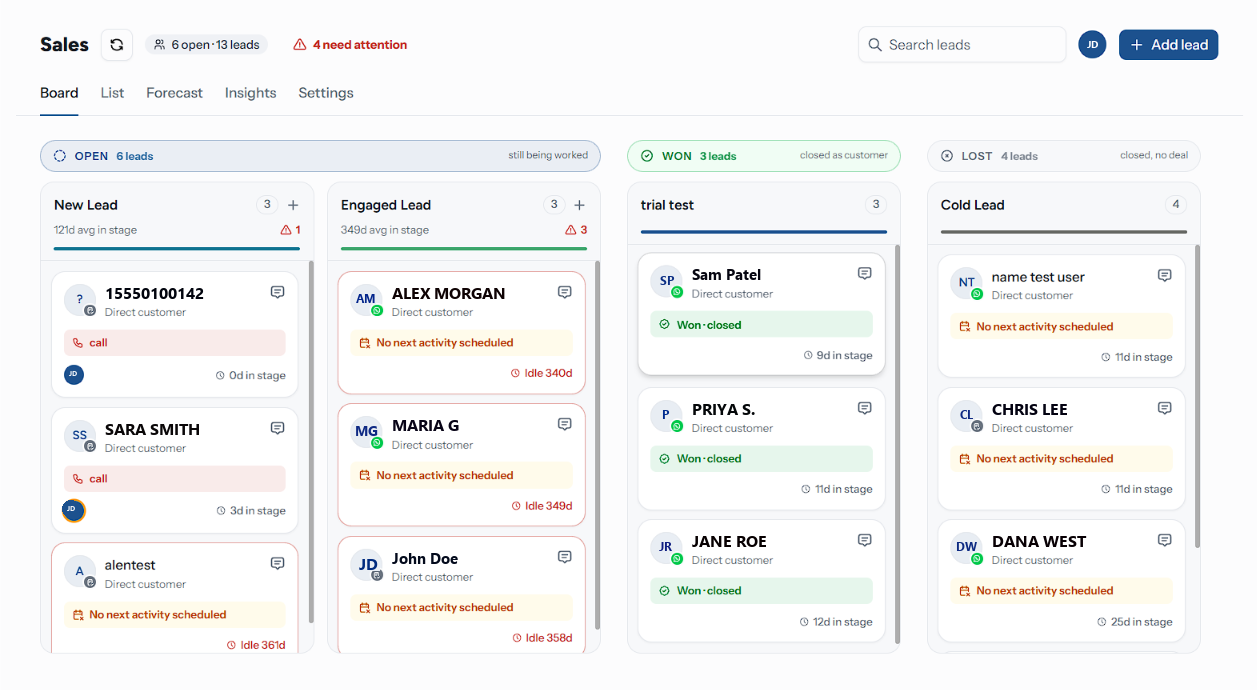
Status Bands
Columns are grouped under a band that says what landing there does to a lead:
| Band | Hint | What it means |
|---|---|---|
| Open | still being worked | An ordinary step. The lead stays open |
| Won | closed as customer | Dropping a lead here closes it as won |
| Lost | closed, no deal | Dropping a lead here closes it as lost |
A band breaks wherever the status changes, so a board that interleaves statuses gets a band per run — your column order is never silently rearranged.
A Column
The header carries everything you need to judge a column without opening anything in it:
| Element | Meaning |
|---|---|
| Name and count | The column, and how many leads sit in it — its own total, not the cards loaded so far |
| {n}d avg in stage | Average days its leads have sat in this column. Hidden while a filter is on |
| Red triangle and a number | How many of them have gone quiet — see below |
| + | Adds a lead straight into this column. Only on an open column |
A trophy on a Won column and a cross on a Lost column mark the ones that close a lead. An empty column reads "Drop a lead here".
How a Column Loads
Each column asks the server for its own cards, fifty at a time, and fetches the next page as you scroll to the bottom of it. Nothing is counted from what is on screen: the header count, the red triangle, the attention chip and every sidebar row come from the board's own totals, so a column that has loaded one page still says how many leads it really holds.
While a filter or a search is on, the header count and the triangle describe what actually matched rather than putting an unrelated total above the cards, and the average is hidden.
A page that fails to load says "Could not load this column." with a Try again underneath, so a broken request never reads as an empty column.
Moving a Lead
Pick a card up by dragging it. The card it came from dims while it is in the air.
Drop it on the column you want. The target column highlights as you cross it.
On an ordinary column the move is committed immediately, and the timeline records "Moved to {stage}".
On a Leads board, dropping onto a Won or Lost column is a close, not a move: it opens the confirmation described in Working a Lead. Losing asks for a reason, and the column you dropped on is the one the lead lands in — so a board with two Lost columns puts it in the one you actually chose.
On Support, Projects and Custom boards there is no lost reason to ask for, so a drop onto a closing column closes the card straight away.
The whole board scrolls sideways with the wheel; each column scrolls its own cards vertically, so a long column never pushes the headers off screen.
A Lead Card
| On the card | Meaning |
|---|---|
| Avatar with a channel pip | The customer, and where they are reachable. Other board types show the board's icon instead |
| Name and, under it, the company — or Direct customer | Who this is. On other board types, the card's title |
| Due {date} | The card's due date, on Support, Projects and Custom boards. Red once it has passed on an open card |
| A message icon on hover | Opens their conversation in the Inbox |
| A broken-link icon | Not linked to a contact — there is no conversation to open |
| Label chips | The labels put on this lead |
| A strip with the next activity | The one thing due next, or No next activity scheduled in amber |
| Avatars | Who is working it. The owner comes first, ringed in amber, whether or not they are also assigned |
| {n}d in stage | How long it has sat where it is |
The card's left edge carries its stage colour. On a lead that has gone quiet it turns red instead, and the day count changes to Idle {n}d — the most important thing about a card is the thing you can read without focusing on it.
A card for a won lead replaces the activity strip with Won · closed (Resolved · closed or Done · closed on other board types).
Leads That Have Gone Quiet
A lead is flagged as needing attention when all of these hold:
- it is still open
- its stage sets a rotting window of more than zero days
- Flag stalled cards is on for the board — see Settings
- nothing has touched it for longer than that window
The count appears in three places at once: the red triangle on the column, the {n} need attention chip in the header, and the Needs attention row in the sidebar. All three are the same number, and clicking either of the last two filters the board down to exactly those leads.
A rotting window is measured from the last activity, not from when the lead entered the stage. A lead you keep noting but never move will never flag — which is the point, but it means the count is a measure of silence, not of progress.
Filtering What You See
| Control | Where | Does |
|---|---|---|
| Search leads | Header | Matches the lead's name, company and phone number. Two characters minimum. Reads Search tickets, Search tasks or Search cards on other board types |
| Assignee avatars | Header | Click one to show only their leads; click again to clear |
| Views | Sidebar | The six saved filters |
| Lead stages, Sources | Sidebar | Click to apply, click the active one again to clear |
| Filter chips | Under the header | One per active filter, each with an ×; Clear filters resets them all |
Filtering runs on the server, so a facet narrows what each column asks for rather than hiding cards it already has. The search waits for your typing to settle, and a single character is ignored — it would match nearly every lead on the board.
The header badge reads {n} open · {n} leads, and both numbers describe the whole board whatever is filtered — it is the board's size, not the size of what you are looking at.
The header also carries a refresh button, Export and Import — see Import and Export.
All leads on board means all of them, won and lost included. Hiding closed leads made the Won and Lost columns read as empty — use the Won and Lost views to narrow to one outcome.
Troubleshooting
| Symptom | Cause | Fix |
|---|---|---|
| This board has no columns | Every stage was deleted | Open settings and add one, with a status |
| A card will not drop on a column | It was released between columns | Drop it on the column body, not the gap |
| A column looks empty but the sidebar counts leads | A facet or search is on | Click Clear filters under the header, or empty the search |
| Could not load this column. | That column's request failed | Try again in the column; the rest of the board is unaffected |
| Typing one letter changes nothing | A search needs two characters | Type one more |
| No need attention chip despite old leads | Flag stalled cards is off, or the stage has no rotting window | Settings and Stages |
Related Pages
- Working a Lead
- Stages
- List — the same leads as rows
- Board Types