Pipeline Overview
Kanban boards for your sales leads, support tickets and projects, with stages, a forecast and win-rate insights.
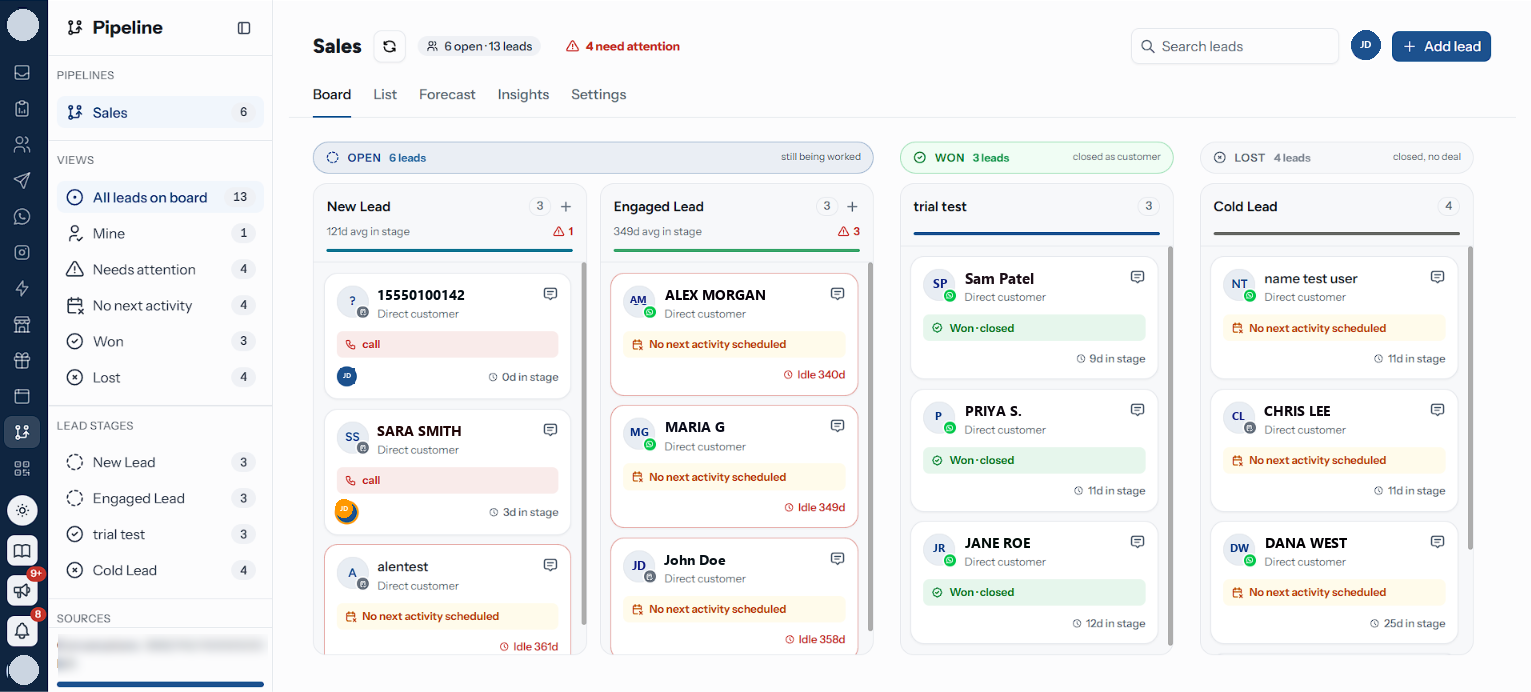
Pipeline is where a conversation becomes a deal you are working. Each customer sits on a lead card, each card sits in a stage column, and moving it across the board is how your team says where things stand.
Your Leads board is the sales funnel the rest of RateUp feeds. Beside it you can keep Support, Projects and Custom boards for work that is not a sale. See Board Types.
What a Lead Is
A lead is one customer's progress towards one outcome. It carries the details of the contact it was raised against — name, company, phone, email — plus everything your team adds while working it: assignees, labels, a next activity, notes and a full timeline.
| A lead has | Meaning |
|---|---|
| Stage | The column it sits in, and with it a win probability |
| Status | Open, Won or Lost — set by the stage it lands on |
| Source | How it reached you — a WhatsApp enquiry, a web survey, added manually |
| Assignees | Everyone working it. A handover adds a name rather than replacing one |
| Owner | Whoever opened it. Fixed at creation, and empty for a lead a rule opened |
| Next activity | The one thing due next. A lead without one is a lead that stalls |
A contact can hold one lead per board. Putting a contact who is already on the board onto another stage moves their existing lead rather than opening a second one.
On Support, Projects and Custom boards a card is a ticket, a task or a plain card instead: a title first, with the contact optional. Most of this section reads the same for them; where it does not, Board Types says so.
Getting In
Pipeline appears in the sidebar for anyone on a team that has the Pipeline feature switched on, and who is on a team attached to the board. See Teams for both.
If nobody has made one yet, the screen reads "No pipelines yet" and offers Create a pipeline: pick a type, give it a name, pick the teams that work it, and it opens with its columns already set up. A Leads board starts with seven columns and five lost reasons. Every one of them is yours to change — see Stages.
An organisation has one Leads board and up to ten others. New pipeline in the sidebar creates the rest — see Board Types.
The Five Views
The same board, rendered five ways. Forecast appears on Leads boards only. Board and List answer to the sidebar's filters; Forecast and Insights report on the whole board and ignore them, so a facet you left on never quietly rewrites a figure you are reading.
Board
Columns you drag leads across. The default view.
List
Every lead as a row, with bulk reassign and bulk moves.
Forecast
Open leads bucketed by the month they should close.
Insights
Funnel, stalls, sources and per-assignee win rates.
Settings
Teams, stalled-card flagging, conversion tracking and deletion.
The Rest of the Section
Board Types
Leads, Support, Projects and Custom boards, and what sets them apart.
Import and Export
Cards from a CSV or Excel file, and the board as a spreadsheet.
Working a Lead
Adding one, the lead window, next activities, notes, closing and reopening.
Stages
Your board's columns — status, probability, rotting window and order.
Leads That Open Themselves
Automation rules, the inbox panel, bulk assign and Zoho Bigin.
The Sidebar
Under Pipeline, the sidebar carries the board's own filters. Everything except the board name is a click, not a page load, and each row counts across every lead on the board — counts come from the server rather than from the cards on screen, so a row never shrinks because another filter is on or because a column has only loaded its first page.
| Section | Rows |
|---|---|
| Pipelines | Each board you can see, the Leads board first, with its open-card count, plus New pipeline while you are under the limit |
| Views | All leads on board · Mine · Needs attention · No next activity · Won · Lost. Other board types read Everything on board, and their own closing words in place of Won and Lost |
| Lead stages | One row per column, in board order. Stages on other board types |
| Sources | One row per source in use, counting open leads. Leads boards only |
Below them sits Pipeline settings. On a plan with a monthly active-contact allowance, an Active contacts left meter sits under the panel: what is left of this month's allowance, which is what decides whether a new lead can still be messaged.
Every filter that is narrowing the board also shows as a chip under the header (View, Stage, Source, Assignee), each with its own ×, and Clear filters resets them all. A filter you set days ago and forgot about can always be undone from the board itself.
Which tab and which filters you had open are remembered in your browser, so returning to Pipeline puts you back where you left it. Only the board itself is in the URL, so a link you share opens the board, not your filters.
Related Pages
- The Board
- Board Types
- Working a Lead
- Lifecycle Stages — what the board superseded
- Teams — who can open the board