Question Types
Input, choice, contact, NPS and rating questions — and when to use each.
Choosing the right question type does more for your data quality than anything else in the editor.
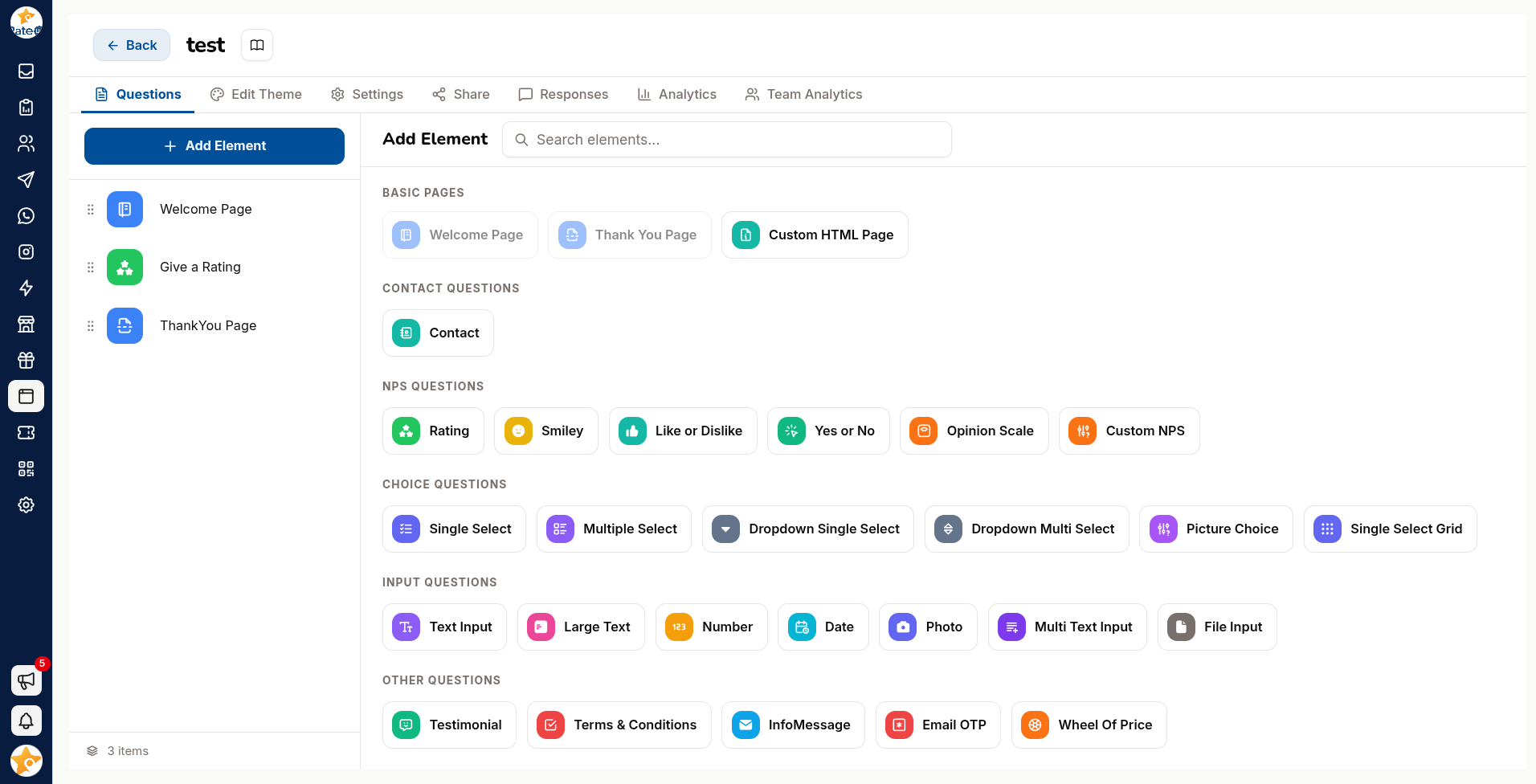
Types are picked from the Add Element pane, grouped by category. Type in Search elements… to filter them by name.
Hover a type and a Review Supported badge appears on its group heading if that type can feed a Google review request — worth checking before you build a form whose whole purpose is collecting reviews.
Input Questions
Free-text and structured input.
| Type | Collects |
|---|---|
| Text Input | A word or a line |
| Large Text | A paragraph |
| Number | Numeric input |
| Date | A date |
| Photo | A photo taken on the spot |
| Multi Text Input | Several short fields in one question |
| File Input | A document or image, up to the maximum file size |
Free text is the most expensive question type — expensive for the customer to answer and for you to analyse. Use one, at the end, and make it optional.
Input questions support custom validation — letters only, numbers only, a length limit, or a pattern of your own with a custom error message.
Choice Questions
Pick from a list.
| Type | Behaviour |
|---|---|
| Single Select | One answer from visible options |
| Multiple Select | Any number of answers from visible options |
| Dropdown Single Select | One answer, from a collapsed list |
| Dropdown Multi Select | Several answers, from a collapsed list |
| Picture Choice | Options presented as images |
| Single Select Grid | One answer per row, across a shared set of columns |
All of them share the same option controls:
| Feature | Notes |
|---|---|
| Add choice | Add options one at a time |
| Import Choices from Excel File | Bulk-load a long list |
| Choice Image | Attach an image to each option |
| Enable Other | Adds an Other option with a free-text box |
Other is worth enabling on any question where you are not certain the list is complete — the answers people type there are how you discover the option you forgot.
Contact Questions
This group holds a single element — Contact — which collects identity and contact details in one structured question. Switch on the parts you need: Name, Phone and Enable Email.
Because these map to contact fields, responses can create or update contacts rather than sitting as loose text.
Restricting who can answer
Address restriction is not part of the Contact question — it belongs to the Email OTP element in Other Questions, which verifies the address with a one-time code before the form continues:
| Option | Effect |
|---|---|
| Allowed Email IDs | Restricts submissions to specific addresses |
| All Emails | Accepts any address |
| Emails from list | Only addresses you have imported |
The list is bulk-loaded from a CSV or XLSX file whose only required column is email. Restriction
turns a public form into an invite-only one — useful for internal or member-only surveys.
NPS & Rating Questions
The satisfaction measures.
The group is called NPS Questions in the pane.
| Type | Scale |
|---|---|
| Opinion Scale | 0–10, the standard Net Promoter Score |
| Custom NPS | The same idea on a scale and wording you define |
| Rating | Stars or numbers |
| Smiley | Emoji faces |
| Yes or No | A binary |
| Like or Dislike | A thumbs judgement |
NPS answers feed the NPS Analytics view in Results.
A rating on its own tells you the score but not the reason. Pair it with one optional follow-up — and use a logic jump so detractors get a different question from promoters.
Other Question Types
| Type | Use |
|---|---|
| Testimonial | A quote you can publish through a collection |
| Terms & Conditions | An I agree checkbox with your terms |
| InfoMessage | Text with no answer — instructions or a thank-you mid-form |
| Email OTP | An email address, verified with a one-time code |
| Wheel Of Price | A gamified reward, sized by segment count (minimum two) |
Google review routing is not a question type. It is a setting on an existing rating or scale question — open the question and use its Google Review tab.
Choosing Well
| To learn | Use |
|---|---|
| How satisfied someone is | Opinion Scale or Rating |
| Which of a known set applies | Single Select or Multiple Select |
| Something you cannot predict | Large Text — sparingly |
| Who they are | Contact |
| Whether they agree | Terms & Conditions |