Flows
Multi-screen forms customers complete without leaving WhatsApp.
A flow is a form built from screens that a customer fills in inside WhatsApp — no browser, no link, no app switch.
Use flows for anything structured: a booking, a feedback survey, a lead form, an order detail.
Creating a Flow
Click Create Flow. The dialog starts with What for — "What is this flow for?"
Pick a purpose: Sign up, Sign in, Appointment booking, Lead generation, Contact us, Customer support, Survey, Loyalty feedback or Other. The purpose becomes the flow's category, so there is nothing to choose later.
For Loyalty feedback only, a Template step follows: pick a ready-made feedback flow. One is marked Suggested for you.
On Details, enter the Name, choose the WhatsApp number and Select Teams (at least one). Leave the number blank and it is created on your first connected number. The number fixes the business account the flow lives under — see below.
Click Create Flow, then build the screens in the flow editor.
Click Save to WhatsApp to push it live.
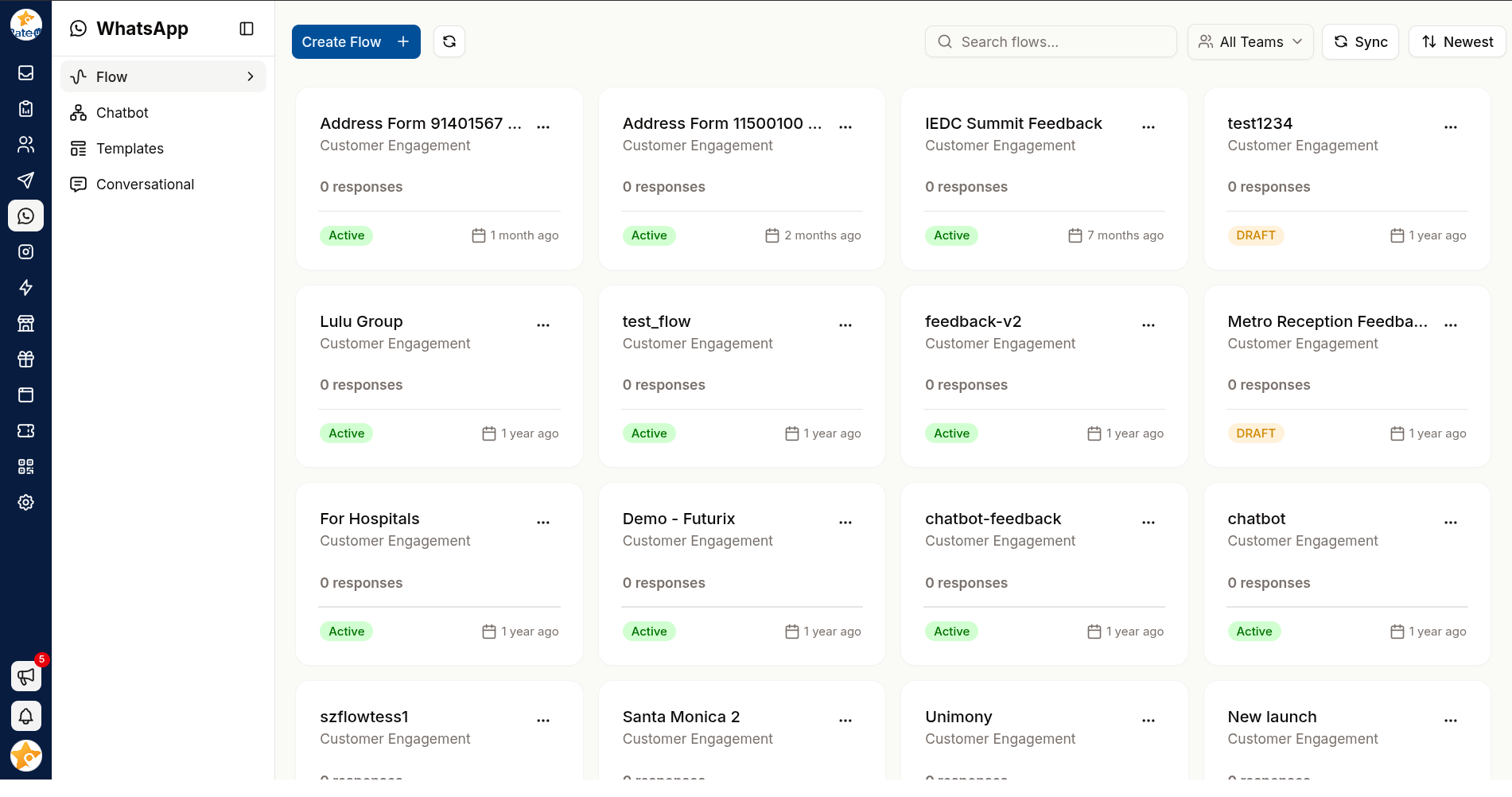
Read the Flow Cards
Each flow is a card:
| Part | Shows |
|---|---|
| Subtitle | The flow's purpose — Sign up, Survey… — or Flow for older flows |
| Big number | How many responses it has collected |
| Team line | The teams the flow belongs to |
| Status badge | Active, Draft, Deprecated, Throttled or Blocked — Meta's state for the flow |
Clicking an Active flow opens it on its Responses tab; any other opens the editor. The card's menu has Clone, Copy & Renew Flow (published flows only) and Delete — a draft is deleted, a published flow is deprecated instead.
Use Search flows... and Filter by Teams to narrow the list once you have several.
A Flow Belongs to One Business Account
You pick a WhatsApp number when you create a flow, but WhatsApp stores the flow against that number's WhatsApp Business Account — the WABA the number sits under. That account, not the number, is the boundary:
- Numbers on the same business account share their flows. A flow created on one can be sent from any of the others, and attached to a template built on any of them.
- Nothing crosses to a second business account. If you have connected numbers under two WABAs, neither one's flows are available to the other.
| Where the boundary applies | What happens |
|---|---|
| Sending a flow from a number on another business account | Refused before it reaches WhatsApp |
| Saving a template whose flow is on another business account | Rejected, naming the flow — see Template Editor |
The flows list shows every flow you have, across all numbers and accounts. It is not filtered, so the business account matters when you attach or send a flow, not when you browse.
The Flow picker on a template's button is stricter than the rule above: it lists flows recorded against that exact number only. A flow on a sibling number of the same business account will not appear, even though the template would be accepted if you could select it. Build the template on the number the flow was created on.
Flows created before the number was recorded belong to your first connected number, and so to its business account. If you run several numbers and an older flow is missing from the picker, that is usually why.
To use the same form under a second business account, build a separate flow there. Copy & Renew Flow does not help — a copy is created on the same number as the original.
Designing Screens That Get Finished
Flows have a much higher completion rate than web forms — but only if they are short.
- One idea per screen. Customers on a phone abandon dense screens.
- Ask only what you will use. Every extra field costs completions.
- Put the easy questions first. Momentum matters.
- Make optional fields obviously optional.
If your flow needs more than four or five screens, it is probably two flows — or a job for a conversation with an agent.
Sending a Flow
A flow reaches customers in three ways:
| Route | Use |
|---|---|
| From a conversation | An agent sends it from the Inbox composer |
| From a template | Attach a flow button to an approved template |
| From a chatbot | A bot step opens the flow |
Responses
Answers come back attached to the customer's conversation, so the agent handling the ticket sees what was submitted without leaving the thread.
To push submissions into your own systems, set a webhook on the flow's Settings tab. It uses the same signed, retried mechanism as web forms — see Web Forms → Settings for the payload, headers and verification.
To receive every Flow your organisation runs at one endpoint instead, subscribe the organisation
webhook to Flow response created (flow.response.created) under
Settings → Integrations → Webhook. It carries the flow's name and
ids along with the answers.
Syncing
Flows live on Meta's side too. Use Sync to align RateUp with WhatsApp after making changes. It is disabled until a WhatsApp number is connected — "Connect a WhatsApp number in settings to sync a Flow".
A flow that is edited but not synced still serves the old version to customers. Sync after every change you intend to be live.
Related Pages
- Flow Editor — screens, elements, logic jumps and settings
- Templates — attaching a flow to a message
- Chatbots
- Web Forms — the browser-based alternative