Revenue
Which campaigns, journeys, rules, ads and Instagram touches brought in orders, what their messages cost, and how often customers come back.
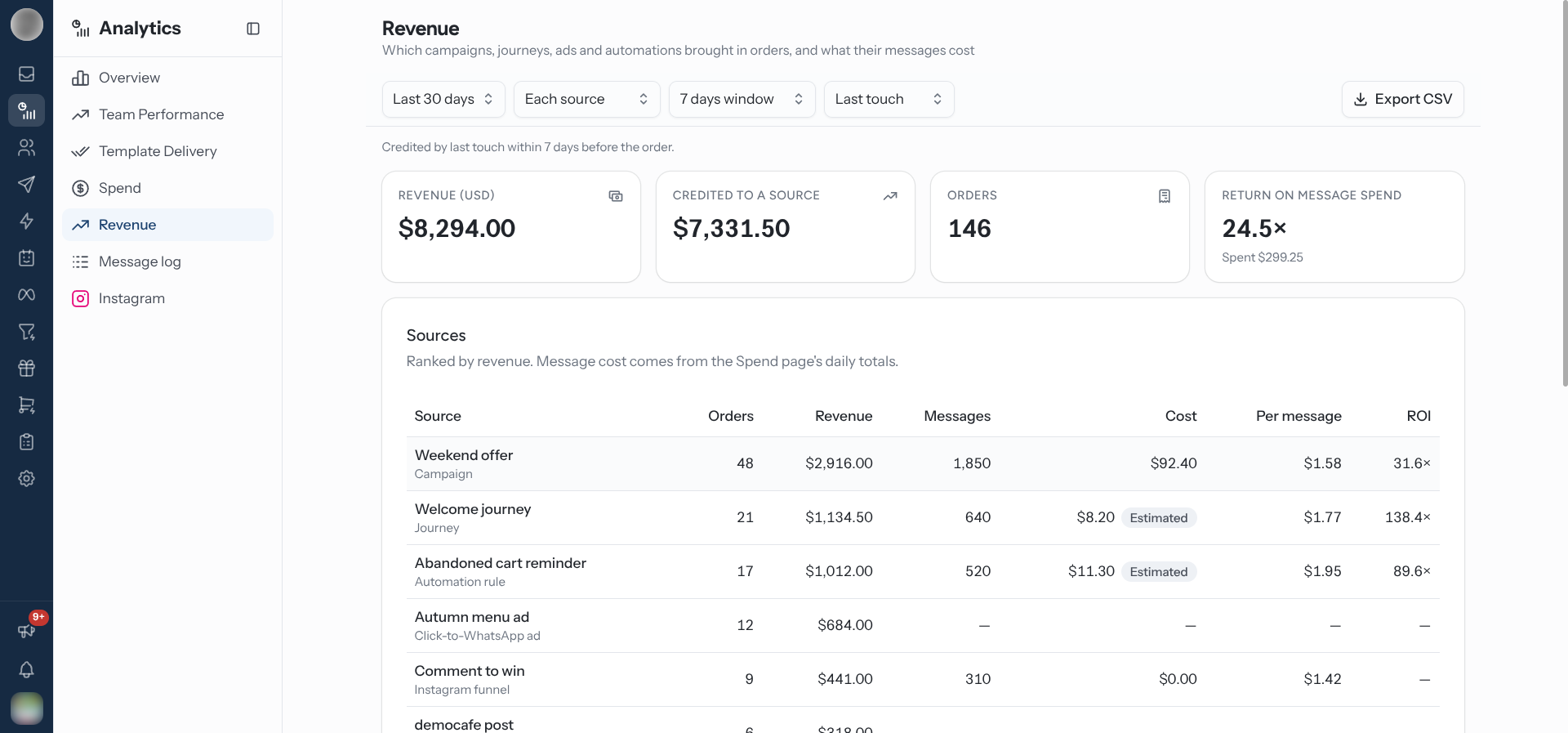
Analytics → Revenue ranks everything that messaged your customers by the paid orders it brought in: "Which campaigns, journeys, ads and automations brought in orders, and what their messages cost". Below the ranking, Retention shows how many buyers come back and when.
Open the Revenue Page
Click Analytics → Revenue in the sidebar. You need See analytics.
| Control | What it does |
|---|---|
| Date range | Last 30 days (the default), This month, Last month, Last 90 days or Custom Range. Orders count by the day they were paid (UTC). The range ends yesterday at the latest |
| Group by | Each source — one row per campaign, journey, rule or ad — or By kind, one row per kind |
| Window | 1 day window, 3 days window, 7 days window (the default) or 14 days window |
| Model | Last touch (the default) or First touch |
| Export CSV | Downloads the table as it is grouped, one row per currency and source. The first line records the model, window and range |
The line under the toolbar repeats the rule in force, e.g. "Credited by last touch within 7 days before the order." Every number on the page depends on it.
How an Order Is Credited
Each paid order is credited to one source, or to nobody. RateUp looks at the customer's touches in the window before the order and picks one.
What Counts as a Touch
| Touch | Comes from |
|---|---|
| Campaign | A campaign message the customer received, or a campaign link the order was placed through |
| Journey | A message a journey sent |
| Automation rule | A message a rule sent |
| Other automations | An automated or flow message RateUp cannot tie to one journey or rule |
| One-off templates | A template sent on its own, outside a campaign |
| Click-to-WhatsApp ad | The customer clicked one of your Meta ads into WhatsApp |
| Instagram comment or story | The order recorded that it started from an Instagram comment or story |
| Instagram funnel | The order recorded that it came through an Instagram funnel |
Inbox replies are not touches: a reply from your team never takes credit for an order.
Which Touch Wins
| Model | Rule |
|---|---|
| Last touch | If the order itself recorded where it came from — an ad click, an Instagram comment or story, a campaign link — that wins. Otherwise the most recent touch in the window wins |
| First touch | The earliest touch in the window wins. What the order recorded is dated at the order (an ad click at the click), so it only wins when nothing came earlier |
An order that came through an Instagram funnel is always credited to the funnel. An order with no touch in the window goes to No touch in the window.
The Window
The window is the number of days before the order that a touch still counts. For an order placed in RateUp it is counted back from when the order was created; for a Shopify or WooCommerce order, from when RateUp heard it was paid. An ad click older than the window does not count, even if the order recorded it.
What Counts as Revenue
| Rule | Detail |
|---|---|
| Paid orders only | Paid and Partially refunded orders. Test orders never count |
| Refunds come off | Revenue is the order total less refunds. A fully refunded order keeps its row at zero and drops out of Orders |
| Store orders count | Paid and refunded orders from your Shopify or WooCommerce store are credited too, unless RateUp created them. The customer is matched by phone or email; an order whose customer is not one of your contacts goes to No touch in the window |
| One currency at a time | Each order currency gets its own tiles and table. Amounts are never converted |
Change the Window or Model
Pick a window from the window menu, or a model from the model menu.
The change saves at once: "Saved. The last 90 days are being recomputed."
The window and model are one setting for the whole organisation, so they change the page for everyone. Changing them needs Edit organisation details and business hours (Managers and above); for anyone else the menus are greyed out.
Only the last 90 days are re-credited. Orders older than that keep the credit they got under the old window, so a long custom range that crosses the 90-day line mixes two rules. Pick the window once and leave it.
Read the Tiles
| Tile | Meaning |
|---|---|
| Revenue (USD) | All paid revenue in the range, less refunds |
| Credited to a source | The part of it credited to a campaign, journey, rule, ad or Instagram touch — everything except No touch in the window |
| Orders | Paid orders in the range |
| Return on message spend | Credited revenue ÷ message cost, e.g. 6.4×, with "Spent $193.75" underneath |
Read the Sources Table
"Ranked by revenue. Message cost comes from the Spend page's daily totals."
| Column | Meaning |
|---|---|
| Source (or Kind) | The campaign (click to open it), journey, rule or ad, with its kind underneath |
| Orders | Orders credited to it |
| Revenue | Their revenue, less refunds |
| Messages | WhatsApp messages it sent in the range |
| Cost | What those messages cost in Meta fees, from Spend |
| Per message | Revenue ÷ messages |
| ROI | Revenue ÷ cost. — when there is no cost, or the cost is in another currency |
Every source that sent messages gets a row, even if it sold nothing, so a campaign that cost money and brought nothing in is in the table too.
| Cost note | Why |
|---|---|
| Estimated badge on a journey or rule | Spend is counted for all automations together. A journey's or rule's cost is that total split by its share of the billable automated messages — "This automation's share of the automated messages' cost." |
| No cost on an ad or Instagram row | Their cost is your ad spend at Meta, not WhatsApp message fees |
| Costs are estimates | Message cost is priced the way Spend explains, and is counted overnight, so yesterday is the newest day with a cost |
The Same Figure on a Campaign, Journey or Rule
The campaign page, the rule builder and the journey editor show a small chip for that one source, e.g. Last 90 days: $1,240.00 from 31 orders · 6.2× ROI. Click it to open this page. It only shows to people with See analytics, and only when the source sold something.
See Who Comes Back
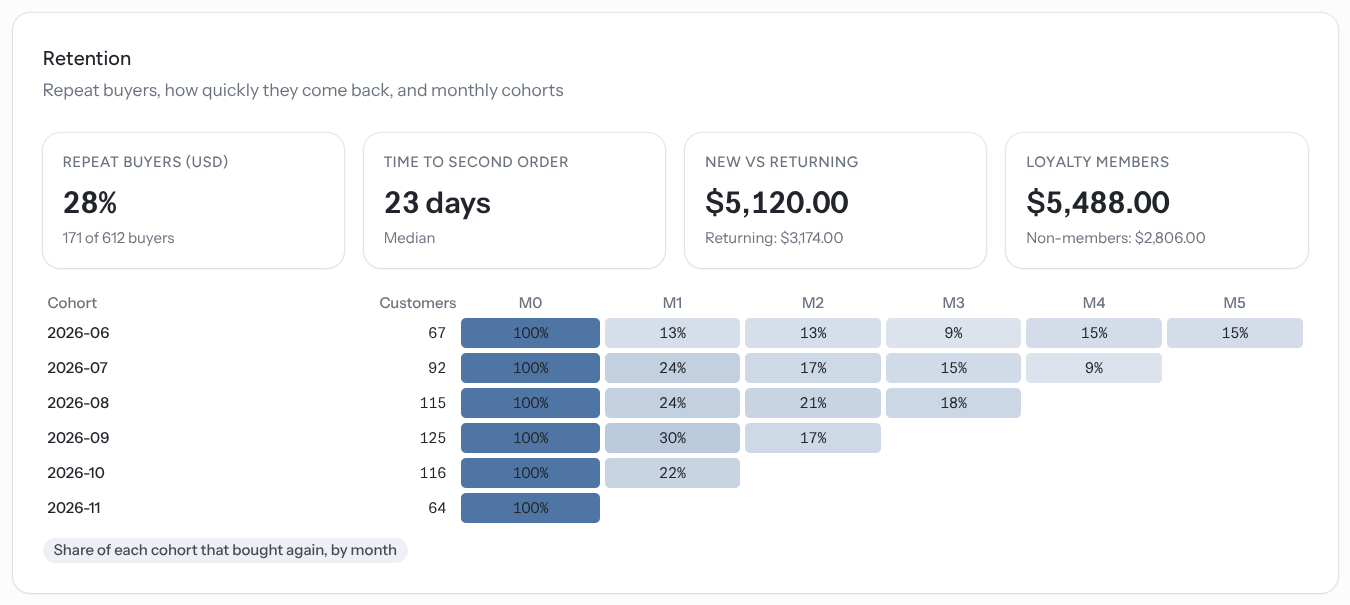
Retention — "Repeat buyers, how quickly they come back, and monthly cohorts" — is worked out from paid orders placed in RateUp. Shopify and WooCommerce orders are not part of it.
| Tile | Meaning | Range |
|---|---|---|
| Repeat buyers (USD) | Share of buyers with two or more paid orders, e.g. "84 of 410 buyers" | All time |
| Time to second order | Median days from a customer's first paid order to their second | All time |
| New vs returning | Revenue from customers' first orders, with "Returning: …" from later orders | The range |
| Loyalty members | Revenue from customers with a loyalty account, with "Non-members: …" | The range |
Read the Cohort Grid
Each row is a Cohort: the customers whose first paid order fell in that month, with their number under Customers. Column M0 is that first month, M1 the month after, up to M11. A cell is the share of the cohort who bought in that month — the darker, the more came back. Hover a cell for the customer count and their revenue. The grid shows the last 12 cohorts and is rebuilt every night.
Troubleshooting
| Symptom | Cause | Fix |
|---|---|---|
| Most revenue is No touch in the window | The orders came with no message, ad or Instagram touch within the window, or their customer is not a contact | Expected for walk-in and web orders; a longer window credits more, but loosely |
| A store order is missing | RateUp only hears of Shopify and WooCommerce orders from the store connection, and skips orders RateUp itself created there | Check the store under Integrations |
| Today's orders are not shown | The range ends yesterday | Check tomorrow |
| A journey's cost carries Estimated | Its cost is a share of all automated messages' cost | Expected |
| The window menu is greyed out | Changing it needs Edit organisation details and business hours | Ask a Manager or Admin |
| Retention shows "No paid orders yet" | Retention only reads orders placed in RateUp | Expected if you sell only through Shopify or WooCommerce |
Related Pages
- Spend — where the message cost comes from
- Campaign Details
- Journeys
- Commerce Overview — Messaging cost vs revenue for your shop
- Segments — target the repeat buyers this page finds
Spend
What your WhatsApp messages cost in Meta fees, by category, number, team and sender, and a monthly budget that warns you at 80% and 100%.
Message Log
Every WhatsApp message sent from Campaigns, the Inbox, templates and the API — searchable, filterable and exportable, with the error behind each failure.