Storefront
Your public shop page — publishing it, each product's own link, search indexing, how shoppers check out, and why some orders start with a WhatsApp message from the shopper.
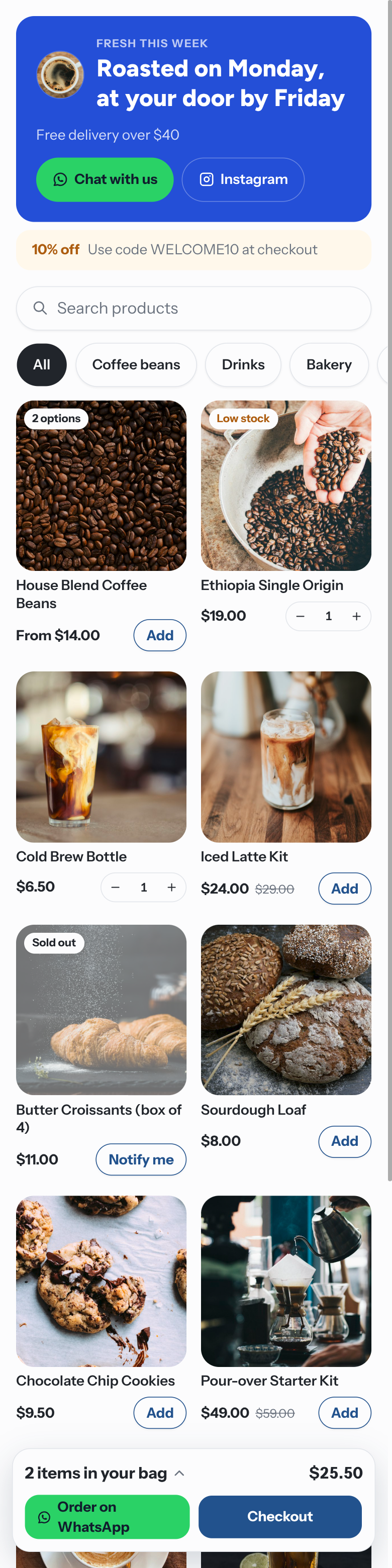
The storefront is "A link-in-bio shop for Instagram and anywhere else. Buyers check out in
WhatsApp or on the page." It lives at rateup.app/s/<your-link> and shows every active product with
Storefront switched on under Where it sells.
Publish Your Storefront
Open Commerce → Settings → Store and scroll to Storefront.
Set the Link — the part after /s/. It is lower-cased and anything other than letters, numbers
and dashes becomes a dash.
Optionally add a Banner headline, Banner text, Banner image and your Instagram profile.
Turn on the Publish storefront switch and click Save changes. The badge turns Live.
Preview opens the Storefront preview — "How shoppers will see your storefront. Checkout is off in the preview." — before you publish.
Once live you can Copy storefront link, Open it, and Download QR — "Print it on packaging, receipts or your counter so shoppers can scan straight in."
Changing the Link of a live storefront breaks every link and QR code you already shared — the old address shows "This shop isn't available". Pick it once.
Without a banner headline, the top of the page advertises your newest active coupon that anyone can use — "Use code … at checkout" — unless customers pay on a Shopify or WooCommerce checkout, where RateUp codes don't work.
Share a Product's Own Link
Every product has its own address: rateup.app/s/<your-link>/p/<product-name>-<code>, built from its
name plus a short code. Shared in a chat or on social media, it shows the product's photo and price.
Chat messages, comment replies and catalog links that RateUp sends use the same addresses.
| You change | The old link |
|---|---|
| The product's name | Moves permanently to the new address |
| The product is hidden, a draft or sold off | Goes to the storefront instead |
Older ?product= links | Move permanently to the product's address |
Get Found in Search
A live storefront and its product pages can be indexed by search engines; a preview, a switched-off
storefront and checkout pages cannot. RateUp lists every live storefront and its products in a
sitemap at rateup.app/s/sitemap.xml, refreshed hourly. There is nothing to turn on beyond
publishing the storefront.
How Shoppers Buy
| Shopper does | Happens |
|---|---|
| Adds products to the bag and taps Checkout | The checkout page asks for Contact, Delivery address, a delivery option, a Coupon code and points where offered, then the payment choice |
| Pays online (Pay) | Card payment through your Stripe or Razorpay |
| Picks Cash on delivery or Bank transfer | Confirms their number on WhatsApp first — see below |
| Your store checkout is chosen | "You'll pay on Shopify's secure checkout" — see Checkout |
| Taps Order on WhatsApp | Shown when "… can't take orders online right now", for example when the plan's monthly orders are used |
After ordering, the shopper's order page shows progress, tracking (Track your parcel), bank details for a transfer, Download invoice once paid, and Request a return once shipped.
How Shoppers Confirm Their Number
A number typed into a web form proves nothing, so RateUp messages it only once its owner has written to you from it — or once the order is paid, since a payment is proof enough.
| When | The shopper sees |
|---|---|
| A sold-out product's Notify me on WhatsApp | "Send us a quick WhatsApp message and we'll tell you when it's back." and Open WhatsApp |
| Choosing Cash on delivery or Bank transfer (or a free order) | "Confirm on WhatsApp to place your order. Send the message that opens, from the number we'll contact you on." and Open WhatsApp |
Open WhatsApp opens a chat with your WhatsApp number with a message such as "Confirm my order #1042. RU-K7P2QX" ready to send. When it arrives, RateUp places the order (or records the restock request) and replies in that chat — so the conversation is open and later updates can reach them.
| Rule | Value |
|---|---|
| The code expires after | 15 minutes — then "That confirmation has run out. Choose how to pay again to get a new one." |
| Unpaid cash or transfer orders one number can hold at once | 3 — "You already have 3 orders waiting for payment. Pay or cancel one first." |
| Unpaid transfer orders are cancelled after | 72 hours by default — Hours to pay before cancelling in Getting Paid |
The number that sends the message is the one RateUp keeps, even if the shopper typed another. Until a storefront order is confirmed or paid, it gets no order messages; its timeline notes "the number isn't confirmed yet".
Troubleshooting
| Symptom | Cause | Fix |
|---|---|---|
| "This shop isn't available" | The storefront is off, the link changed, or Commerce is turned off | Check Publish storefront and the Link |
| A product is missing | It is a draft, archived, or Storefront is off under Where it sells | Turn it on in the product |
| "This shop can't confirm numbers on WhatsApp yet" | No WhatsApp number is connected | Connect one under Channels |
| "Too many confirmation codes from here." | More than 5 codes from one visitor in 15 minutes | Wait a few minutes |
| No offer strip | A banner headline is set, or no active coupon is open to anyone | Expected |
Related Pages
Checkout
Choose where customers pay — RateUp checkout or your Shopify or WooCommerce checkout — what checkout in chat asks for, and when unpaid carts get a reminder.
Legacy Catalog Tools
The older WhatsApp-catalog tools — products kept straight in the Meta catalog, catalog cart orders and their checkout — for accounts that used them before Commerce had its own products.