Products
Add products once and publish them to WhatsApp, Instagram and your storefront — import, bulk-edit, duplicate and check where each one is live.
"RateUp is your product source. Changes reach your WhatsApp catalog and Instagram shop within a minute." A product you add here publishes to your connected Meta catalog (which WhatsApp and Instagram show) and to your storefront.
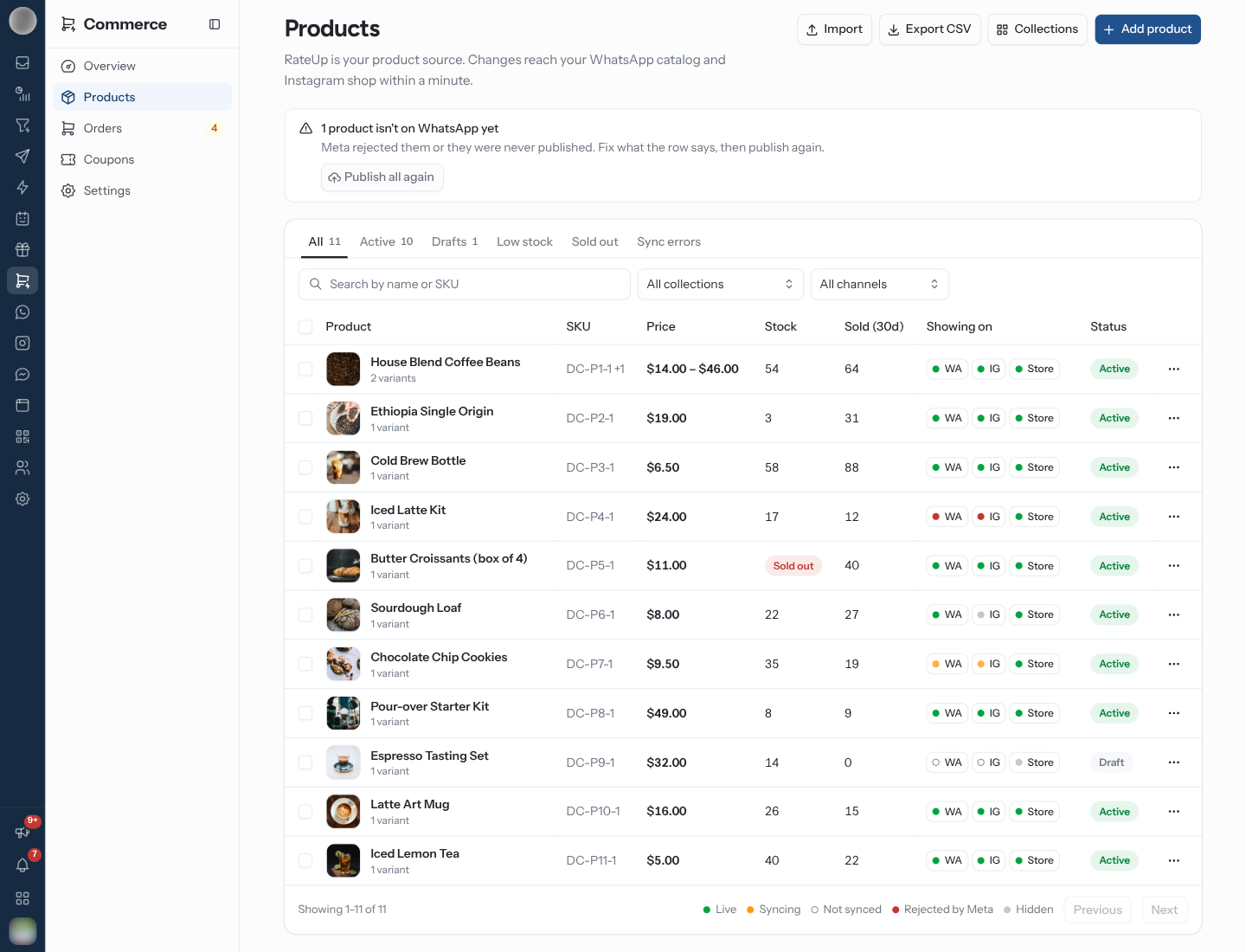
Find a Product
| Control | Options |
|---|---|
| Tabs | All, Active, Drafts (with counts), Low stock, Sold out, Sync errors |
| Search | "Search by name or SKU" |
| Collection filter | All collections or one collection |
| Channel filter | All channels, WhatsApp, Instagram, Storefront |
Each row shows the product, its variants (and No photo when it has none), SKU, Price (a range when variants differ), Stock, Sold (30d), Showing on and Status.
| Stock shows | Meaning |
|---|---|
| A number | Units in stock |
| 3 left | At or below the low-stock alert |
| Sold out | Tracked and at zero |
| Not tracked | Stock is not counted |
Read the Channel Chips
Showing on has a chip per channel — WA, IG and Store. On WA and IG the dot shows the Meta catalog state; Store is green when the product is active and on the storefront, grey otherwise. Hover a chip for the explanation.
| Dot | Label | Meaning |
|---|---|---|
| Green | Live | "Live in your Meta catalog" |
| Pulsing amber | Syncing | "Publishing to your Meta catalog. This usually takes under a minute." |
| Red | Rejected by Meta | Meta refused it; the reason is in the tooltip and on the product page |
| Hollow | Not synced | "Not on WhatsApp yet." — usually no catalog is connected |
| Grey | Hidden | Off for this channel, a draft or sold out |
When products should be on WhatsApp but are not, a banner says so. With a catalog connected, Publish all again re-sends them; without one it points to Commerce → Settings → Store.
Add a Product
Click Add product.
Fill in Details — Name, Description ("Keep the first line short."), Brand, Product URL and Product category (Browse offers Meta's categories, or type your own).
Add Photos. "The first photo is the one customers see in chat. Square, at least 500 px." Pick another as Cover at any time.
Under Options, add up to three, such as Size or Colour. "Each combination becomes a variant."
Under Variants & stock, set each variant's Price, Original price (shown crossed out), SKU, In stock and Alert below. Turn on Track to count stock, and Keep selling when out of stock if you take orders regardless.
Choose Status, Where it sells, Collections and, under Loyalty, Extra loyalty points. Click Save.
How it looks in WhatsApp previews the product card as you type.
| Section | Notes |
|---|---|
| Status | Active, Draft or Archived. "Drafts stay off every channel until you activate them." |
| Where it sells | WhatsApp catalog, Instagram shop & DMs, Facebook page, Storefront — each a switch, with the catalog state beside the Meta ones |
| Variants & stock | Leave stock empty if you don't count it. "Tracked variants hide from chat catalogs when they run out, unless they keep selling when out of stock." When people asked to hear about a restock, a note says how many — "They get a WhatsApp message as soon as you add stock." |
| Loyalty | "Members earn this many times the usual points on this product. 1 is the usual amount, 2 gives ×2 points." |
On a saved product, the pencil next to a tracked variant's stock opens a quick Set with an optional Reason and a History of changes (Order, Cancelled order, Return, Adjusted, Store sync).
Other Product Actions
| Button | What it does |
|---|---|
| Sell on Instagram | Opens a new automation from the Comment to buy template for this product — see Sell from a Comment |
| Send to my WhatsApp | Sends the product to your own number, "the way a customer gets it in chat" |
| Duplicate | Makes a copy — "Copy saved as a draft" — and opens it |
| Archive | "It disappears from WhatsApp, Instagram and your storefront. Past orders keep it." |
Send to my WhatsApp only works inside WhatsApp's 24-hour window. If it is closed you see "Message your business number first, then try again" with Open WhatsApp. A product that is live in the catalog arrives as a product card; otherwise as a photo with a link.
Import Products
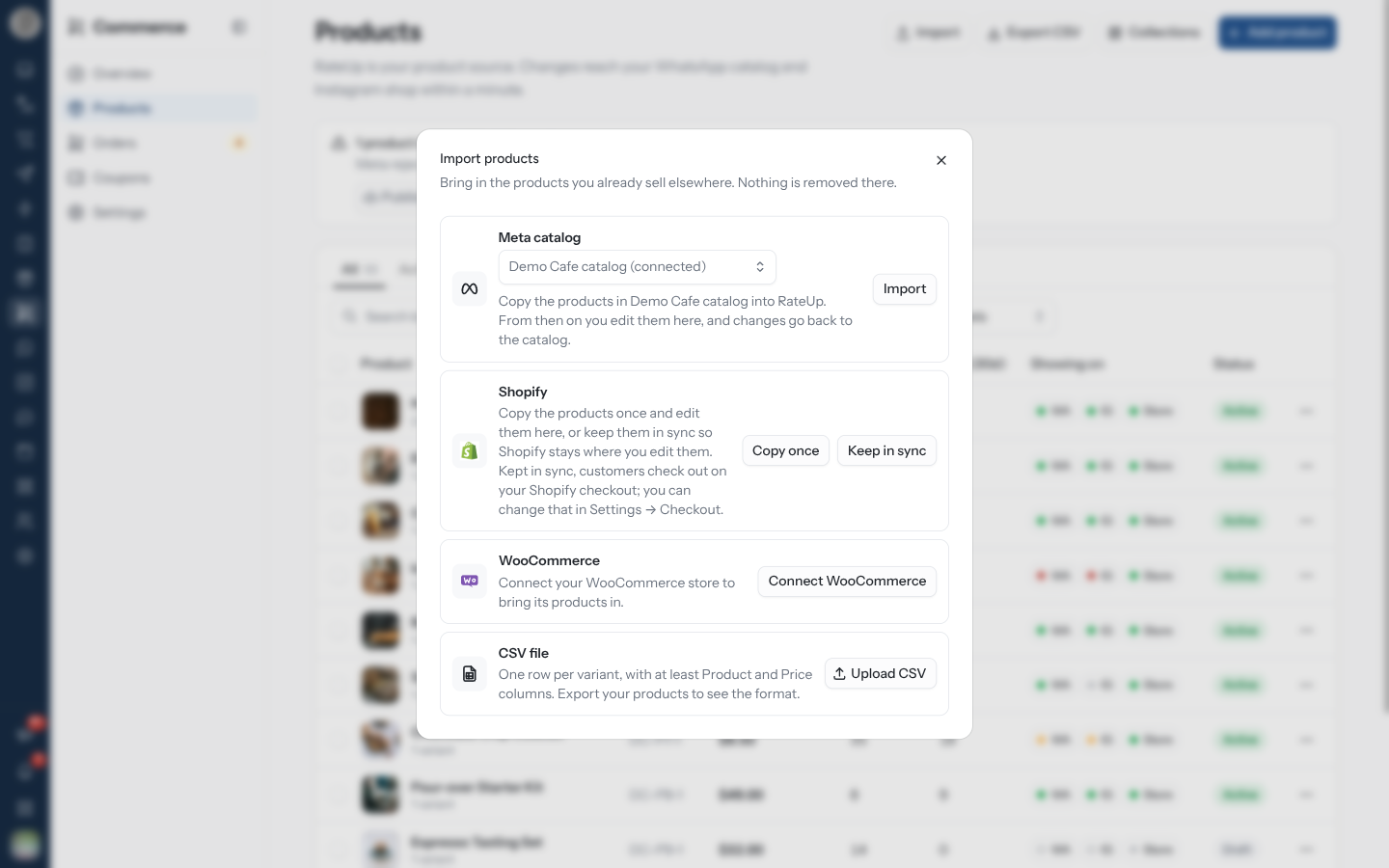
Import gathers every way to bring products in. "Nothing is removed there."
| Source | Options |
|---|---|
| Meta catalog | Import copies the catalog's products into RateUp: "From then on you edit them here, and changes go back to the catalog." With several catalogs, Catalog to import from picks which one — products copied from another catalog are added to your connected one, and that other catalog "isn't changed or connected". Needs a connected catalog first (Connect catalog) |
| Shopify / WooCommerce | Copy once — copy the products and edit them here from then on. Keep in sync — the store stays where you edit them, and customers check out on that store's checkout. Connect Shopify / Connect WooCommerce opens Integrations first |
| CSV file | Upload CSV — "One row per variant, with at least Product and Price columns. Export your products to see the format." |
Import finished reports what was added, updated and skipped, with a reason per skipped product.
Keep in sync changes where customers pay: they check out on your Shopify or WooCommerce page, and RateUp coupons, points at checkout and cart reminders stop applying. It is offered only while the shop has no products of its own. See Checkout.
A shop that already follows a store shows Sync now for it instead, and products that follow a store are edited there: the product page says "This product comes from your connected store", and only Where it sells and collections can be changed in RateUp.
CSV Columns
Export CSV downloads products.csv in the same format.
| Column | Notes |
|---|---|
Product | Required. Rows with the same name become one product's variants |
Price | Required |
Variant | Variant name; Default when empty |
SKU, Compare at | Optional |
Stock | Empty means stock is not tracked |
Status | DRAFT makes a draft; anything else is active |
Collections | Separated by ; — missing collections are created |
Image | A web link |
Description |
A product whose name already exists is skipped ("A product with this name already exists").
Edit Many Products at Once
Tick products in the list to get a selection bar.
| Button | Does |
|---|---|
| Edit prices and stock | Opens the bulk editor below |
| Set active / Set as draft | Changes status straight away |
| Archive | Archives them |
Select products and click Edit prices and stock. Untick any variant you want left alone.
For each of Price, Original price (shown crossed out), Stock and Status, choose what to do — "Anything you leave on Keep stays as it is."
Click Update N variants. Changes saved lists what was updated and what was left unchanged, with the reason.
| Field | Choices |
|---|---|
| Price | Keep, Set to, Change by %, Change by amount — "Use a minus sign to lower prices, for example -10." |
| Original price (shown crossed out) | Keep, Set to, Remove |
| Stock | Keep, Set to (uncounted variants start counting from it), Add or remove (uncounted variants are skipped) |
| Status | Keep, Active, Draft |
Products that follow Shopify or WooCommerce are left out — their prices and stock are edited in the store.
Group Products Into Collections
Collections opens a dialog to add, rename and delete collections — "Group products for your storefront and for coupons that apply to a collection." Deleting one leaves its products in place. Add a product to collections from its page.
Troubleshooting
| Symptom | Cause | Fix |
|---|---|---|
| Chip shows Not synced | No Meta catalog connected | Connect one in Commerce → Settings → Store, then Publish again |
| Meta rejected this product | Meta's checks failed | "Check the photo, the description and the category, then publish again." |
| "WhatsApp and Instagram need a photo to show this product." | No photo | Add one |
| "Customers can't buy this product right now" | Customers pay on your store's checkout, which only sells that store's products | Add it to the store, or switch to RateUp checkout |
| No Duplicate in the menu | The product follows a connected store | Duplicate it in the store |
Related Pages
- Settings — connecting the Meta catalog
- Storefront — each product's own link
- Coupons
- Send Products to Buy