Set Up Your Programme
The six-step loyalty setup — profile, earning, tiers, rewards, messages and launch — and what each step decides.
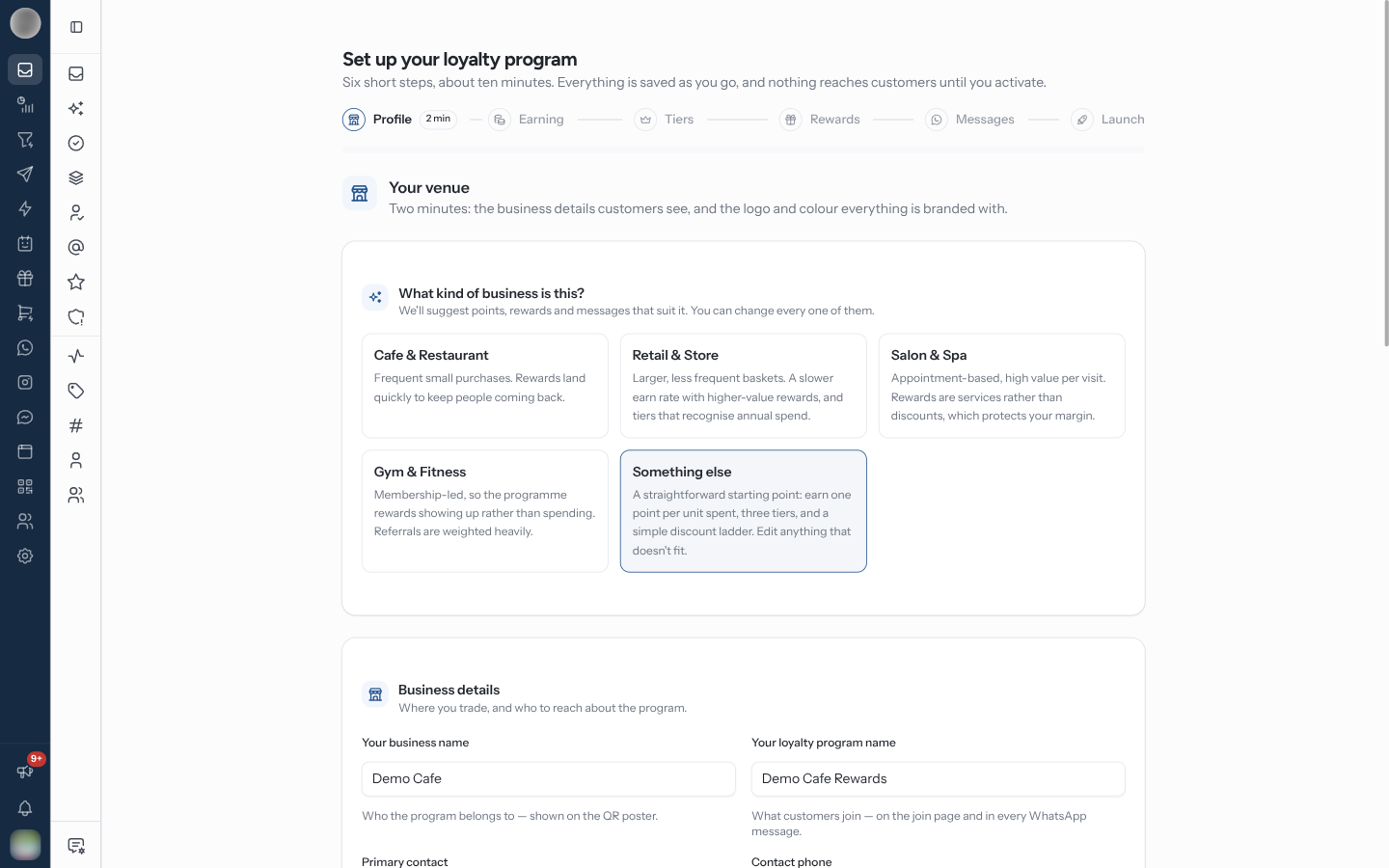
Set up your loyalty program is a guided setup at /dashboard/loyalty/onboarding: "Six short
steps, about ten minutes. Everything is saved as you go, and nothing reaches customers until you
activate." It fills in points, tiers, rewards and WhatsApp messages suited to your kind of
business, and every one of them can be changed afterwards.
Where You Land
An organisation with no loyalty programme is sent to the setup whichever loyalty page it opens. Once you have saved a step, the programme exists as a Draft: you can leave and come back, and the Program entry in the sidebar carries a Draft chip until you activate.
While the programme is a draft, only Overview, Program and Rewards open. Every other loyalty page shows "Finish setting up your program" with a Continue setup button instead. Continue setup on the Overview or the Program page resumes the setup at the first unfinished step.
Walk Through the Six Steps
Profile — pick "What kind of business is this?": Cafe & Restaurant, Retail & Store, Salon & Spa, Gym & Fitness or Something else. Your choice seeds the earning rate, rewards and messages in the later steps. Then fill in Your business name, Your loyalty program name, Currency, Time zone, the Primary contact, and the branding: Logo, Brand colour and Hero image.
Earning — set What you call your points, the rate for Every purchase ("spend this, earn that"), and the Typical spend in one visit, which is what the giveback estimate is worked out from.
Tiers — switch Offer tiers on or off. With tiers on, name the tier Everyone starts as, then Add a tier above for each step up, with its Spend to reach it, Points multiplier and Perks. Spend counted within sets whether tiers are reached on Lifetime spend or within a number of months.
Rewards — review the suggested rewards, grouped by who can redeem them (Rewards for everyone and one group per tier), and the Points for joining and referring. Re-price from my earn rate resets their costs to about 3% back if you changed the rate.
Messages — under When a customer texts you, the keyword replies (They text / You reply); under What we send, the notifications that need Meta's approval. Write it from my program fills a reply in for you. The templates are submitted to Meta when you continue — you do not have to wait for approval.
Launch — check the list, then click Activate program.
| Step | Rough time | Where to change it later |
|---|---|---|
| Profile | 2 min | Program › Profile |
| Earning | 1 min | Program › Earning |
| Tiers | 1 min | Program › Tiers |
| Rewards | 3 min | Rewards |
| Messages | 2 min | Messages |
| Launch | 1 min | Settings — pause and resume |
Tiers take at most three in all: the starting tier and two above it. "Three tiers is the most this programme can run."
Check the Launch List
The Launch step lists what is set up, under Ready to go live, and what is still To do. Anything in Worth knowing before you launch does not block activation.
| Row | Done when |
|---|---|
| Venue & branding | The profile is saved — a missing logo is fine, the poster uses your colour |
| Earning rule | "Customers earn points on every purchase" |
| Tiers | Tiers are saved above the starting tier, or switched off |
| Rewards | At least one reward exists |
| WhatsApp messages | Keyword replies and notifications are written |
| WhatsApp channel | "Connected — the join QR opens a chat with your keyword ready to send" |
Each row has a Fix, Edit, Open or Connect button that takes you back to it.
Activating turns on point earning, keyword replies and notifications at once. Check the earning rate and reward costs before you click Activate program — changing them once customers hold points changes what those points are worth.
After You Activate
"You're live" shows your counter QR poster, with Print materials and Go to Overview. Scanning the QR opens WhatsApp with your join keyword ready to send. Without a connected WhatsApp number you see "Your programme is live. Connect WhatsApp to get the counter QR." instead.
Points from a sign-up on the web join page are held until the customer's first real activity, so a bot filling in the form gains nothing.
Troubleshooting
| Symptom | Cause | Fix |
|---|---|---|
| "Some keywords were already taken" on Messages | Another automation or command already answers that word | Pick a different keyword and save again |
| "No WhatsApp channel connected yet" | No number connected | Set up the messages anyway; connect a number in Settings → Channels — nothing sends until you do |
| Move members down a tier? when saving Tiers | You removed a tier that has members | Confirm to move them to the tier below, where they earn at its rate |
| A loyalty page shows "Finish setting up your program" | The programme is still a draft | Continue setup and activate |