Feedback
A short WhatsApp survey after a visit, a Google review ask for happy customers, a review reward, and the results.
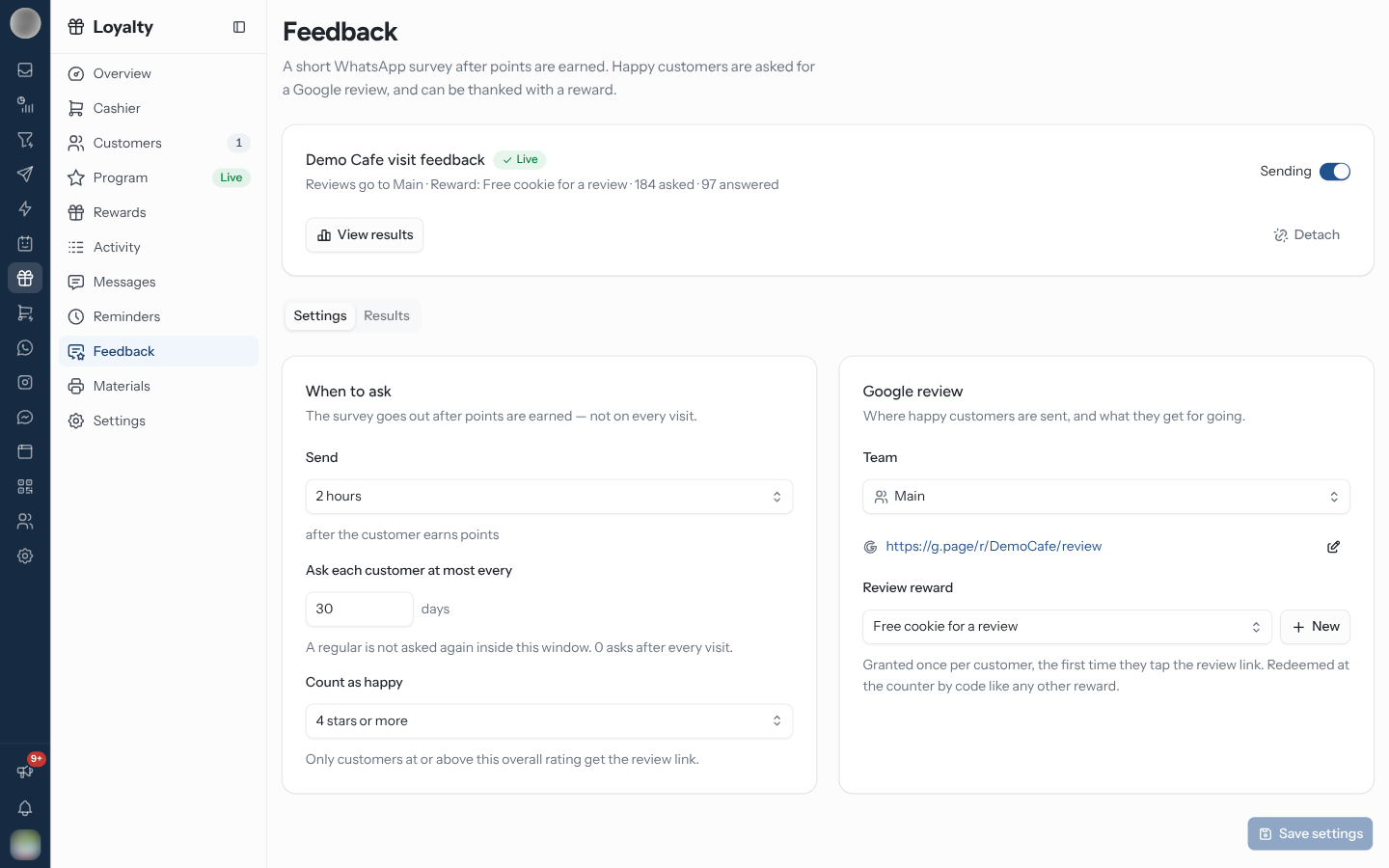
Feedback (/dashboard/loyalty/feedback) sends "A short WhatsApp survey after points are
earned. Happy customers are asked for a Google review, and can be thanked with a reward." The
sidebar entry shows Draft until the survey is submitted and Awaiting Meta while Meta reviews
it.
How It Works
| Step | What happens |
|---|---|
| A customer earns points | The survey is scheduled for the delay you set |
| They answer on WhatsApp | The answers land under Results |
| They rate at or above your Count as happy | They are sent your team's Google review link |
| They tap the link the first time | They get the review reward, if you set one |
Set Up the Survey
Go to WhatsApp → Flow and create a flow with the Loyalty feedback purpose. Choose a ready-made survey for your kind of business, and publish it from the flow editor.
Back on Feedback, under Pick a feedback flow, choose the flow.
Under Where the review goes, pick the Team whose Google review link happy customers are sent to.
Click Use this flow.
On the status card, click Submit to Meta. This publishes the survey and sends its message template to Meta. "Once published, the questions can no longer be edited — you would start over with a new draft."
When Meta approves the template, sending switches on.
| Status | Meaning |
|---|---|
| Not set up | No flow picked |
| Draft — not submitted | Picked, not yet sent to Meta — Submit to Meta |
| Awaiting Meta | "Meta is reviewing the message template — usually hours, sometimes a day." |
| Live | Sending |
| Off | Send feedback requests is switched off |
| Rejected by Meta | Detach, then select the flow again to resubmit |
| Blocked by Meta | "This flow can no longer be sent. Detach it and pick another." |
If the survey was published in the flow editor, the card asks you to Create message template instead.
Choose When to Ask and Who Counts as Happy
The Settings tab:
| Setting | Options |
|---|---|
| Send … after the customer earns points | Straight away, 30 minutes, 1 hour, 3 hours or Next day |
| Ask each customer at most every … days | "A regular is not asked again inside this window. 0 asks after every visit." |
| Count as happy | 5 stars only, 4 stars or more, 3 stars or more or 2 stars or more — "Only customers at or above this overall rating get the review link." |
| Google review › Team | Whose review link is used |
| Review reward | A reward granted for tapping the link, or No reward |
Click Save settings.
Keep Count as happy high. Asking an unhappy customer for a public Google review turns a private complaint into a one-star review. 2 stars or more sends the link to people who just told you they were disappointed.
Add a Google Review Link
Each team has its own link. If the chosen team has none, the page says "Feedback is still collected, but happy customers would have nowhere to go."
Click Add link (or Edit Google review link).
Paste the Review link — the Write a review link from your Google Business Profile.
Click Save.
Reward a Review
Under Review reward, click Create a review reward.
Enter the Name — "Free coffee on your next visit" — and the Details.
Optionally pick the WhatsApp message that carries the code, or keep the Default reward message.
Click Create reward, then Save settings.
A review reward "costs no points and each customer can earn it once." It is granted the first time they tap the review link — RateUp cannot see whether they actually posted — and redeemed at the counter by code like any other reward. It appears on Rewards with Manage in Feedback.
Read the Results
The Results tab, over Last 30 days, Last 90 days or Last 12 months:
| Tile | Meaning |
|---|---|
| Asked | Feedback requests delivered |
| Answered | How many finished the survey |
| Completion rate | Share of asks that were answered |
| Happy | How many rated you above the threshold |
| Review link taps | Happy customers who opened Google |
| Rewards granted | One per customer, on their first tap |
By question gives the average rating out of 5 for each question. The table lists every request with its Rating (Happy / Not happy), Status (Due, Sent, Answered) and whether they opened Google or were granted the reward. Open every response shows the full answers.
Troubleshooting
| Symptom | Cause | Fix |
|---|---|---|
| "No Loyalty feedback flow yet" | No flow with the Loyalty feedback purpose | Create one in WhatsApp → Flow |
| "The selected feedback flow no longer exists" | It was deleted in WhatsApp → Flow | Detach, then pick another |
| Nobody is being asked | Send feedback requests is off, or the template is still with Meta | Check the status card |
| Happy customers are not sent anywhere | The team has no Google review link | Add link |
Detach keeps the flow in WhatsApp → Flow and keeps your results; surveys already sent still record their answers, but no review link is sent for them.