Inbox Layout
A guided tour of the four regions of the RateUp Inbox and every control in them.
The Inbox is split into four regions. This page names every one of them, so the rest of the documentation can point at things without describing them again.
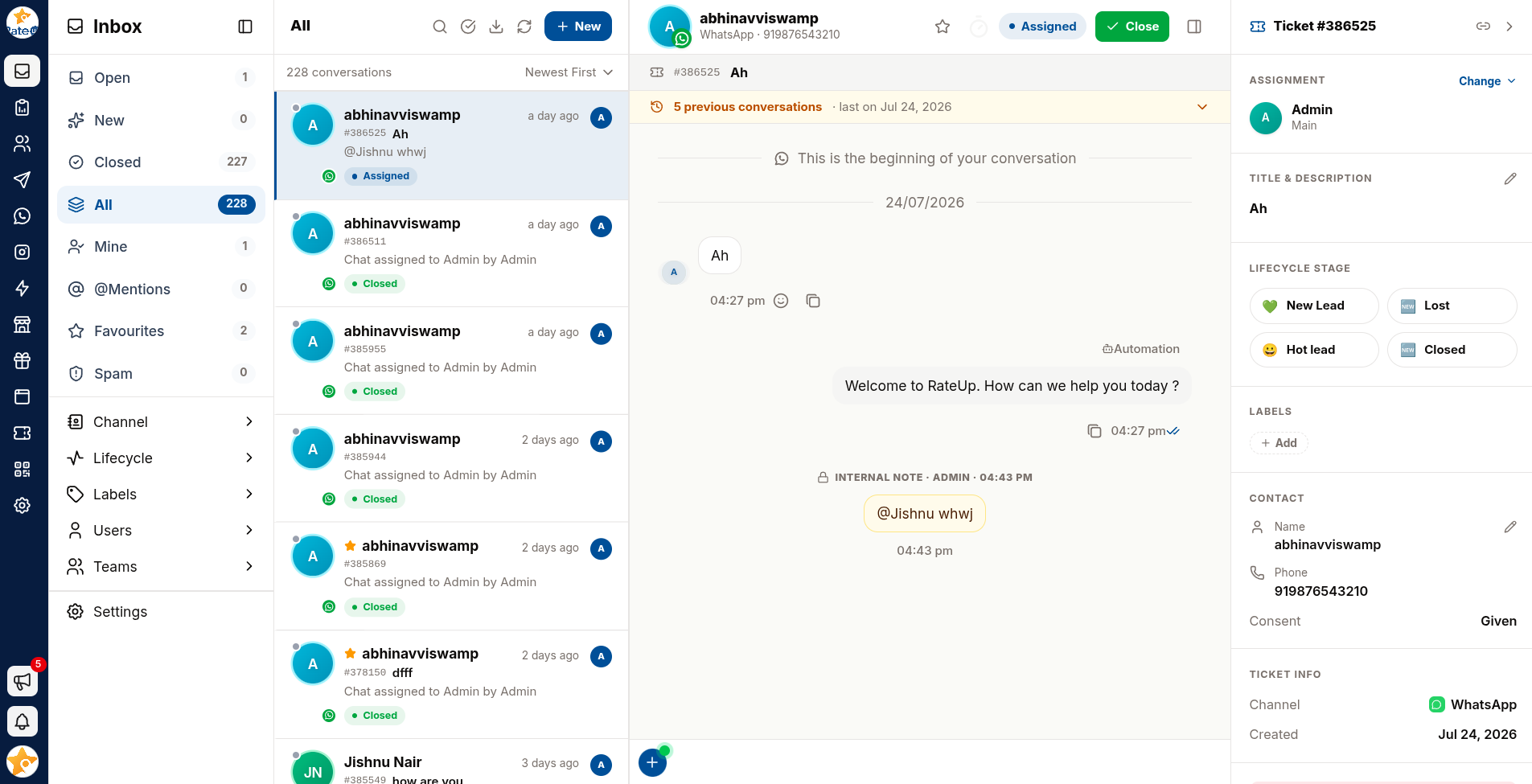
| # | Region | Purpose |
|---|---|---|
| 1 | Sidebar | Choose which tickets you are looking at |
| 2 | Conversation list | One row per ticket, with search, filters and sort |
| 3 | Chat window | The selected ticket: history, header controls, composer |
| 4 | Ticket Details | Everything about the ticket and the customer (collapsible) |
1 · Sidebar
The sidebar holds the eight Inbox views, each with a live count so you can see where work is waiting without opening anything.
| View | Shows |
|---|---|
| Open | Every active ticket |
| New | Tickets with no owner yet |
| Closed | Finished tickets |
| All | Every ticket, any status |
| Mine | Tickets assigned to you |
| @Mentions | Tickets where a colleague mentioned you |
| Favourites | Tickets you have starred |
| Spam | Contacts you have flagged as spam — one row each |
Below the views sits the Filter group: Channel, Lifecycle, Labels, Users and Teams. Each narrows whatever view you are in and stays applied as you move between them.
Views in detail → · Sidebar filters →
2 · Conversation List
Each row is a ticket, not a customer. A customer with three tickets appears three times.
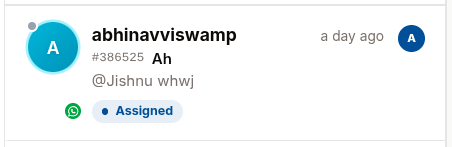
What a row tells you
| Element | Meaning |
|---|---|
| Avatar + platform badge | The customer, and whether they wrote on WhatsApp, Instagram, Messenger or Webchat. A green dot on the avatar means their 24-hour window is open |
| Star | The ticket is a favourite. Hover any row to star it |
| Bold name + Unassigned / New badge | A message arrived in the last 24 hours. A filled amber Unassigned badge means nobody owns it yet; an outlined New badge means it is assigned |
| Relative time | How long ago the last message arrived |
#1042 + title | The ticket's number and subject. Hover the title to read its description |
| Message preview | The most recent message on this ticket — bold while unread |
| Status pill | New, Assigned or Closed. Hover a Closed pill for who closed it, when and how |
| Channel chip | Which of your numbers or accounts the ticket came in on. Hover for "Received on …". A dashed outline means that number is no longer connected |
| @ Mention chip | A colleague mentioned you on this ticket — with a count if more than once |
| Filled coloured chips | Contact labels |
Outlined # chips | Conversation tags |
| Grey chip with a dot | The customer's pipeline stage, or their lifecycle stage if they are not on the board |
| Green badge | Number of unread messages |
| Avatar on the right | Who the ticket is assigned to (+2 if several) — hover for the list |
| Cream background + amber left edge | Unowned and recent — nobody has picked it up |
| Person + button | Assign to me in one click — shown on every unassigned row |
| Red Spam pill | The contact is flagged as spam — only shown in Spam |
A deleted message reads "This message was deleted" in the preview, in place of its text.
The channel chip is always shown when a ticket has one. Webchat and internal-only threads have no number to name, so they have no chip. If you run several WhatsApp numbers, this chip is the quickest way to see which one the customer wrote to.
The compact list hides the preview and the whole chip row, keeping the name, time, #number +
title and the right-hand avatars. Switch views →
Above the list
- The view name and the toolbar: compact list, search, select, export, refresh, New Contact
- A second row with the count for the view and the sort control
- In selection mode, a selection bar with select-all and the bulk assign, close and delete buttons
Toolbar and bulk actions in detail →
3 · Chat Window
The chat window shows the selected ticket — only its messages, never the customer's whole history.
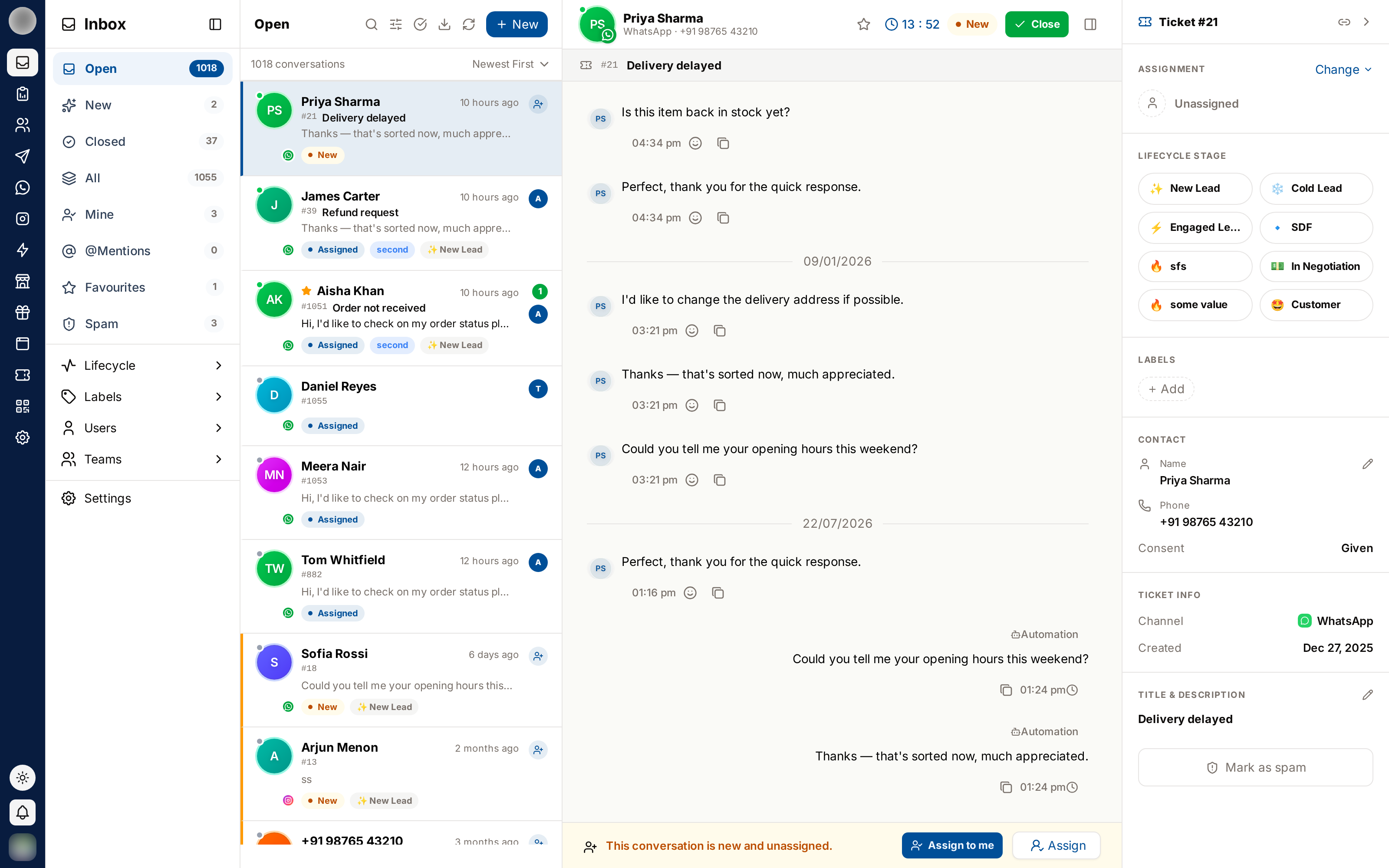
Header row
| Control | What it does |
|---|---|
| Customer name and sub-line | Name, then the platform and the customer's phone number — "WhatsApp · +44 7700 900123" |
| DND badge | The contact has not consented to template messages |
| ★ Star | Add or remove this ticket from Favourites |
| @ | Clear your mention on this ticket (only shown when you have one) |
| Countdown | Time left in WhatsApp's 24-hour reply window |
| Status pill | New, Assigned or Closed |
| Close / Reopen | End the ticket, or start a successor once it is closed |
| Not spam | Replaces Close / Reopen when the contact is flagged as spam |
| ⋮ | Contact actions — and, for admins, Delete conversation — on a closed or spam ticket, where the Close menu would otherwise host them |
| Panel icon | Show or hide the Ticket Details panel |
On narrower screens the countdown and status pill are dropped from the header to leave room for the name. Both are still on the list row and in Ticket Details.
Ticket strip
Directly under the header: the ticket icon, #number, the ticket title, and — once the ticket has
been closed with an outcome — a green result badge on the right.
Previous conversations
If the customer has other tickets, an amber bar appears: "3 previous conversations · last on Mar 12, 2026". Expand it to see each earlier ticket with its number, title, status, assignees and result, and click any of them to jump straight there.
Message thread
- Customer messages on the left, your replies on the right with the sender's name
- Messages sent by a chatbot or automation are labelled Automation, and campaign sends Campaign, in a lighter bubble
- Internal notes appear centred in amber, with a padlock and the author's name
- System notes record assignments, closures, reopenings and spam flags
- Delivery ticks show Sent → Delivered → Read
- Each message has a Copy button, and customer messages can be reacted to with an emoji
- A message deleted on WhatsApp keeps its place, shown as "This message was deleted"
Composer
Two tabs: Message (goes to the customer) and Private Note (internal only). To their right sit the quick-replies button and the character counter.
The composer is replaced by a banner when you cannot reply — because the ticket is unassigned, closed, the contact is blocked or flagged as spam, or you are outside WhatsApp's 24-hour window.
4 · Ticket Details Panel
Open it with the panel icon at the far right of the chat header.
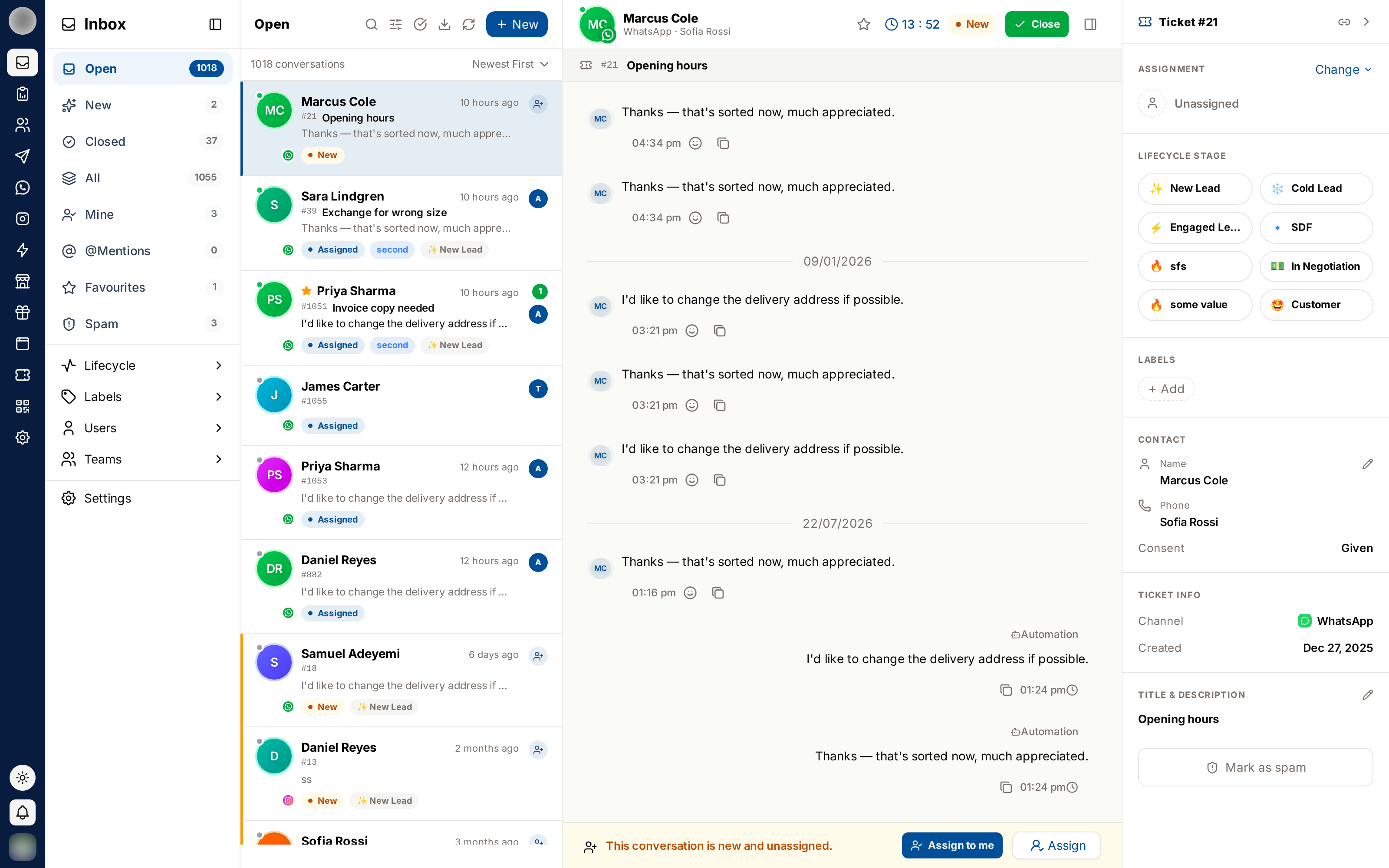
It contains, top to bottom:
- Ticket #number and a copy link button
- Assignment — the owner and team, with Change
- Title & Description — editable with the pencil icon
- Lead stage — where the customer sits on your pipeline board
- Conversation Tags — tags on this ticket
- Contact Labels — labels on the customer
- Contact — name (editable), phone, customer since, consent
- Ticket Info — channel, account, created date, close result
- Mark contact as spam — or Not spam, if they are already flagged
- Delete conversation — admins only
Resize the List
On a wide screen, drag the divider between the conversation list and the chat window to make the list wider or narrower. The list can take between roughly a fifth and two-fifths of the space. A wider list shows longer titles and more chips; a narrower one gives the conversation more room.
On Smaller Screens
Below roughly 1024px wide, the list and the chat window take turns instead of sitting side by side. Opening a ticket fills the screen, and a back arrow appears in the header to return to the list.
Narrower still — below roughly 768px — the sidebar is off-screen entirely, so the conversation list carries what you would otherwise lose: a scrollable strip of the eight views with their counts, and the Channel selector. Both are the same controls as the sidebar's, not a reduced version.
Related Pages
- Tickets & Conversations — what a ticket actually is
- Inbox Views — the eight sidebar views
- Ticket Details — the right-hand panel