WhatsApp Voice Calls
Answer customers' WhatsApp voice calls in your browser, call a customer from their chat once they allow it, and find every call in the thread and in Analytics.
Customers can call your WhatsApp number, and you answer right in your browser. You can also call a customer from their chat once they have said yes to being called. Every call is written into the customer's thread and listed under Analytics → Calls.
Before You Start
Calling is switched on per WhatsApp number, in the number's Calling tab under Settings → Channels. An admin with the right to manage channels sets:
| Setting | What it does |
|---|---|
| Voice calls | Customers can call this number, and agents answer from the inbox |
| Call button in chat | Shows the call icon at the top of the customer's WhatsApp chat with you |
| Callback requests | When a customer calls and nobody answers, WhatsApp asks them if you may call them back |
| Calling hours | Outside these hours customers cannot call; they see when you are open |
WhatsApp only allows calling on a number with a messaging limit of at least 2,000 customers a day.
You also need the Reply and send messages ability to hear calls ring and to place them.
Calling does not work on a number shared with the WhatsApp Business app (coexistence). WhatsApp supports calls only on numbers that run purely on the Cloud API. If you connected your number by keeping the WhatsApp Business app on your phone, customers' calls keep going to the app, and turning on Voice calls in RateUp is refused by WhatsApp. See WhatsApp's Calling Limits.
Answer a Call
Calls ring in RateUp wherever you are in the dashboard — you do not need the Inbox open.
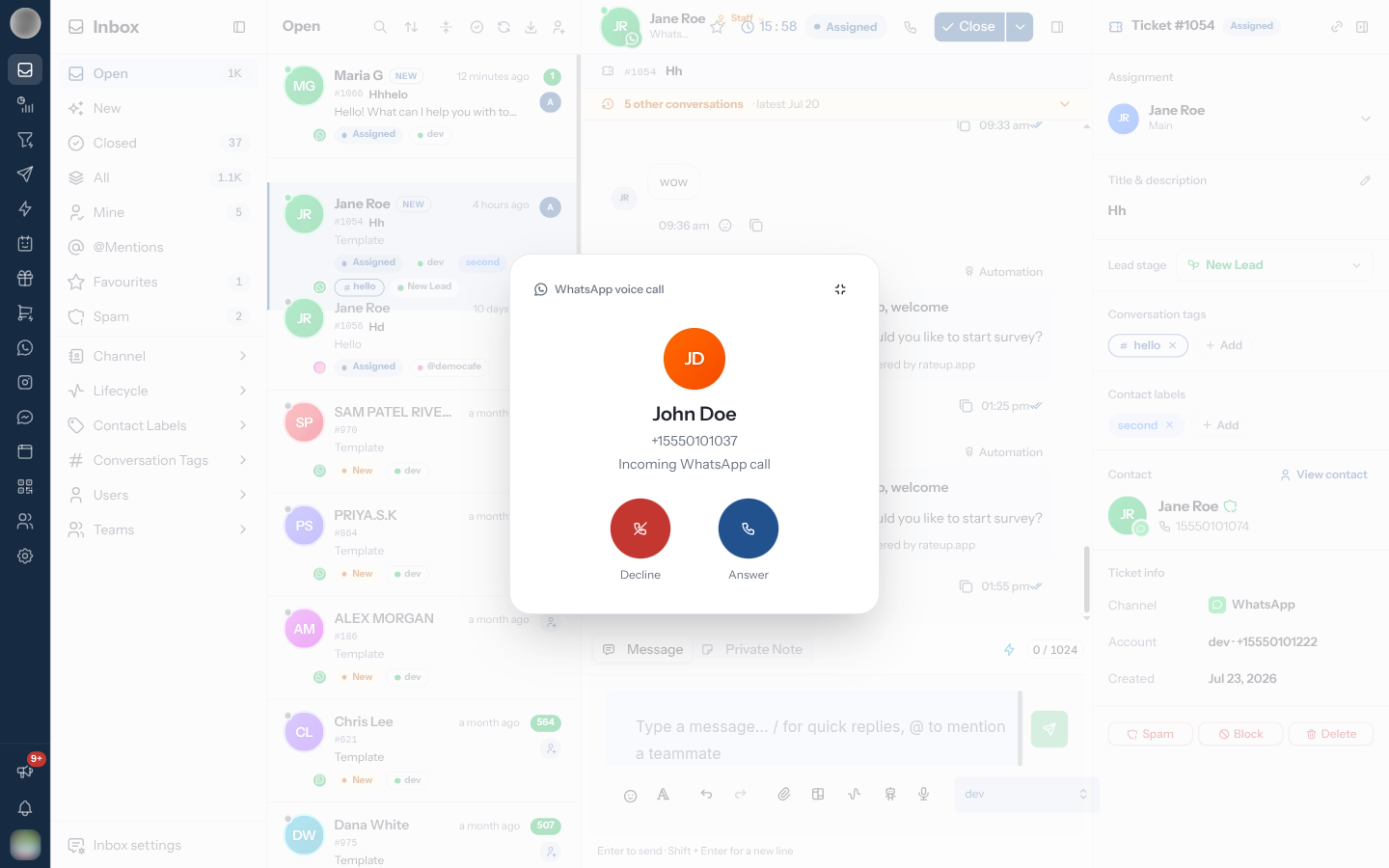
A large call screen opens in the middle of the page: the customer's name and number and "Incoming WhatsApp call", with a ringtone.
Click Answer. Your browser asks for the microphone the first time — allow it.
Or click Decline.
While you talk, the screen shows the call clock, Mute / Unmute and Hang up.
The call rings for everyone who could reply to that customer: members with Reply and send messages whose teams reach that number. If you only see your own chats, it rings for you only when the customer is assigned to you. The first person to click Answer takes the call, and it stops ringing for everyone else.
A customer gives up after about a minute of ringing. That call becomes a Missed call.
Keep reading the chat during a call
Click Minimise call, or press Esc, to shrink the call to a card in the corner. Click the card's Expand call to bring the full screen back. Further incoming calls ring in the corner too, where they can still be answered.
When there is no ringtone
Browsers refuse to play sound until you have clicked something on the page. If that happens, the call screen shows Turn on ringtone — click it once.
Leaving or reloading the page ends the call. The call's audio lives in your browser tab, so your browser warns you first — and if you leave anyway, RateUp hangs up rather than leaving the customer on a dead line. Keep the tab open until you have said goodbye.
Call a Customer
WhatsApp only lets a business call someone who has agreed to be called.
Open the customer's WhatsApp chat. Check the reply number in the composer's From selector — the call is placed from it.
Click the phone icon (Call on WhatsApp) in the chat header.
If the customer has already allowed calls, the call starts straight away: "Starting call…", then "Ringing…".
If they have not, Ask to call this customer opens instead. Edit the message if you like — "We'd like to call you on WhatsApp to help with your request. Is that okay?" — and click Send request.
The customer gets the message with an option to allow calls. Their answer arrives in the thread as Allowed calls from your business — sometimes with an end date, "…until" — or Declined calls from your business. Once they allow it, click the phone icon again.
| Limit | What happens |
|---|---|
| One request a day, two in 7 days per customer | Past that, the dialog says so and offers only Close. Ask again later — the count resets once you have had a connected call with them |
| The 24-hour window | The request is an ordinary message, so it only sends inside the customer's 24-hour window |
| One call at a time | While you are on a call the icon is disabled — "You are already on a call" |
If the customer declines your call, you see "The customer declined the call". When a call ends you see "Call ended · 2:14".
WhatsApp's Calling Limits
These are WhatsApp's own rules for business calling. RateUp cannot lift them, and when one is hit the call or the setting is refused by WhatsApp.
Which numbers can use calling
| Rule | Detail |
|---|---|
| Cloud API numbers only | A number shared with the WhatsApp Business app (coexistence) cannot make or take calls through RateUp — WhatsApp lists voice and video calls as not supported for coexistence. Calls to such a number keep ringing in the Business app |
| Messaging limit of 2,000 or more | The number needs a daily messaging limit of at least 2,000 customers before calling can be switched on |
| Voice only | Video calls and screen sharing are not available to businesses yet |
| Calling out is not available everywhere | Customers can call you wherever WhatsApp Business messaging works. Calling a customer is not available when your business number is from the United States, Canada, Egypt, Vietnam or Nigeria |
Calling a customer
| Rule | Detail |
|---|---|
| Permission first | You can only call a customer who has allowed calls from your business |
| How long permission lasts | Usually 7 days from when they allow it — the thread shows "Allowed calls from your business … until". A customer can also allow calls with no end date. Either way they can take it back at any time |
| Asking for permission | At most 1 request in 24 hours and 2 in 7 days to the same customer. A connected call resets the count |
| Unanswered calls | After 2 calls in a row that the customer does not answer or declines, WhatsApp asks them whether to keep allowing your calls. After 4 in a row, their permission is withdrawn automatically and you must ask again |
| How many calls | Up to 100 connected calls a day to the same customer, and up to 10,000 new calls a day from one business number |
Customers calling you
| Rule | Detail |
|---|---|
| Calling hours | Outside the hours set in the Calling tab, customers cannot call you. If Callback requests is on, they are offered a callback request and shown when you open next |
| Changes take time to reach phones | After you change calling settings, customers' WhatsApp can take up to 7 days to show the change (usually much sooner). WhatsApp applies the new settings straight away either way |
| Free for the customer | Customers are not charged for calls with your business |
Find Calls Afterwards
Every call is added to the customer's thread as a centred entry with a phone icon:
| Entry | Meaning |
|---|---|
| Incoming voice call · 2m 14s / Outgoing voice call · … | An answered call and its length |
| Missed voice call | The customer called and nobody answered |
| Declined voice call | Your team declined the customer's call |
| Voice call not answered | You called and the customer did not pick up |
| Voice call declined by customer | You called and the customer declined |
| Incoming voice call failed / Outgoing voice call failed | The call did not connect |
For the full list across all customers — and who is on a call right now — open Analytics → Calls.
Troubleshooting
| Symptom | Cause | Fix |
|---|---|---|
| "Calling is turned off for this WhatsApp number" | Voice calls is off for the number you are replying from | Turn it on in the number's Calling tab under Settings → Channels, or ask an admin |
| "Select the number to call from" | No reply number is selected | Pick one in the composer's From selector |
| No phone icon in the header | Not a WhatsApp chat, the contact has no phone number, or you cannot reply | Calls are WhatsApp only and need Reply and send messages |
| Calls never ring for you | Your teams do not reach that number, or you only see chats assigned to you | Ask an admin to check your teams and role |
| The customer cannot hear you | The browser has no microphone permission | Allow the microphone for RateUp in your browser's site settings |
| Voice calls will not turn on, or calls never reach RateUp | The number is shared with the WhatsApp Business app (coexistence), or its messaging limit is below 2,000 | Calling needs a Cloud API-only number with a limit of 2,000 or more — see WhatsApp's Calling Limits |
| You could call a customer before, now you are asked for permission again | Their permission ran out after 7 days, or was withdrawn after 4 unanswered calls in a row | Send a new request; it counts toward the 1-a-day, 2-a-week limit |
Frequently Asked
Related Pages
- Analytics → Calls — the call log and call analytics
- Channels — turning calling on for a number
- Replying to Customers — the From selector and the 24-hour window