Setup Guide
The Set up RateUp checklist new organisations land on — choose features, connect a channel, finish WhatsApp, and the optional steps after.
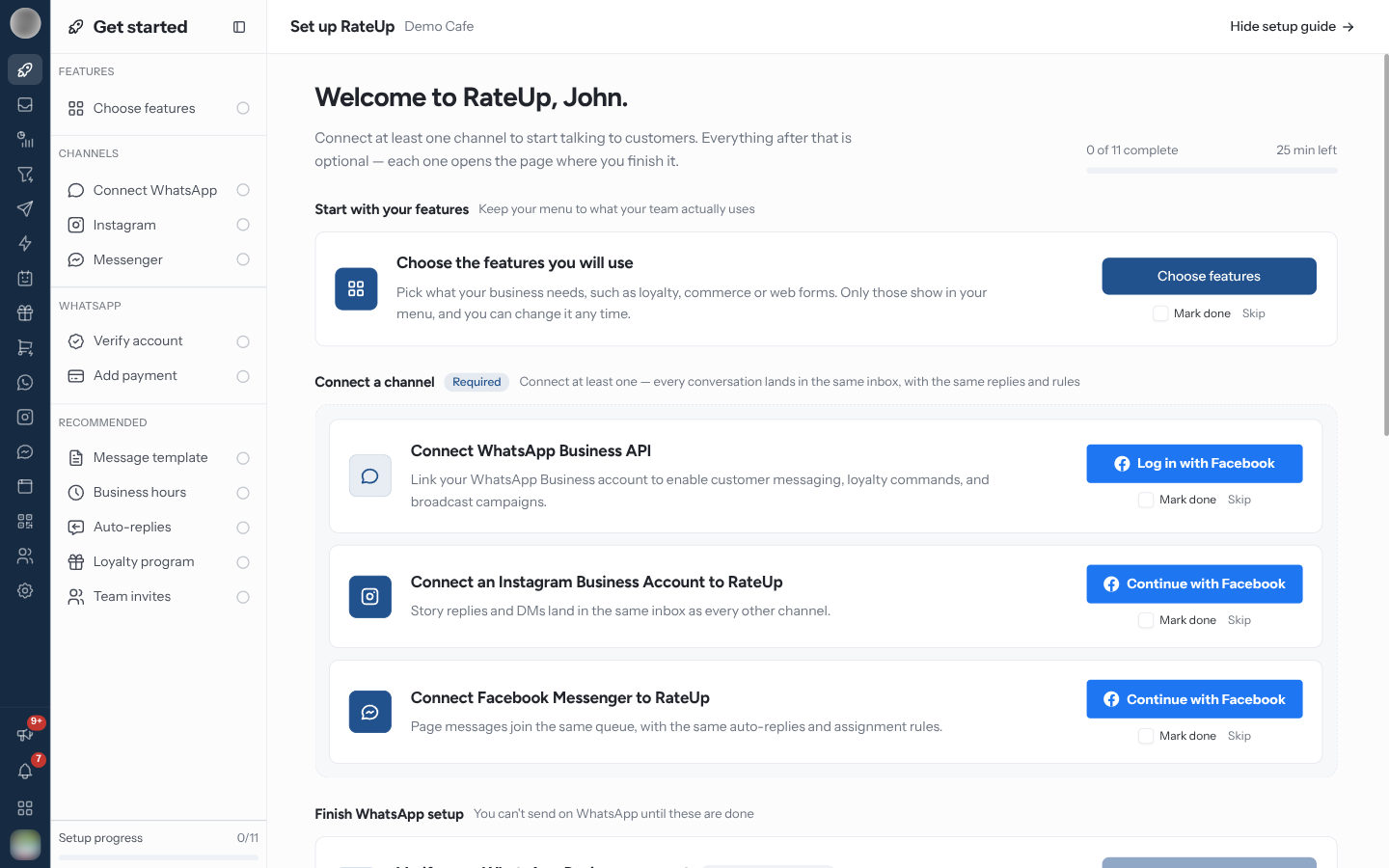
Set up RateUp is the checklist an Owner or Admin lands on after signing up. It walks through the few things an organisation needs before conversations can flow, ticks steps off as you do them, and goes away once you finish or hide it.
Open the Guide
The guide lives at /dashboard/setup. While it is unfinished:
- Opening the dashboard takes you there, if you can connect channels (the ability Connect, remove and configure channels — by default Admins and the Owner).
- A rocket icon, Get started, sits at the top of the sidebar rail. Its panel lists every step under Features, Channels, WhatsApp and Recommended; click one to jump to its card.
The header shows your progress — "2 of 9 complete" — and how many minutes the remaining steps take.
The Steps
Start with your features
"Keep your menu to what your team actually uses."
| Step | Button | Does |
|---|---|---|
| Choose the features you will use | Choose features | Opens "Which features will you use?" — the same cards as Features, pre-ticked from your signup answers. Click Save and continue to save and come back to the guide |
Only people who can change features can save this step; for anyone else Save and continue is disabled.
Connect a channel — Required
"Connect at least one — every conversation lands in the same inbox, with the same replies and rules." Any one of the three completes the band.
| Step | Button |
|---|---|
| Connect WhatsApp Business API | The Facebook connect button; Manage connection once connected |
| Connect an Instagram Business Account to RateUp | Connect Instagram |
| Connect Facebook Messenger to RateUp | Connect Messenger |
A channel's step ticks itself as soon as the channel is connected. See Channels.
Finish WhatsApp setup
"You can't send on WhatsApp until these are done." These wait for WhatsApp to be connected — until then they show Waiting on WhatsApp — and cannot be skipped.
| Step | Button | Does |
|---|---|---|
| Verify your WhatsApp Business account | Check Status | Asks Meta for your business verification status and shows Verified, Under review, Not verified or Not eligible. Verified completes the step |
| Add payment in Meta | Add payment | Opens Meta's billing settings in a new tab. Tick Mark done when you have added a card |
Make it work for you
"Optional — do these in any order, any time."
| Step | Button | Opens |
|---|---|---|
| Create your first message template | Open templates | Templates. Needs WhatsApp |
| Set your business hours | Set hours | Account → Business hours |
| Set up auto-replies | Open automation | Automation |
| Launch a loyalty or referral program | Set up loyalty | Loyalty settings. Only when your plan includes loyalty and Loyalty is on in Features |
| Invite your team | Invite team | Members & Roles |
Mark Done, Skip and Hide
| Control | Effect |
|---|---|
| Mark done | Ticks a step you finished somewhere RateUp cannot see. Untick it to undo |
| Skip | Takes a step off the count, marked Skipped. Steps that depend on it (the WhatsApp steps on WhatsApp, for example) are skipped with it. Undo skip brings it back. You cannot skip every channel — one must stay |
| Hide setup guide | Top right. Marks the guide finished, removes Get started from the rail and opens the Inbox |
| Skip setup and explore the app | Under "Rather poke around first?" — the same as hiding the guide |
| Book a 15-minute setup call | Books time with the RateUp team |
When every step is done or skipped, the header changes to "You're live." with Open Inbox, and the guide is finished.
Hiding the guide is permanent — the rocket does not come back. Everything it links to is still in the normal menu, so nothing is lost, but note any steps you still mean to do.
Troubleshooting
| Symptom | Cause | Fix |
|---|---|---|
| No Get started rocket in the rail | The guide was finished or hidden, or you cannot connect channels | Ask an Admin or the Owner, or open the pages directly |
| The WhatsApp steps say Waiting on WhatsApp | WhatsApp is not connected yet | Connect it in the Connect a channel band |
| Save and continue is greyed out on Choose features | You lack Edit organisation details and business hours | Ask a Manager, Admin or the Owner |
| No loyalty step | Loyalty is off in Features, or not on your plan | Turn it on, or check Billing |
| Check Status shows Not verified | Meta has not verified the business | Complete business verification in Meta Business Suite, then check again |