Manage Group Members
The Manage Members section is used to add, view, and remove contacts within a group. All actions described here are performed from the Group Details page.
Adding Members to a Group
To add contacts to a group:
- Open the required group from the Groups List
- Click Add Members
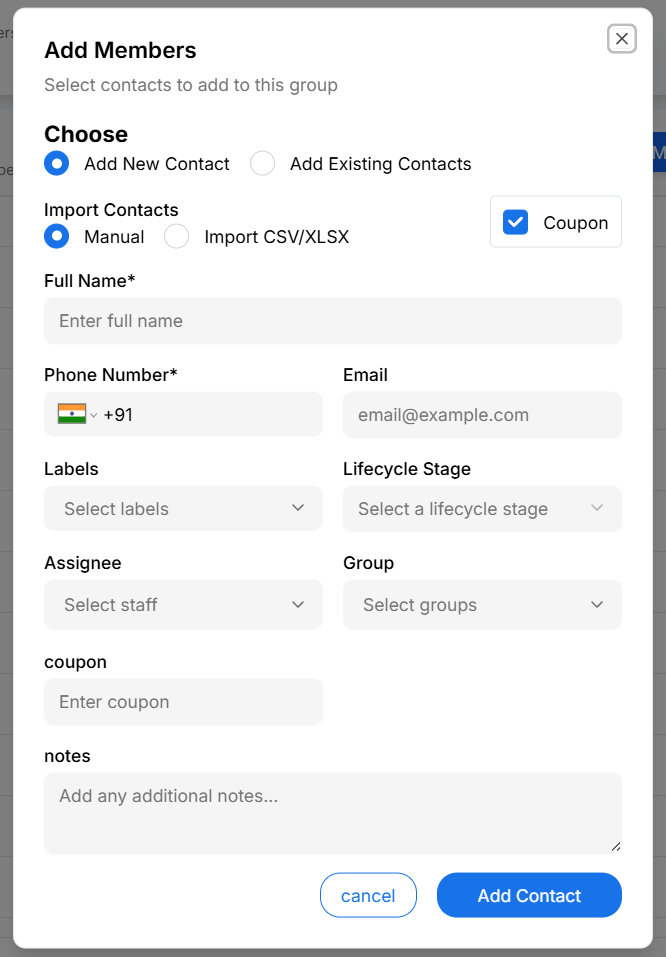
The Add Members modal opens.
Ways to Add Members
Choose one of the following methods to add contacts:
-
Add a new contact
Create a new contact and add it directly to the group. -
Select existing contacts
Choose one or more contacts from your existing contact list. -
Import contacts
Upload contacts using CSV or Excel files.
Each method adds contacts directly to the selected group.
Setting Member Information During Add
While adding members, you can optionally configure additional information:
- Labels
- Lifecycle stage
- Assignee
- Custom fields (for example, coupon)
- Internal notes
This ensures contacts are enriched at the time of addition.
Viewing Group Members
After members are added:
- Scroll to the Group Members List
- Review the listed contacts
Each member row displays:
- Name and avatar
- Phone / IGSID
- Assigned labels (if any)
- Source
- Date added to the group
This list confirms successful member addition.
Customizing the Members List View
To customize visible columns:
- Click View Settings in the Group Members section
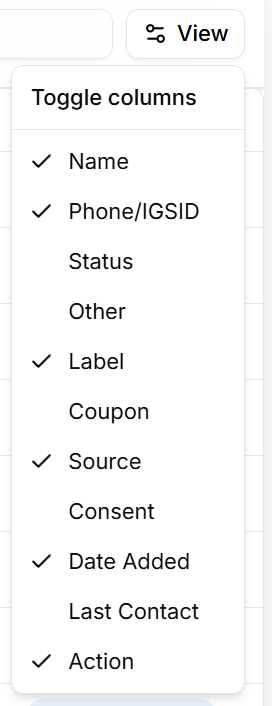
- Enable or disable required columns
This helps focus on relevant member information when managing large groups.
Changes apply instantly and affect only your current view.
Removing Members from a Group
To remove a contact from a group:
- Locate the contact in the Group Members List
- Click Remove member
The contact is removed from the group but remains available in the Contacts List.
Best Practices for Managing Members
- Keep group membership updated regularly
- Use labels and lifecycle stages for better segmentation
- Avoid adding unnecessary contacts to large groups
- Review group members periodically
Why Managing Members Matters
Managing group members correctly helps teams:
- Maintain clean and accurate groups
- Improve targeting and segmentation
- Avoid outdated or irrelevant members
- Work efficiently with large contact sets