Create Additional Earning Rule
The Create Additional Earning Rule page allows administrators to define bonus point opportunities such as happy hour multipliers, birthday bonuses, or weekend reward campaigns. These rules provide additional incentives beyond the standard tier-based earning rates.
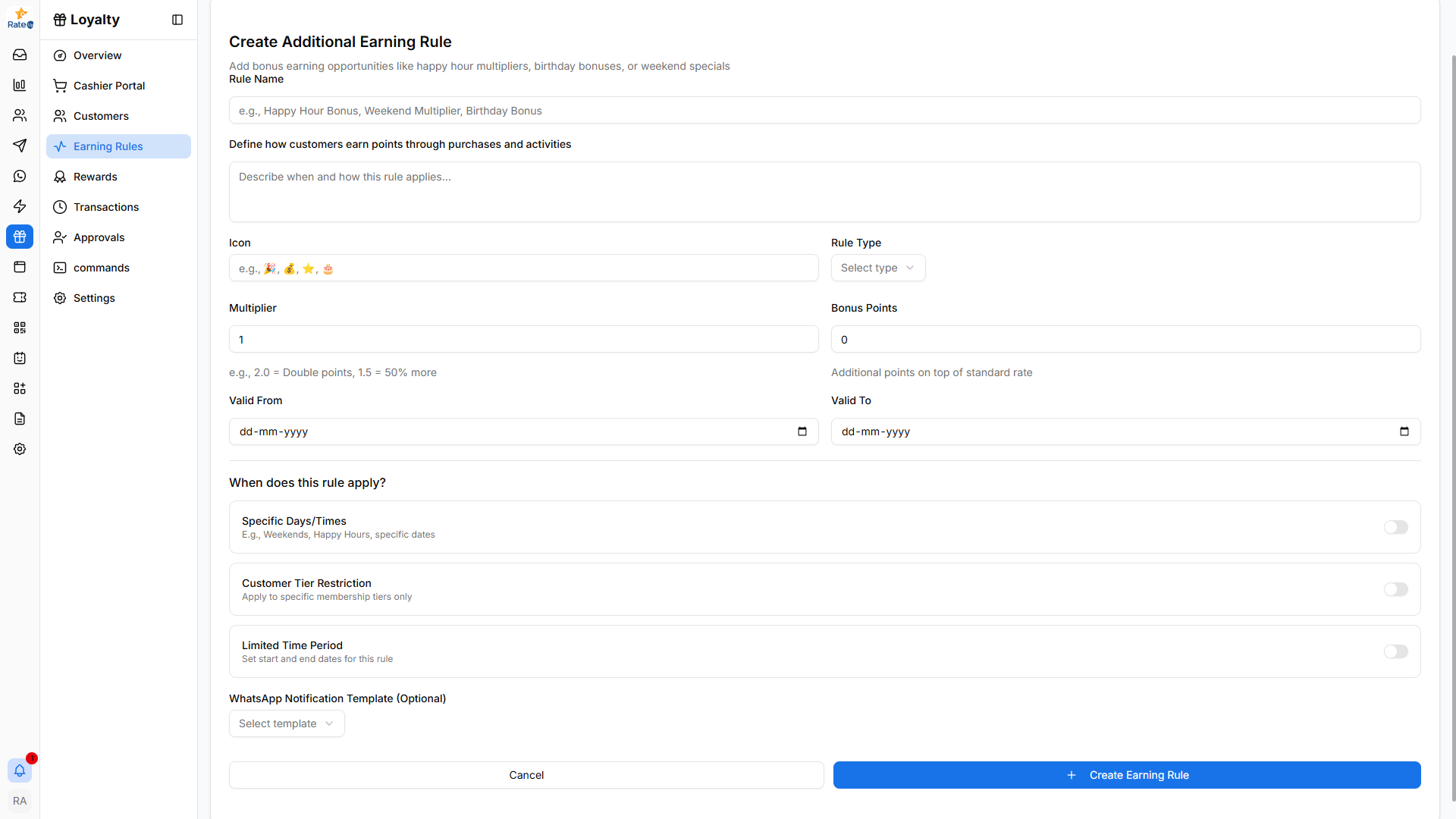
Opening the Add Rule Page
To create a new earning rule:
- Navigate to Loyalty from the sidebar.
- Click Earning Rules.
- Click Add Rule in the top-right corner.
The Create Additional Earning Rule page will open.
Rule Information
The first section defines the basic details of the earning rule.
Rule Name
The Rule Name identifies the earning rule.
Examples:
- Happy Hour Bonus
- Weekend Multiplier
- Birthday Bonus
Choose a descriptive name so administrators can easily recognize the rule.
Description
The Description field explains how the rule works.
Examples:
- Double points during weekends
- Bonus points for first purchase
- Extra rewards during promotional events
Providing a clear description helps administrators understand the rule purpose.
Icon
The Icon field allows adding an emoji to visually represent the rule.
Examples:
- 🎉 Promotions
- 🎂 Birthday rewards
- ⭐ Special events
Icons help visually identify rules in the earning rules list.
Rule Type
The Rule Type determines how additional points are calculated.
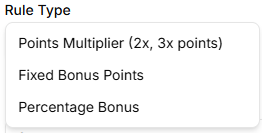
Available options include:
Points Multiplier
Multiplies the points earned during a transaction.
Example:
- 2x multiplier → Customers earn double points
- 3x multiplier → Customers earn triple points
Fixed Bonus Points
Adds a fixed number of bonus points to a purchase.
Example:
- +50 bonus points for a qualifying transaction.
Percentage Bonus
Adds bonus points based on a percentage of the earned points.
Example:
- 50% extra points on top of the base earning rate.
Multiplier and Bonus Points
Depending on the selected rule type, administrators can configure the following values.
Multiplier
Defines how many times the normal earning rate should be multiplied.
Example:
- 2.0 → Double points
- 1.5 → 50% additional points
Bonus Points
Defines additional points that will be awarded on top of the base earning rate.
Example:
- +20 bonus points
- +50 bonus points
Rule Validity Period
Administrators can set the active period for the earning rule.
Valid From
Defines when the rule becomes active.
Valid To
Defines when the rule expires.
This is useful for temporary promotional campaigns.
Rule Conditions
The When does this rule apply? section allows administrators to limit when the rule is applied.
Specific Days / Times
Allows configuring rules for specific time periods.
Examples:
- Weekend promotions
- Happy hour campaigns
- Holiday promotions
Customer Tier Restriction
Restricts the rule to specific loyalty tiers.
Example:
- Only Gold and Platinum members receive bonus points.
Limited Time Period
Defines a promotional period during which the rule applies.
This can be used for seasonal campaigns or special events.
WhatsApp Notification Template
Administrators can optionally select a WhatsApp notification template.
This allows customers to receive automated messages when they earn bonus points.
Example notifications:
- “You’ve earned double points during Happy Hour!”
- “Birthday bonus points added to your account!”
Creating the Rule
To create the earning rule:
- Fill in the rule details.
- Configure the rule conditions.
- Click Create Earning Rule.
The rule will immediately become available in the Additional Earning Rules section.
Why Additional Earning Rules Matter
Additional earning rules help businesses:
- Run promotional campaigns
- Encourage purchases during specific times
- Reward loyal customers
- Increase customer engagement
These rules allow businesses to make their loyalty program more dynamic and engaging.